
Participating Frequently
September 6, 2023
Answered

Short cut text alignment help please!

  • September 6, 2023
  • 2 replies
  • 2254 views

"Command | " used to be an automated short cut for aligning (indenting) text to the same position as the line above after using a bullet point. But it no longer works for me which does my head in!  Can anyone help or maybe I'm loosing my mind as its one of those short cuts I used to do without thinking so maybe I'm not doing it right!


Thanks,

Mark


Correct answer Barb Binder

Hi Mark:


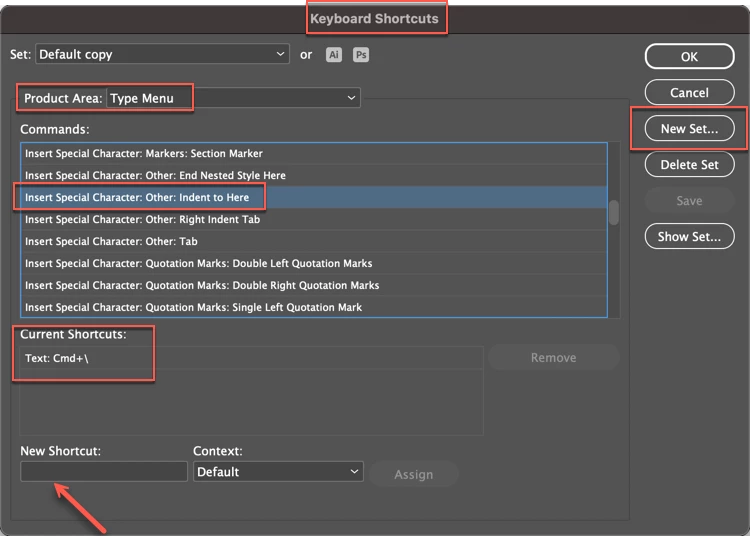
Is it 1Password? It uses that shortcut to fill in content and I just tested it on my Mac and it opened 1Password when I typed Cmd+\. I've never encountered this because I have never used Indent to Here in my life. As an instructor, I need to know all the commands and how they work, but on the layout side of my job, I use hanging indents and paragraph styles. It's a more efficient workflow (and @Willi Adelberger's suggestion).


So whether it is or isn't 1Password, some application is hijacking that command. You will either need to need to change the shortcut for the app, or change the shortcut in InDesign. InDesign will warn you if you attempt to change a command that's already been assigned.


~Barb


2 replies

Willi Adelberger
Community Expert
Community Expert
September 6, 2023

I recommend to use Paragraph Styles instead. In my opinion it is more professional and causes less problems later. 

Participating Frequently
September 11, 2023

Thanks Willi - i miss this simple short though. hopefully someone can assist 

Barb Binder
Community Expert
Community Expert
September 6, 2023

Hi Mark:


Indent to here is Cmd \.


~Barb

~Barb at Rocky Mountain Training
Participating Frequently
September 11, 2023

Hey Barb thanks for this. It doesnt seem to work for me though command | or command \ opens another program. Any help very welcome I miss this short cut! thanks.

Joel Cherney
Community Expert
Community Expert
September 11, 2023

It opens another program? Which one?


If it's opening another app, it's most likely not an InDesign issue at all. The most likely possibility is that your OS has updated, or you've installed an app, and this has added MacOS-level keyboard shortcut that takes precedence over InDesign's shortcuts. You can look in your Apple menu -> System Settings -> Keyboard and see if something has been assigned to this shortcut.