

Seb Mainguet
Participating Frequently
August 31, 2022
Question

Shortcut on mac keyboard to switch from a window to another

  • August 31, 2022
  • 4 replies
  • 225 views

Hello, this is probably a question for all Adobe apps, as the answer may be the same.


I'd just like to find the shortcut to switch from a window to another, as I have several opened docs.


On the Adobe page I found this (in french, sorry, I can't find the page in english) :
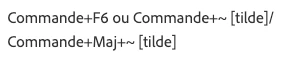
(This is here.)


But how can I do this on my keyboard ? I can type this sign with alt + N ==> ~ …

No problem… but what about the shortcut to switch from a window to another ?


Thanks !

This topic has been closed for replies.

4 replies

Seb Mainguet
Participating Frequently
August 31, 2022

Thx all for your answers and help.

By chance I just found the shortcut while looking for something else…

On my mac keyboard I shall make 'cmd + <' or 'cmd + MAJ + <', instead of 'cmd + ~' or 'cmd + MAJ + ~'

(As I don't have any ~on the keyboard…)

That's all !

Community Expert
August 31, 2022

Hi @Seb Mainguet ,

the help page in English ( just remove your country code /fr from your URL you posted ) :

https://helpx.adobe.com/indesign/using/default-keyboard-shortcuts.html


and in German, ( country code /de ) , because I'm on a German version of InDesign on Windows 10:

https://helpx.adobe.com/de/indesign/using/default-keyboard-shortcuts.html


For my German keyboard on my German InDesign on Windows 10 the help is wrong.

It suggests key combination Strg + F6. What actually is working is Strg + Tab.

( Note: On an English keyboard my German Strg key is named Ctrl when on a Windows PC. )


Regards,
Uwe Laubender
( Adobe Community Professional )

Peter Spier
Community Expert
Community Expert
August 31, 2022

Ctrl + Tab is a Windows shortcut rather than Adobe and works in other applications as well.

Peter Spier
Community Expert
Community Expert
August 31, 2022

The Tilde (~) on a standard PC Keyboars is on the far left end of trhe number row (to the left of the digit 1), and I presume is in the same location on Mac, but I havewn't had a mac keyboard for years. To use the shortcut press Cmd +Shift + that tilde key.

Seb Mainguet
Participating Frequently
August 31, 2022

I also tried to set a custom shortcut via the edition menu, but there I can't find window selecting…