Participant
February 21, 2017
Answered

Show in finder after Indesign export?

  • February 21, 2017
  • 2 replies
  • 718 views

In Lightroom I have the option to show my file in the finder after I export it. Usually this is handy because I'm sending that file to another location right after. Is that option available for Indesign as well? Thanks.
This topic has been closed for replies.
Correct answer geoffball

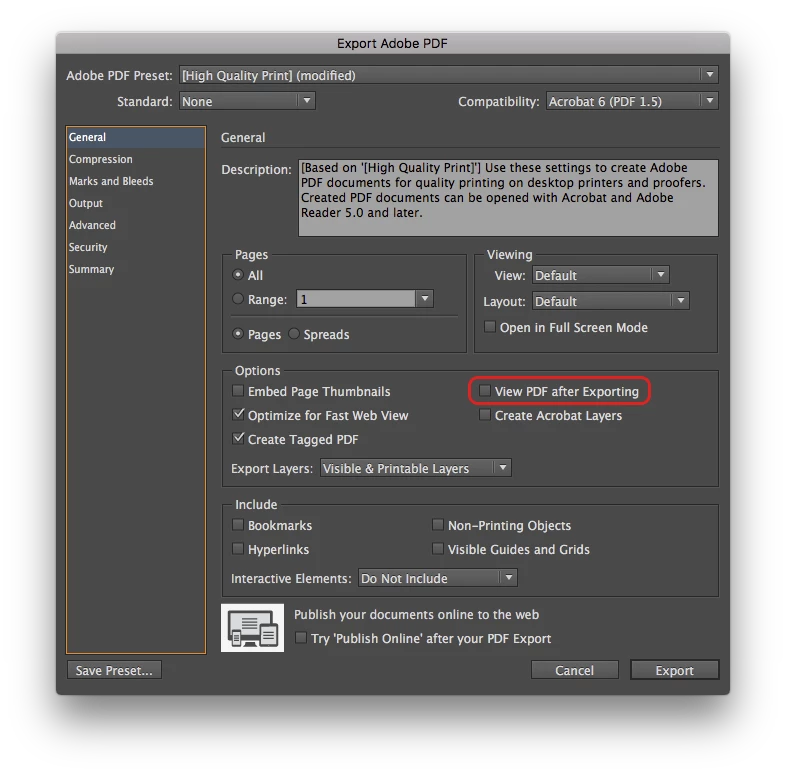
In the export dialog, check the "View PDF after Exporting" box.

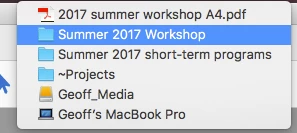
When the PDF opens, right-click the file name in the title bar and choose the folder in which the file resides, which opens a Finder window with that file selected.

2 replies

Participant
February 13, 2023

This is so frustrating...it seems as though once a company gets big (Apple, Microdoft & Adobe), they begin to control your content more by making things that are so basic, difficult. I am very disappointed.

geoffball
geoffballCorrect answer
Inspiring
February 21, 2017

In the export dialog, check the "View PDF after Exporting" box.

When the PDF opens, right-click the file name in the title bar and choose the folder in which the file resides, which opens a Finder window with that file selected.

Jongware
Community Expert
Community Expert
February 22, 2017

Notably, it's only there in the Export to PDF dialog. (It's not a general option, and OP does not mention to what file type is exported.)