
Known Participant
January 15, 2025
Answered

Shrink one text frame as another expands

  • January 15, 2025
  • 5 replies
  • 4524 views

I have a template with several text frames that stack vertically on a page, all anchored in series. The bottom frame is for additional notes and won't always be used. I would like for the stack to always extend to the bottom of the page, and as content is added into the upper frames, I want the bottom "notes" frame to shrink so that the stack always takes up the same amount of room, regardless of content. Is this possible?


One caveat is that we have a custom auto-fill script that needs to be able to target individual text frames and insert text without breaking any of the anchoring.

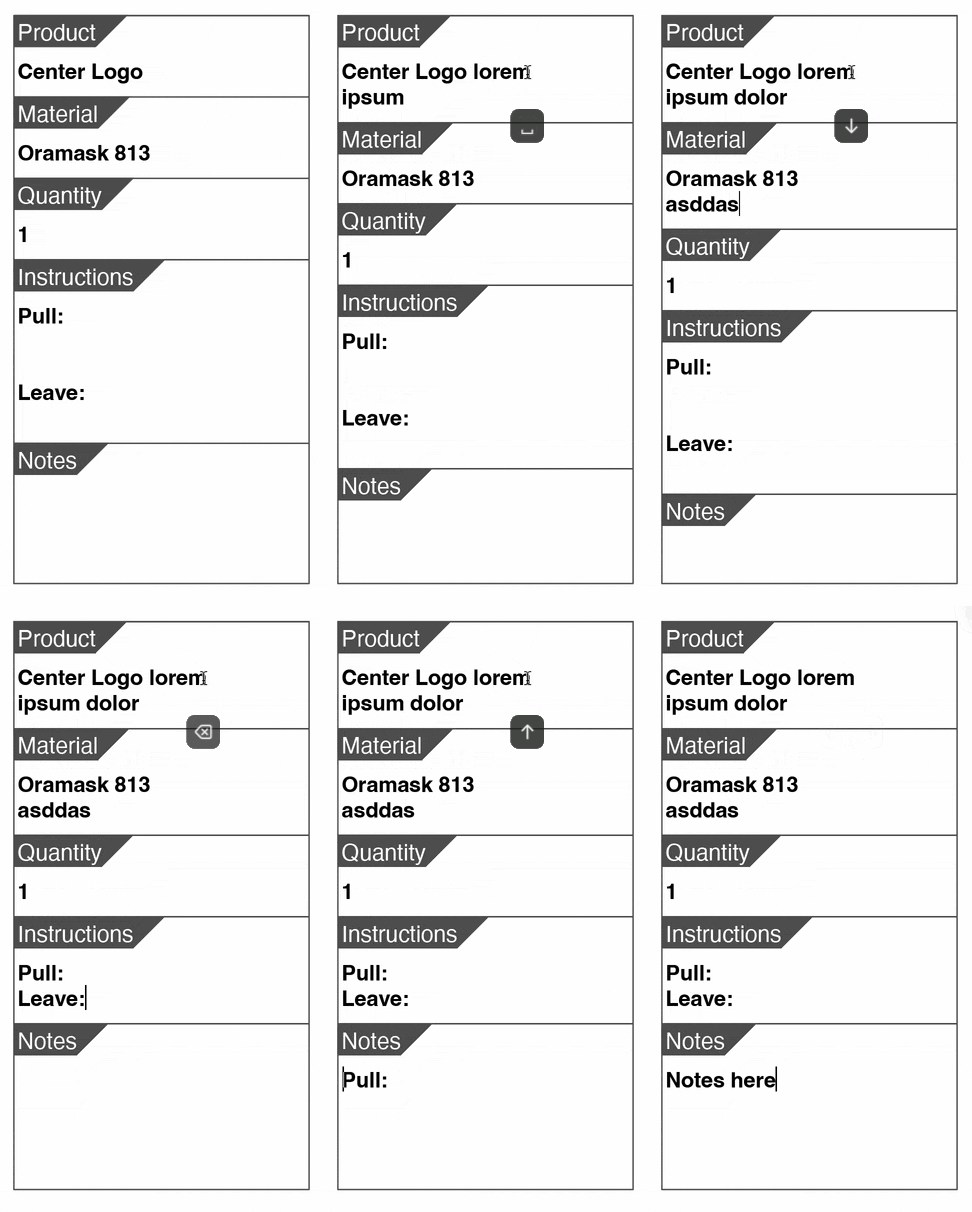
Correct answer m1b

Hi @brian.sipsy, just to add to the options here, I'm thinking like @James Gifford—NitroPress in that I think this could be best handled with paragraph styles and no anchored text frames, which are too clunky for this job. Have a look at the attached demo document to see how it could work.


Then your script could just update the contents of the "Spec Text" paragraphs, for example.

- Mark


5 replies

m1b
Community Expert
m1bCommunity ExpertCorrect answer
Community Expert
January 16, 2025

Hi @brian.sipsy, just to add to the options here, I'm thinking like @James Gifford—NitroPress in that I think this could be best handled with paragraph styles and no anchored text frames, which are too clunky for this job. Have a look at the attached demo document to see how it could work.


Then your script could just update the contents of the "Spec Text" paragraphs, for example.

- Mark


Peter Kahrel
Community Expert
Community Expert
January 16, 2025

Very clever!

Robert at ID-Tasker
Legend
January 16, 2025

What is this last character??


Robert at ID-Tasker
Legend
January 15, 2025

@brian.sipsy


Depends on your template. 


I can think of at least two solutions - that wouldn't need a script for post-processing.


FRIdNGE
January 15, 2025

… Just by curiosity, could you post .idml documents (before/after) with complete modules?


(^/)

Known Participant
January 15, 2025

I'm not sure? I'm not familiar with any of that. I'm learning as I go, because I typically only use indesign to fill out a premade template for production orders. I'm really not used to doing much creative work in inDesign.
Most of my work is done in Illustrator.

FRIdNGE
January 15, 2025

I mean 2 indesign docs with, e.g., 3 pages.

before and after to clearly understand what you mean.


(^/)

FRIdNGE
January 15, 2025

… Why not ask the guy who wrote your "custom auto-fill script" to implement this feature in his script?


(^/)  The Jedi

Known Participant
January 15, 2025

Because a lot of the info is added manually after the autofill script is run.

FRIdNGE
January 15, 2025

… So ask him to write another script as "second step" of your process (the first step is the script you mentioned)?


(^/)

James Gifford—NitroPress
Legend
January 15, 2025

There is no (inherent/simple) way to automate this kind of "object stack." I've no doubt a script could be written to accomplish it, but with few exceptions InDesign treats all page and composition objects as independent items.


It could be done, in a different approach and with somewhat different interaction/results, with paragraph styles. I can't say it's the case in your project, but it's always best to avoid breaking text up into separate frames whenever another approach can avoid it — for situations exactly like this one.