


Known Participant
July 19, 2024
Answered

Single Right hand side page top of document, causing problems when uploading to kdp

  • July 19, 2024
  • 2 replies
  • 1824 views

Can someone please tell me how to get rid of this extra single right hand side page at the top of this document? When I managed to do it, it messed up other pages below, (leaving page 19 on it's own when it should be right next to page 18). 

I am uploading screenshots in case it helps.

Fist upload is what i need to remove (because indesign saves that one page in the middle, see 2nd upload). 

Second upload is how Indesign saves the document, and 3rd upload is of lower down, with page 19 being shunted on it's own. 4th upload is what Amazon does with the document.

I don't know what I'm doing wrong. I have played with the allowing of pages to shuffle...

I have added extra pages to see if that helps... at one point I managed to have it gone (but then it started on the left when I thought it should start on the right). Ideally I need it to look like it looks, but without the top right single page.   

I may not be able to answer now till tomorrow afternoon after work, so I thank you in advance for any help anyone can offer. 🙏

This topic has been closed for replies.
Correct answer Robert at ID-Tasker

@Carolyn32257242he70


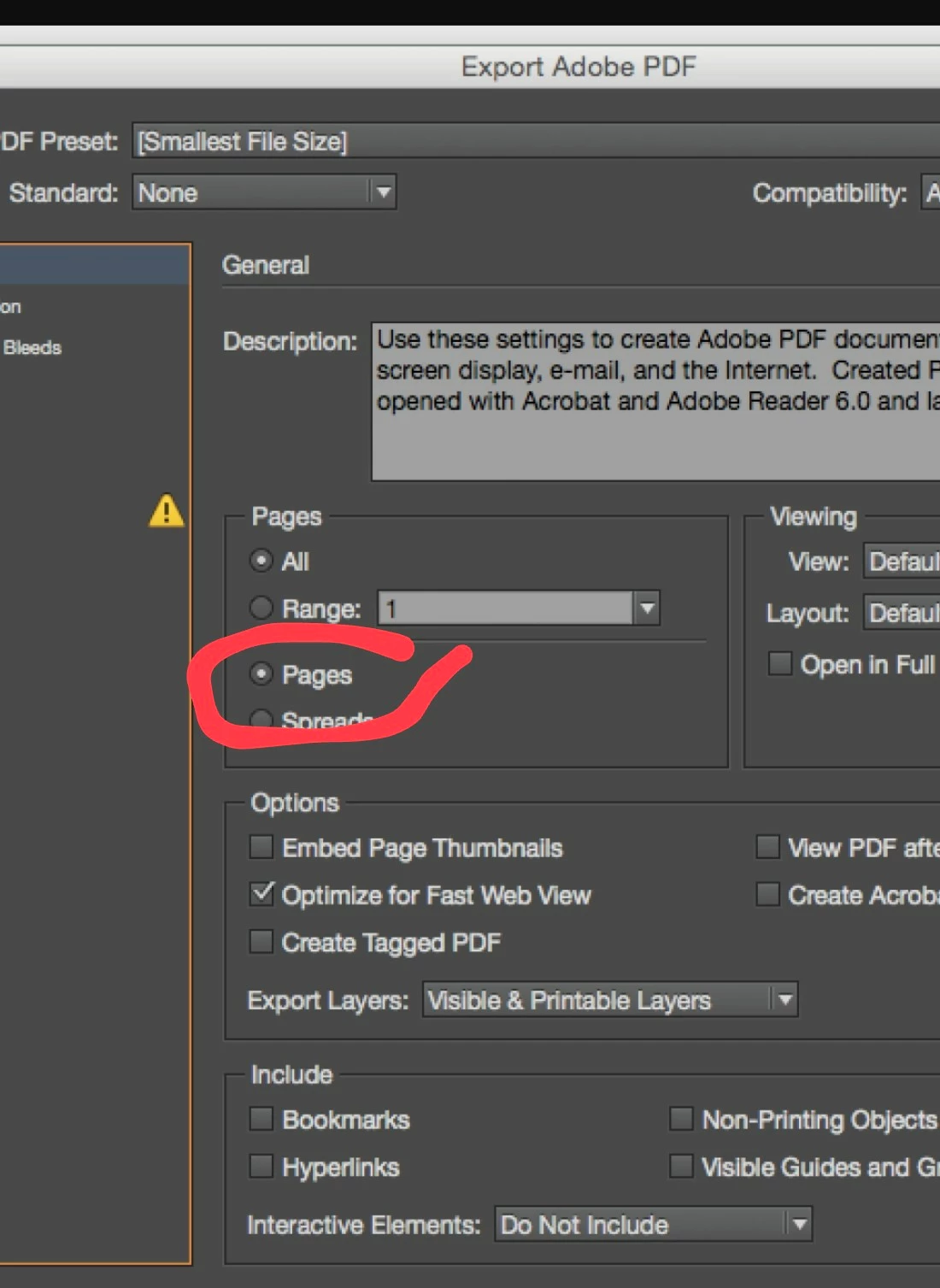
You shouldn't be exporting your PDF as SPREADS - but as PAGES. 


2 replies

James Gifford—NitroPress
Legend
July 19, 2024

As RT says, delete both of those blank pages. Book interiors start on page 1 or i, on the right-hand side. Any printing inside the cover (which KDP doesn't do, but some book services permit) is part of the cover printing, not the interior. Your book file should start with your current page iii.

Known Participant
July 20, 2024

Thanks James, and thank you too RT. 

I did this, the two pages deleted - so that now what was iii is now i.

When I open in kdp, the first page is correct (blank left, greyscale cover right) - looking like I thought it would.

This is how it looks in my indesign (Upload 1a).  

This is what the pdf looks like once exported (Upload 1b)

But this is what it looks like on kdp: (Upload 1c) As mentioned the greyscale cover page is good - it's on the right (as I wanted), page ii where the "welcome/how to use this book" should be left, then "contents" (invisible 1) should be on the right - but from ii they're split across the pages.

Yet in indesign, AND in my preview of the save of the document, they're normal pages.

I'm exporting as "spreads" - that's right isn't it?  Is it something to do with the fact that there's an invisible 1 after ii?  I don't know how it happened 🫣) but it worked with my numbering following so I went with it! 

I'm sorry if I'm dumb - I just can't figure out what's happening. Appreciate any help either of you would like to give!  

Many thanks!


Robert at ID-Tasker
Robert at ID-TaskerCorrect answer
Legend
July 20, 2024

@Carolyn32257242he70


You shouldn't be exporting your PDF as SPREADS - but as PAGES. 


Robert at ID-Tasker
Legend
July 19, 2024

So you want to remove "i" page? 


Then start new Section on the "ii" page - then you will be able to delete "i" page and pages won't shift. 


Remember to have "Start Page Numbering At" as "2": 


https://helpx.adobe.com/uk/indesign/using/numbering-pages-chapters-sections.html