
Skript: Export opened Documents skips documents
Hello everyone,
I have a problem with my InDesign Script. I created the Script with ChatGPT and want to export all opened InDesign documents at once.
My Problem: My Script skips some open documents in the export process.
This is the interface when you start the script:
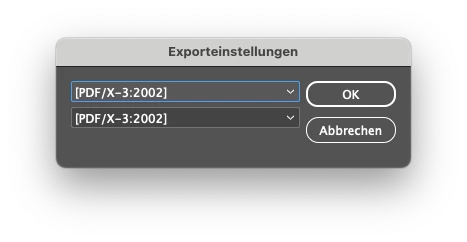
Here you can select two PDF-Presets, so you can generate two different PDFs.
After you selected the PDF-Presets, you can chose the path, where you can save the files. The scripts generates 3 Folders:
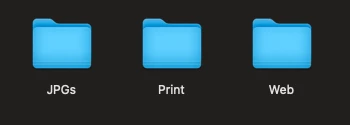
In the "Print" & "Web" Folders should be all the PDFs of the opened documents. For example: I have 5 opened documents in indesign. But in my case, the script doesnt generate 1 PDF for every document, just 3. Somehow the script skips some of the opened documents.
So you can understand it better: i have 5 documents with this structure:

Here you can see different pages of indesign. I have 5 documents:
Document 1: 1-5
Document 2: 6-10
Document 3: 11-15
Document 4: 16-20
Document 5: 21-25
Somehow the script only generates 3 files. Like this:
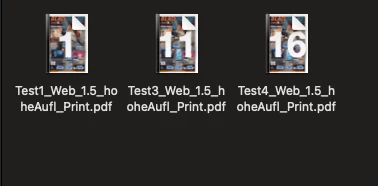
Please help me.
Here is the Code:
// InDesign JavaScript

// Globale Variablen für die Exporteinstellungen
var globalExportSettings = null;

// Funktion für den Export als PDF mit einem bestimmten Preset, benutzerdefinierter Dateibezeichnung und Unterordnern
function exportPDFWithPresetAndNameAndFolders(presetName, outputPath, subfolder) {
    // Erstelle Unterverzeichnis, falls es nicht existiert
    var subfolderPath = outputPath + "/" + subfolder;
    var subfolderObj = new Folder(subfolderPath);
    if (!subfolderObj.exists) {
        subfolderObj.create();
    }

    var myPDFExportPreset = app.pdfExportPresets.itemByName(presetName);
    var exportedFile = new File(subfolderPath + "/" + app.activeDocument.name.replace(/\.[^\.]+$/, "") + "_" + myPDFExportPreset.name + "_" + subfolder + ".pdf");
    app.activeDocument.exportFile(ExportFormat.pdfType, exportedFile, false, myPDFExportPreset);

    // Rückgabe des exportierten Dateipfads für spätere Verwendung (falls benötigt)
    return exportedFile;
}

// Funktion für den Export als PDF mit einem bestimmten Preset und benutzerdefinierter Dateibezeichnung
function exportPDFWithPresetAndName(presetName, outputPath) {
    // Exportiere PDF in den Ordner "Web"
    exportPDFWithPresetAndNameAndFolders(presetName, outputPath, "Web");
}

// Funktion für den Export als PDF mit einem bestimmten Preset und benutzerdefinierter Dateibezeichnung
function exportPDFWithPresetAndNameForPrint(presetName, outputPath) {
    // Exportiere PDF in den Ordner "Print"
    exportPDFWithPresetAndNameAndFolders(presetName, outputPath, "Print");
}

// Funktion für den Export als JPG mit benutzerdefinierten Einstellungen und benutzerdefinierter Dateibezeichnung
function exportPagesAsJPG(outputPath) {
    var doc = app.activeDocument;

    // Erstelle den JPGs-Ordner, falls er nicht existiert
    var jpgFolder = new Folder(outputPath + "/JPGs");
    if (!jpgFolder.exists) {
        jpgFolder.create();
    }

    for (var p = 0; p < doc.pages.length; p++) {
        var myPageName = doc.pages[p].name;

        // Set JPEG export preferences
        var jpegExportSettings = {
            antiAlias: true,
            embedColorProfile: true,
            exportResolution: 72,
            jpegColorSpace: JpegColorSpaceEnum.rgb,
            jpegExportRange: ExportRangeOrAllPages.exportRange,
            jpegQuality: JPEGOptionsQuality.maximum,
            jpegRenderingStyle: JPEGOptionsFormat.baselineEncoding,
            useDocumentBleeds: false,
            simulateOverprint: false,
            pageString: myPageName,
        };

        app.jpegExportPreferences.properties = jpegExportSettings;

        // Exportiere JPGs in den Ordner "JPGs"
        doc.exportFile(ExportFormat.jpg, File(jpgFolder + "/" + "JPG_" + app.activeDocument.name.replace(/\.[^\.]+$/, "") + "_" + myPageName + ".jpg"), false);
    }
}

// Funktion zum Erstellen eines Dialogfensters für PDF-Presets und JPG-Einstellungen
function createExportDialog() {
    var pdfPresetDropdown1 = null;
    var pdfPresetDropdown2 = null;
    var outputPath = null;

    try {
        // Dialogfenster erstellen
        var dialog = app.dialogs.add({
            name: "Exporteinstellungen",
            canCancel: true
        });

        // Dialogspalte erstellen
        var column = dialog.dialogColumns.add();

        // Wenn es globale Exporteinstellungen gibt, verwende diese
        if (globalExportSettings) {
            pdfPresetDropdown1 = column.dropdowns.add({
                stringList: [globalExportSettings.pdfPreset1],
                selectedIndex: 0,
                minWidth: 200,
                maxWidth: 400
            });

            pdfPresetDropdown2 = column.dropdowns.add({
                stringList: [globalExportSettings.pdfPreset2],
                selectedIndex: 0,
                minWidth: 200,
                maxWidth: 400
            });

            outputPath = Folder(globalExportSettings.outputPath);
        } else {
            // Dropdown für erstes PDF-Preset erstellen
            pdfPresetDropdown1 = column.dropdowns.add({
                stringList: app.pdfExportPresets.everyItem().name,
                selectedIndex: 0,
                minWidth: 200,
                maxWidth: 400
            });

            // Dropdown für zweites PDF-Preset erstellen
            pdfPresetDropdown2 = column.dropdowns.add({
                stringList: app.pdfExportPresets.everyItem().name,
                selectedIndex: 0,
                minWidth: 200,
                maxWidth: 400
            });

            // Dialog anzeigen und Benutzereingaben sammeln
            if (dialog.show() == true) {
                outputPath = Folder.selectDialog("Wählen Sie das Ausgabeverzeichnis für die Dateien:");
            } else {
                return null;
            }
        }

        return {
            pdfPreset1: pdfPresetDropdown1.stringList[pdfPresetDropdown1.selectedIndex],
            pdfPreset2: pdfPresetDropdown2.stringList[pdfPresetDropdown2.selectedIndex],
            outputPath: outputPath ? outputPath.fsName : null
        };
    } catch (e) {
        // Fehlerbehandlung
        alert("Fehler beim Erstellen des Dialogfensters: " + e);
    } finally {
        // Dialog schließen, wenn er geöffnet wurde
        if (dialog && dialog instanceof Dialog) {
            dialog.destroy();
        }
    }
}

// Funktion für den Export als PDF mit einem bestimmten Preset und benutzerdefinierter Dateibezeichnung
function exportPDFWithPresetAndName(presetName, outputPath) {
    // Exportiere PDF in den Ordner "Web"
    exportPDFWithPresetAndNameAndFolders(presetName, outputPath, "Web");
}

// Funktion für den Export als PDF mit einem bestimmten Preset und benutzerdefinierter Dateibezeichnung
function exportPDFWithPresetAndNameForPrint(presetName, outputPath) {
    // Exportiere PDF in den Ordner "Print"
    exportPDFWithPresetAndNameAndFolders(presetName, outputPath, "Print");
}

// Funktion zum Exportieren für jedes geöffnete Dokument
function exportForAllDocuments() {
    var documents = app.documents;

    if (documents.length > 0) {
        var originalActiveDocument = app.activeDocument; // Das aktive Dokument speichern

        for (var d = 0; d < documents.length; d++) {
            var currentDocument = documents[d];

            // Benutzereingabe für PDF-Presets und JPG-Export (nur beim ersten Mal abfragen)
            var exportSettings = (d === 0) ? createExportDialog() : globalExportSettings;

            if (exportSettings) {
                try {
                    app.activeDocument = currentDocument; // Aktuelles Dokument setzen

                    // Setze die globalen Exporteinstellungen für jedes Dokument separat
                    globalExportSettings = {
                        pdfPreset1: exportSettings.pdfPreset1,
                        pdfPreset2: exportSettings.pdfPreset2,
                        outputPath: exportSettings.outputPath
                    };

                    // Exportiere erste PDF mit ausgewähltem Preset und Ausgabeverzeichnis
                    exportPDFWithPresetAndName(globalExportSettings.pdfPreset1, globalExportSettings.outputPath);

                    // Exportiere zweite PDF mit ausgewähltem Preset und Ausgabeverzeichnis für "Print"
                    exportPDFWithPresetAndNameForPrint(globalExportSettings.pdfPreset2, globalExportSettings.outputPath);

                    // Exportiere JPGs mit benutzerdefinierten Einstellungen und Ausgabeverzeichnis
                    exportPagesAsJPG(globalExportSettings.outputPath);
                } catch (e) {
                    alert("Fehler beim Exportieren des Dokuments: " + currentDocument.name + "\n" + e);
                }
            }
        }

        app.activeDocument = originalActiveDocument; // Das ursprüngliche aktive Dokument wiederherstellen

        alert("Export für alle geöffneten Dokumente abgeschlossen.");
    } else {
        alert("Es sind keine Dokumente geöffnet.");
    }
}

// Führe das Skript für alle geöffneten Dokumente aus
exportForAllDocuments();
Thank you! -Luca


 AdChoices