


Participant
September 4, 2026
Question

Snippet changing my tables layout

  • September 4, 2026
  • 6 replies
  • 81 views

Hi everyone, Can anyone help me? I'm trying to create an InDesign snippet that contains a table, but every time I place it on the page, it messes up the layout. Has anyone experienced this before or knows how to fix it? Apologies for my english, please see the photo for reference before and after of my snippet
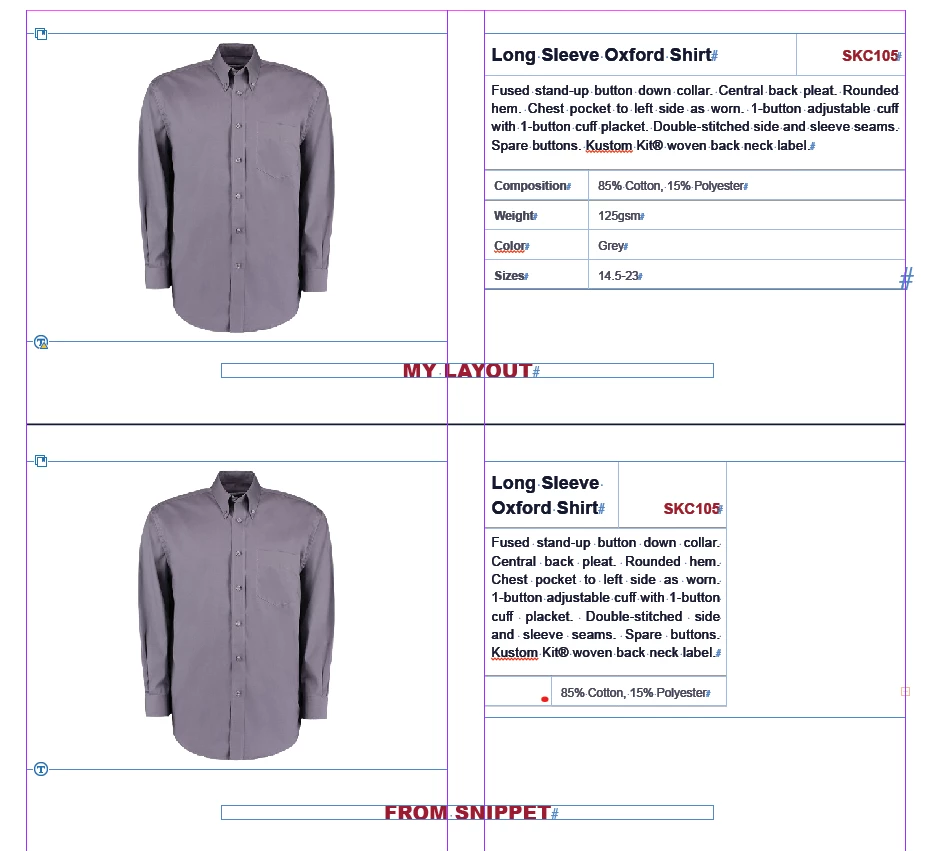
 

    6 replies

    G_Man
    Inspiring
    September 17, 2026

    Yup, I’ve just run into this problem as well.

    I’ve just installed the prerelease build and still have the same problem. Come ON Adobe - I need to get my packaging projects finished today. 

    nik.m
    Community Manager
    Community Manager
    September 17, 2026

    Hi @G_Man, we're sorry about the trouble.

    Could you please share the version of InDesign you initially experienced the behavior with, along with your computer's operating system?

    Have you tried creating a new file to check if you continue to face the same issue?


    Thanks,
    Nikunj

    G_Man
    Inspiring
    September 17, 2026

    Hi Nikunj,

    Sure. Version 21.6 is the ID version I’m using and experiencing problems with.

    The Pre-release has not helped. 

    I’ve created a new file and imported Snippets again and same problem.

    Host Name:                 G-MAN
    OS Name:                   Microsoft Windows 10 Pro
    OS Version:                10.0.19045 N/A Build 19045
    OS Manufacturer:           Microsoft Corporation
    OS Configuration:          Standalone Workstation
    OS Build Type:             Multiprocessor Free
    Registered Organization:   
    Product ID:                00330-71446-57540-AAOEM
    Original Install Date:     04/06/2021, 17:21:14
    System Boot Time:          16/09/2026, 08:46:31
    System Manufacturer:       ASUS
    System Model:              System Product Name
    System Type:               x64-based PC
    Processor(s):              1 Processor(s) Installed.
                               [01]: Intel64 Family 6 Model 165 Stepping 5 GenuineIntel ~3696 Mhz
    BIOS Version:              American Megatrends Inc. 2103, 15/04/2021
    Windows Directory:         C:\Windows
    System Directory:          C:\Windows\system32
    Boot Device:               \Device\HarddiskVolume5
    System Locale:             en-gb;English (United Kingdom)
    Input Locale:              en-gb;English (United Kingdom)
    Time Zone:                 (UTC+00:00) Dublin, Edinburgh, Lisbon, London
    Total Physical Memory:     32,671 MB
    Available Physical Memory: 17,391 MB
    Virtual Memory: Max Size:  45,983 MB
    Virtual Memory: Available: 25,035 MB
    Virtual Memory: In Use:    20,948 MB
    Page File Location(s):     C:\pagefile.sys
    Domain:                    WORKGROUP
    Logon Server:              \\G-MAN
    Hotfix(s):                 66 Hotfix(s) Installed.
                               [01]: KB5126421
                               [02]: KB5028951
                               [03]: KB4562830
                               [04]: KB4570334
                               [05]: KB4577586
                               [06]: KB4580325
                               [07]: KB4586864
                               [08]: KB5000736
                               [09]: KB5003791
                               [10]: KB5011048
                               [11]: KB5012170
                               [12]: KB5015684
                               [13]: KB5072653
                               [14]: KB5122878
                               [15]: KB5006753
                               [16]: KB5007273
                               [17]: KB5011352
                               [18]: KB5011651
                               [19]: KB5014032
                               [20]: KB5014035
                               [21]: KB5014671
                               [22]: KB5015895
                               [23]: KB5016705
                               [24]: KB5018506
                               [25]: KB5020372
                               [26]: KB5022924
                               [27]: KB5023794
                               [28]: KB5025315
                               [29]: KB5026879
                               [30]: KB5028318
                               [31]: KB5028380
                               [32]: KB5029709
                               [33]: KB5031539
                               [34]: KB5032392
                               [35]: KB5032907
                               [36]: KB5034224
                               [37]: KB5036447
                               [38]: KB5037018
                               [39]: KB5037240
                               [40]: KB5037995
                               [41]: KB5039336
                               [42]: KB5041579
                               [43]: KB5043935
                               [44]: KB5043130
                               [45]: KB5046823
                               [46]: KB5050388
                               [47]: KB5050111
                               [48]: KB5052916
                               [49]: KB5054682
                               [50]: KB5055663
                               [51]: KB5058526
                               [52]: KB5059504
                               [53]: KB5061902
                               [54]: KB5063706
                               [55]: KB5063261
                               [56]: KB5063979
                               [57]: KB5066411
                               [58]: KB5066790
                               [59]: KB5068780
                               [60]: KB5077456
                               [61]: KB5081263
                               [62]: KB5084130
                               [63]: KB5094145
                               [64]: KB5104021
                               [65]: KB5122877
                               [66]: KB5005699
    Network Card(s):           3 NIC(s) Installed.
                               [01]: Avast SecureLine Wintun Adapter
                                     Connection Name: Avast SecureLine VPN
                                     Status:          Media disconnected
                               [02]: Intel(R) Ethernet Controller (2) I225-V
                                     Connection Name: Ethernet 3
                                     DHCP Enabled:    Yes
                                     DHCP Server:     192.168.1.1
                                     IP address(es)
                                     [01]: 192.168.1.11
                                     [02]: fe80::c461:3e18:8913:bc71
                                     [03]: 2a0a:ef40:905:102:2496:aa76:1665:1eec
                                     [04]: 2a0a:ef40:905:101:2496:aa76:1665:1eec
                                     [05]: 2a0a:ef40:905:102:1aef:54ca:d034:33ac
                                     [06]: 2a0a:ef40:905:101:cd25:3197:cf2:898
                               [03]: Realtek PCIe GbE Family Controller
                                     Connection Name: Ethernet 4
                                     Status:          Media disconnected
    Hyper-V Requirements:      VM Monitor Mode Extensions: Yes
                               Virtualization Enabled In Firmware: No
                               Second Level Address Translation: Yes
                               Data Execution Prevention Available: Yes

    Abhishek Rao
    Community Manager
    Community Manager
    September 4, 2026

    Hi @daring_Dragonfly93fa,


    Sorry you're running into this issue with the table layout changing when placing the snippet.

    This appears similar to a known issue where table column widths can change during IDML/snippet-related workflows. Please refer to the report here:
    https://adobe.ly/3SMfz2E

    A fix is available for testing in the latest InDesign 21.6 Prerelease build. Could you please install it from Creative Cloud Desktop > All Apps > Prerelease and test the same snippet workflow?

    If you don't have access to the Prerelease program, please follow the steps here to join:
    https://adobe.ly/4qU9wWk

    Please let us know whether the issue persists in 21.6.


    Thanks,
    Abhishek

    Participant
    September 7, 2026

    Hi ​@Abhishek Rao,

    The snippet is still the same problem. I think the fix for this is to have the same option of this in Table/cell width