
Known Participant
November 21, 2018
Answered

Soft Return Problems

  • November 21, 2018
  • 7 replies
  • 3906 views

Hi all, looking for help here:

When my co-worker enters a soft return (say, for example, in order to line up text below a bullet) InDesign puts in a hard return...well, actually more than a hard return, it adds a whole lot of space.

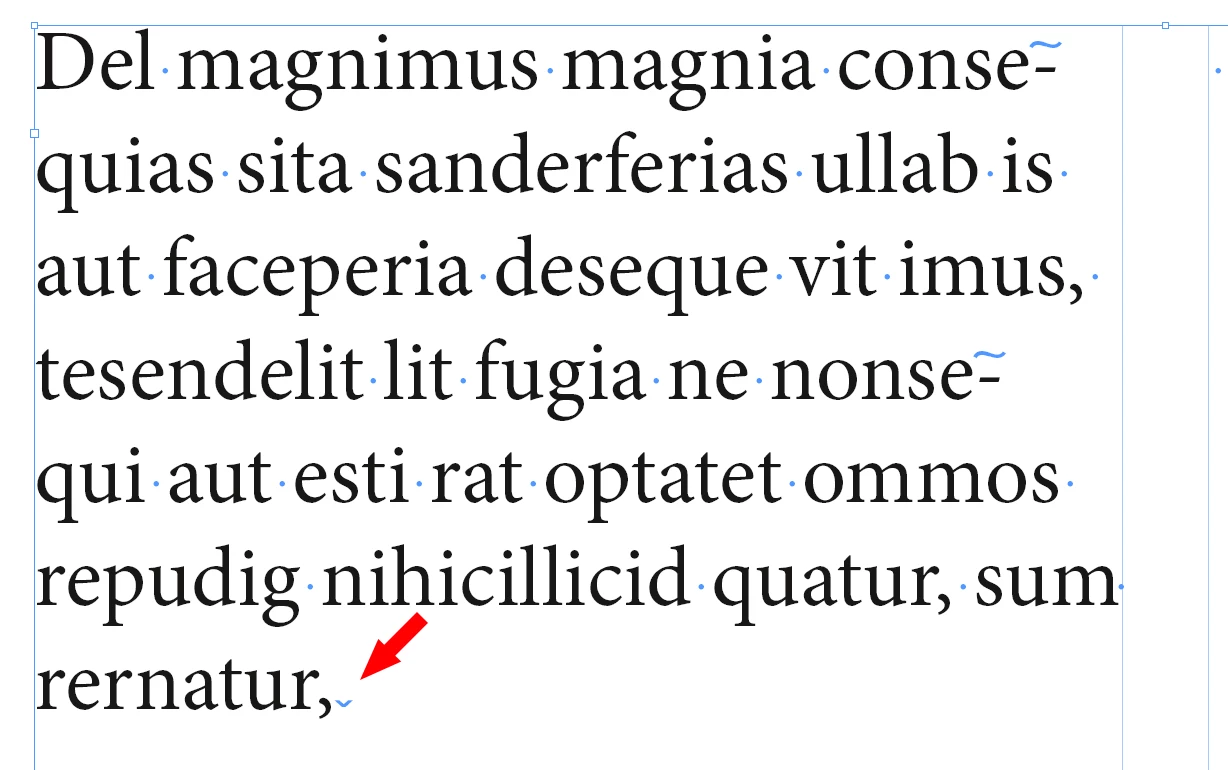
When he shows hidden characters, it isn't a paragraph symbol, it isn't a down arrow, it's more of a down carat...

We can't figure it out... Suggestions?
    This topic has been closed for replies.
    Correct answer Laubender

    theresad47791615  wrote

    …When he shows hidden characters, it isn't a paragraph symbol, it isn't a down arrow, it's more of a down carat...

    We can't figure it out... Suggestions?

    I think, I know what it is.

    Your co-worker is hitting the Enter key on the Num Pad of the keyboard.

    That will insert a special character, a Column Break character, that forces every text, that comes after to the next column of a text frame or, if there is only one column in the text frame, to the next text frame in the story or to overset, if there is no next text text frame.

    Are you seeing this special character?

    To avoid this use the Return key of the keyboard.

    Regards,
    Uwe

    7 replies

    Known Participant
    November 27, 2018

    Well thanks everyone for the snarky remarks and no real help. Thought this would be a good way to get some assistance, guess I was wrong, seems more like a place for you all to feel superior.

    Have a blessed day.

    Community Expert
    November 27, 2018

    Hi Theresa,

    please provide a screenshot of the text frame selected where all hidden characters and frame edges are showing.

    Without that all we can do is only guess what's going on.

    Thanks,
    Uwe

    Known Participant
    November 27, 2018

    Thanks all, it actually turned out to be a faulty keyboard!!! We swapped it out and all is good! Thanks for the input and suggestions.

    maxwithdax
    Community Expert
    Community Expert
    November 21, 2018

    Uwe,

    I bet you're right. Now that I re-read her comment, the "down carrot" was the dead giveaway. Good catch!

    LaubenderCommunity ExpertCorrect answer
    Community Expert
    November 21, 2018

    theresad47791615  wrote

    …When he shows hidden characters, it isn't a paragraph symbol, it isn't a down arrow, it's more of a down carat...

    We can't figure it out... Suggestions?

    I think, I know what it is.

    Your co-worker is hitting the Enter key on the Num Pad of the keyboard.

    That will insert a special character, a Column Break character, that forces every text, that comes after to the next column of a text frame or, if there is only one column in the text frame, to the next text frame in the story or to overset, if there is no next text text frame.

    Are you seeing this special character?

    To avoid this use the Return key of the keyboard.

    Regards,
    Uwe

    FRIdNGE
    November 21, 2018

    Theresa,

    If it's what I think, you're not wrong! …

    Best,

    Michel, for FRIdNGE

    Derek Cross
    Community Expert
    Community Expert
    November 21, 2018

    You'll will (almost) always be told the correct way to do things on these forums. You can't expect to be given the slovenly way!

    BobLevine
    Community Expert
    Community Expert
    November 21, 2018

    The solution is to not use soft returns. If you can tell us why you think you need them we can provide better advice.

    Lining text up under a bullet is done through the bullets and numbering feature and setting indents and tabs properly.

    Known Participant
    November 21, 2018

    Yeah...no...

    We use soft returns. I am not looking to teach the entire company a different method. And, it's not just bullets...sometimes it's necessary to force a return for other reasons.

    I need to solve this issue, not use another method

    maxwithdax
    Community Expert
    Community Expert
    November 21, 2018

    Hi Theresa,

    While I understand your situation and have been there myself in employment situations where things are "just done this way," There is no escaping the fact that the method they are using is an incorrect method that causes more problems than it solves and is never necessary.

    I completely get that now is probably not the time to "train" anyone on the finer points of proper paragraph settings, please know that everything can be adjusted with the correct paragraph, hyphenation and and "keep" settings. Understanding how to use the tools the correct way is always preferred. It's like getting that word document where someone used 50 spaced to line up text instead of setting tabs.

    That being said.. lets address your request. You stated "We can't figure it out... Suggestions?"

    Can you clarify what you are asking?

    1. If you hold down Shift when pressing return, this is a soft return.

    2. Without seeing your paragraph settings or a screenshot we cannot give you advice as to what is happening. Things like line spacing, hidden characters, "keep with" options, balanced lines and space-before and space-after are all things that can add extra space between lines.

    More information will help us solve your current issue of what is happening with your text.

    - Thanks

    Dax