

Typothalamus
Known Participant
February 3, 2025
Question

Some objects shifting when adding new pages

  • February 3, 2025
  • 3 replies
  • 882 views

Not long after compiling 47 chapters into one file, I noticed the following unwanted behavior after going back and inserting an additional page spread in the middle:

1. A few items newly placed on the pasteboard in subsequent chapters  are now one spread off in sequence. 

2. Running chapter footers (intended to appear after the initial spread of each ch., so I simply cover them with a white box on the first spread of each ch.) are also now visible, perhaps due to this sort of recollating. 

3. On the page spread just before the newly inserted one, a pic with a bounding box set to 1 cm text wrap now pushes or covers the footer when moved close to it . Items with text wrap do not do this to running footers anywhere else in the doc.

It may already be clear what's happening but this also might be related: on the pages panel, there's a new blue line or box showing up on the spread preceding the newly added spread:
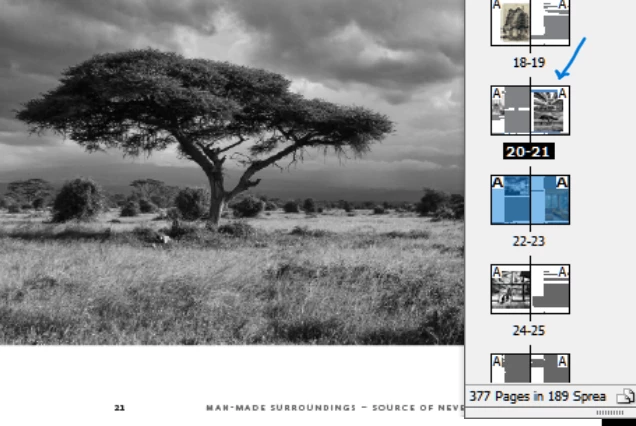


Thank you

3 replies

davecourtemanche
Inspiring
February 4, 2025

Just to add 2¢ regarding your 47 chapters in 1 file. I think you should explore the book function in ID. Your odds of a giant, image heavy file going corrupt increases in this kind of situation. I have found the book function perfect for this type of project. 

Typothalamus
Known Participant
February 4, 2025

Yes, I'm aware, but in this case, as designer, I must keep a conceptual overview of everything easily in view, and compartmentalizing it makes that very difficult. In other cases, it's suited. I began with the book feature long ago on this project and after several months, had to back out of it for that reason. Frequent use of Save As (not Save) and keeping links updated helps avoid corruption. 

Mike Witherell
Community Expert
Community Expert
February 4, 2025

When dealing with an overridden objects page, followed probably by improvements to the Parent page, I find that the next step is often re-applying the parent page to the local page (and probably first deleting heavily-modified objects overridden in the first place.)

Mike Witherell
Mike Witherell
Community Expert
Community Expert
February 3, 2025

1. I'm not sure what you mean by this statement. My general experience has been if you add pages before a page, the page moves down in sequence and the pasteboard items go with it. That is, if all the objects are independant and not heavily threaded/linked. Also, I try to keep my pasteboards largely empty of stored pieces of object.

2. If a parent page footer is unwanted on a certain page, why not Cmd/Ctrl+Shift+Click it to override it to the local page and simply delete it, instead of covering it with a paper-filled box?

3. If a parent page object is NOT overridden to the local page, text wrapped objects will have no effect on it. If the parent page object IS overridden on the local page, it becomes sensitive to another object that has text wrap on.

4. Have you had a good look at your parent pages and layers? Is everything well-organized?

Mike Witherell
Typothalamus
Known Participant
February 3, 2025

Sorry if that came off vague. It looks like what you're deducing with #3 is probably what happened. How do I undo the unintended override on the local footer?

And with #2, I got into the habit of keeping some objects covered up rather than deleting them to retain an option of quickly getting them back if needed later as I work through provisional ideas.

Willi Adelberger
Community Expert
Community Expert
February 4, 2025

Did you anchor the images which are now on the wrongvspread?  
I recommend to anchor them in the text. 

Covering items with white frames to make them ivisible is never a good idea. Tongetbrid of them, you should use another mastee/parent without them or better workbwith correct dynamic content based text variables. 

Footnotes and running headers behave differently. Text wrapping is applied to footnotes, not to running headers or footers. 
Are the running geaders and footers based on textvariables?

Do you work with layers?


What do you mean with the blue line?