Participant
February 4, 2020
Answered

Space before heading inconsistent because of previous paragraph style

  • February 4, 2020
  • 2 replies
  • 812 views

I'm having an issue with inconsitent heading styles, because of the style that comes before it.

Let's say, for example, my styles are:

  • Heading - 0.5 inches space before
  • Body - no space before / after
  • Bullet - 0.25 inches space after

If I use the heading style after the body paragraph, there is 0.5 inches of space before my heading.

If I use the heading style after a bullet paragraph, I wind up with 0.75 inches before my heading, because it's adding the 0.25 inches and 0.5 inches.

Is there any way I can set it so that it just uses the bigger of the two and doesn't add them? Maybe I'm imagining that InDesign used to do this, but I feel like this wasn't an issue before. Did something change with a recent update?
This topic has been closed for replies.
Correct answer nigelfrench

InDesign has always determined the space between the paragraphs as the sum of the space before and the space after. 

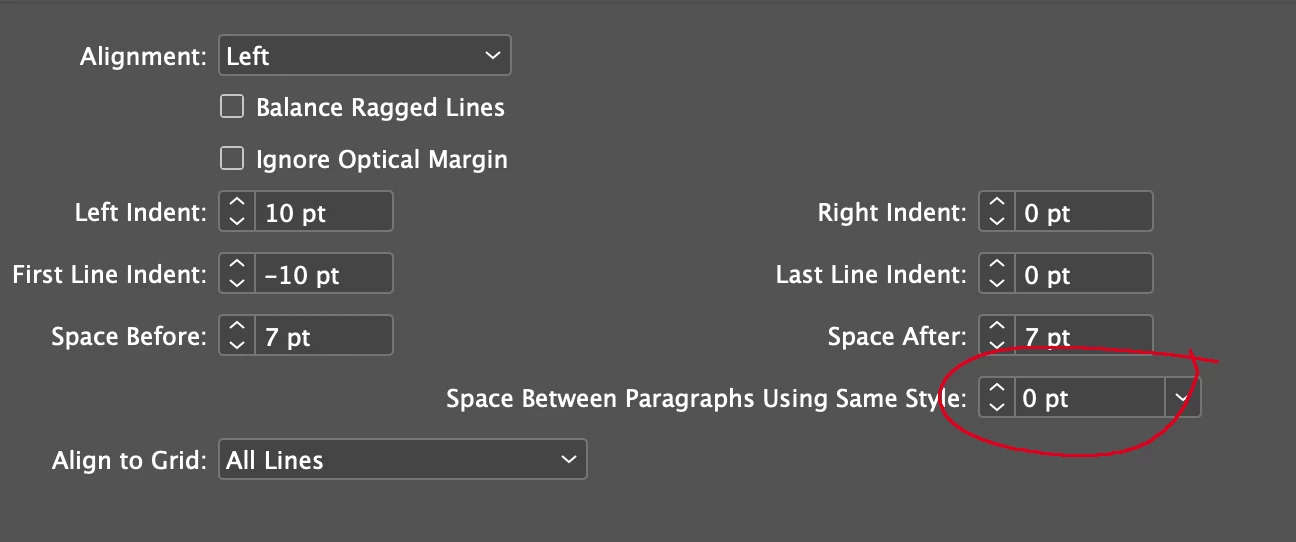
There is a relatively new feature that determines the space between paragraphs of the same style. This might be useful for your bullet paragraphs, where you don't want the space after between each bullet item (see screenshot).

But if you really need the space after the bullet style most—but not all—of the time, then as Migintosh suggests, the best way is to  make a variant of the style, based on the bullet style.

2 replies

nigelfrenchCommunity ExpertCorrect answer
Community Expert
February 5, 2020

InDesign has always determined the space between the paragraphs as the sum of the space before and the space after. 

There is a relatively new feature that determines the space between paragraphs of the same style. This might be useful for your bullet paragraphs, where you don't want the space after between each bullet item (see screenshot).

But if you really need the space after the bullet style most—but not all—of the time, then as Migintosh suggests, the best way is to  make a variant of the style, based on the bullet style.

Participant
February 5, 2020

Thanks for the info! I guess I was remembering incorrectly, which is what I was afraid of. I decided to just change my Body style to match the bullet list space after -- not exactly what I was looking for but I can live with it, so I can limit the number of extra styles needed.

Legend
February 5, 2020

I'm still using 2019 because of my job, so maybe 2020 has what you're looking for, but the way I've always done something like this is to make a copy of the bullet style, base it on the bullet style, and remove the space after on the copy (and probably call it bullet NSA for No Space After). You can still change all of the bullet characteristics by editing the original bullet, but you do have to apply the NSA yourself. Maybe you could use a script to go through your document and find instances of head after bullet and change them to head after NSA, but I'm not a scripting guy, so I can't help you with that.

Participant
February 5, 2020

Thanks for your input!