Inspiring
March 3, 2025
Question

space before in paragraph style along with a border above

  • March 3, 2025
  • 2 replies
  • 635 views

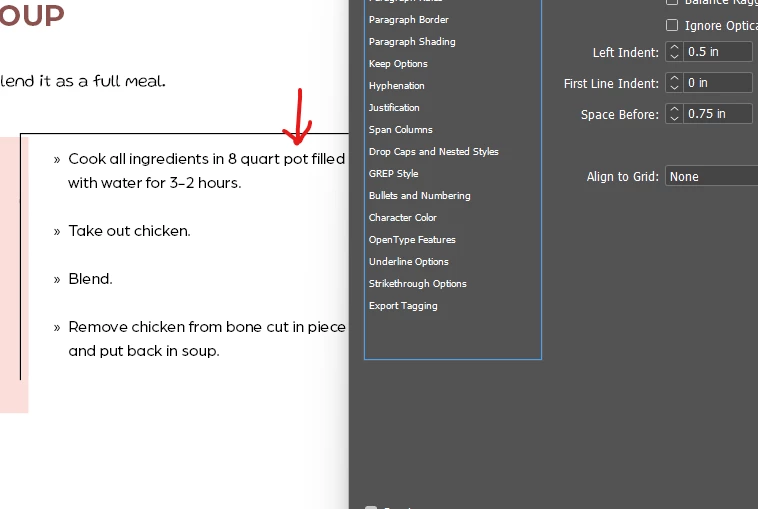
Is there a way to get a space (indicated with red arrow) above the first text border on top

when adding space before, nothing happens
 

2 replies

Barb Binder
Community Expert
Community Expert
March 4, 2025

Hi Hendy:


Add spacing below the paragraph above (... as a full meal.), then follow @tonks_the_auror's advice.


If you adjust both, you will end up with the result you are looking for. 


~Barb


~Barb at Rocky Mountain Training
Inspiring
March 4, 2025

Note I already tried this.

with 1 inch before, nothing changes


James Gifford—NitroPress
Legend
March 4, 2025

You need one inch (or whatever) before the FIRST paragraph inside the border, not all of them. That creates the space above, between it and the prior paragraph, for the border to be expanded.


THEN you extend the border spacing using the Offset value.


This will not work at a page top unless you take other steps; the border will push up into the top margin.

tonks_the_auror
Community Expert
Community Expert
March 3, 2025

Do you mean you want to add space between the top border and the text?

If so, then you need to use Paragraph > Paragraph Borders and Shading  > Border

There you can set the stroke and the offset


James Gifford—NitroPress
Legend
March 3, 2025

This..


Space above means space above the entire paragraph "block" or style, including borders etc.


To distance a border or rule from the text, you need to set the Offset for each (and each side of).
