


Participant
September 11, 2024
Answered

Space before only sets to 0p8 or 0. Related to grid?

  • September 11, 2024
  • 2 replies
  • 396 views

Hi! I'm an InDesign newbie, and I'm trying to set the space before a heading to 0p6. However, it will only let me set it to 0p8 or 0. It seems to be connected with the grid lines—the heading appears to hop from one line to another, no matter what value I set in the "space before" box. Attached is a screenshot of the heading I'm trying to adjust ("Naming"). Any help would be greatly appreciated!
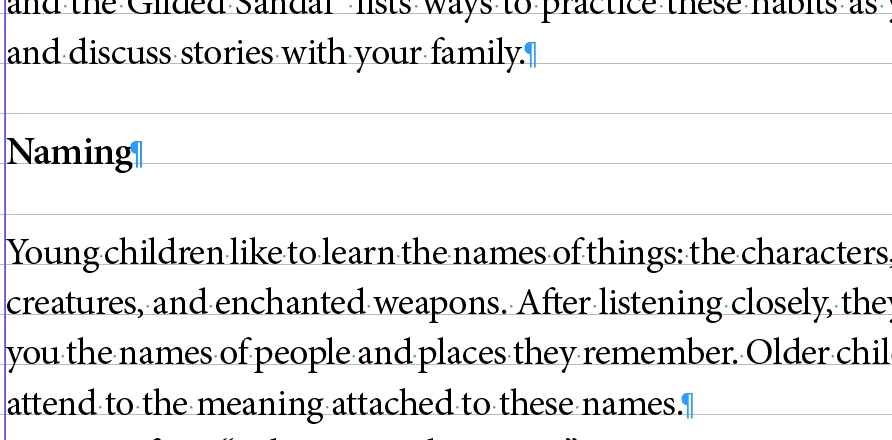

This topic has been closed for replies.
Correct answer Robert at ID-Tasker

@Rachel386807735xn6


If your whole text has Align To Baseline Grid applied - then your spacing won't work the way you want.


You need to turn it off for the ParaStyle(s) applied to the heading(s).


2 replies

Robert at ID-Tasker
Robert at ID-TaskerCorrect answer
Legend
September 11, 2024

@Rachel386807735xn6


If your whole text has Align To Baseline Grid applied - then your spacing won't work the way you want.


You need to turn it off for the ParaStyle(s) applied to the heading(s).


Participant
September 11, 2024

@Robert at ID-Tasker 


This worked perfectly! Thank you so much!!

Robert at ID-Tasker
Legend
September 11, 2024

You're welcome. 


Anshul_Saini
Community Manager
Community Manager
September 11, 2024

Hi @Rachel386807735xn6,


It sounds like you’re encountering an issue where the baseline grid in InDesign is constraining the spacing. The baseline grid is a feature that helps align text vertically across your layout, but it can sometimes interfere with fine-tuning spacing settings.


Go to View > Grids & Guides > Hide Baseline Grid. This will allow you to see if the spacing issue is related to the grid.

If you want to keep the baseline grid visible but adjust its settings, go to InDesign > Preferences > Grids (or Edit > Preferences > Grids on Windows).
Adjust the Baseline Grid settings to better match your desired spacing. You can change the grid’s increment to something that aligns more closely with your text spacing needs.

I hope it helps!

Best,

Anshul Saini