Inspiring
July 26, 2025
Answered

Spaces on right side of text bozx

  • July 26, 2025
  • 4 replies
  • 336 views

Hello,


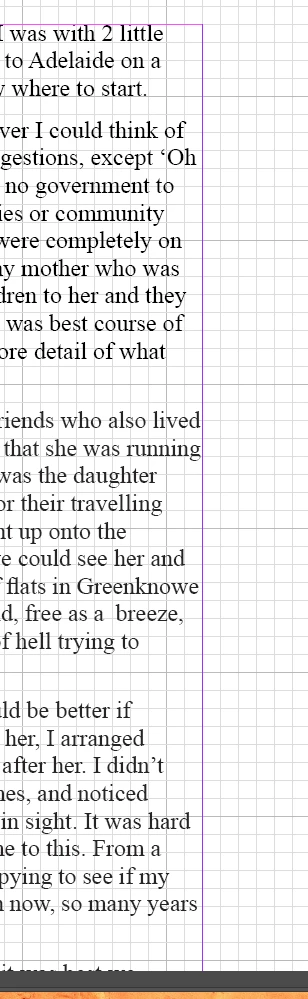
How can I adjust the text content so that the right sdie of the text box page doesn't show so many blank spaces.

I tried to move the word up to the space however it won't stick.


I never had this problem before and wonder how it happened.

 Oz

Correct answer Mike Witherell

You might try making a paragraph style and applying it to your text. It would include, among other settings:

Left alignment along with Adobe Single-Line Composer; not Adobe Paragraph Composer, which is often the default.


Why does Adobe Paragraph Composer leave gaps? Because it is trying to satisfy all the lines in the paragraph; not just one. Therefore it compromises some in order to satisfy other lines. A great way to help the Adobe Paragraph Composer is to also go to Justification settings. These include between-Word-spacing, within the Word Letter spacing, and individual letter glyph scaling. At default, only Word spacing is turned on. The other two are turned off. 


So in a paragraph style, turn the other two on and allow the InDesign typesetting engine its full freedom of ability:

Word

80/100/120

Letter

-5/0/5%

Glyph Scaling

95/100/105%

4 replies

Mike Witherell
Community Expert
Mike WitherellCommunity ExpertCorrect answer
Community Expert
July 28, 2025

You might try making a paragraph style and applying it to your text. It would include, among other settings:

Left alignment along with Adobe Single-Line Composer; not Adobe Paragraph Composer, which is often the default.


Why does Adobe Paragraph Composer leave gaps? Because it is trying to satisfy all the lines in the paragraph; not just one. Therefore it compromises some in order to satisfy other lines. A great way to help the Adobe Paragraph Composer is to also go to Justification settings. These include between-Word-spacing, within the Word Letter spacing, and individual letter glyph scaling. At default, only Word spacing is turned on. The other two are turned off. 


So in a paragraph style, turn the other two on and allow the InDesign typesetting engine its full freedom of ability:

Word

80/100/120

Letter

-5/0/5%

Glyph Scaling

95/100/105%
Mike Witherell
ozstarAuthor
Inspiring
July 29, 2025

Many thanks everyone. It is appreciated.

Susan Culligan
Inspiring
July 26, 2025

It also looks like you have hyphenation off. Is this on purpose? 

These are my settings but you can modify them to your liking.


ozstarAuthor
Inspiring
July 27, 2025

Many thanks guys. 

On second thoughts, where would I change the whole book to full justify  if I decided to go that route? I have looked at several options but don't want to do too much messing around in case I goof up and forget what I did? (85 is no spring chicken 🙂


EDIT:


Okay did it but still prefer the jagged, so went back to it.

Whilst I am following your advice, what is the one that will allow a word to fill the right side space if it fits.  When I try to get it to do it, it just reverts back down to the next line, yet it would easily fit above.

Sorry for the simplicity of my questions.

Mike Witherell
Community Expert
Community Expert
July 26, 2025

Hi Oscar,

Maybe what you are asking about is to set the Alignment of your paragraph text to "Left Justify" instead of "Left Aligned"? That will definitely take the white space gaps away. Set this alignment in a paragraph style that controls the look of the text.

Mike Witherell
Peter Kahrel
Community Expert
Community Expert
July 26, 2025

Check whether Balance Ragged Lines is enabled. If it is, disable it.