
lunalisa
Participant
December 20, 2016
Question

Spacing issues with Footnotes and body text

  • December 20, 2016
  • 1 reply
  • 1003 views

Hi all,

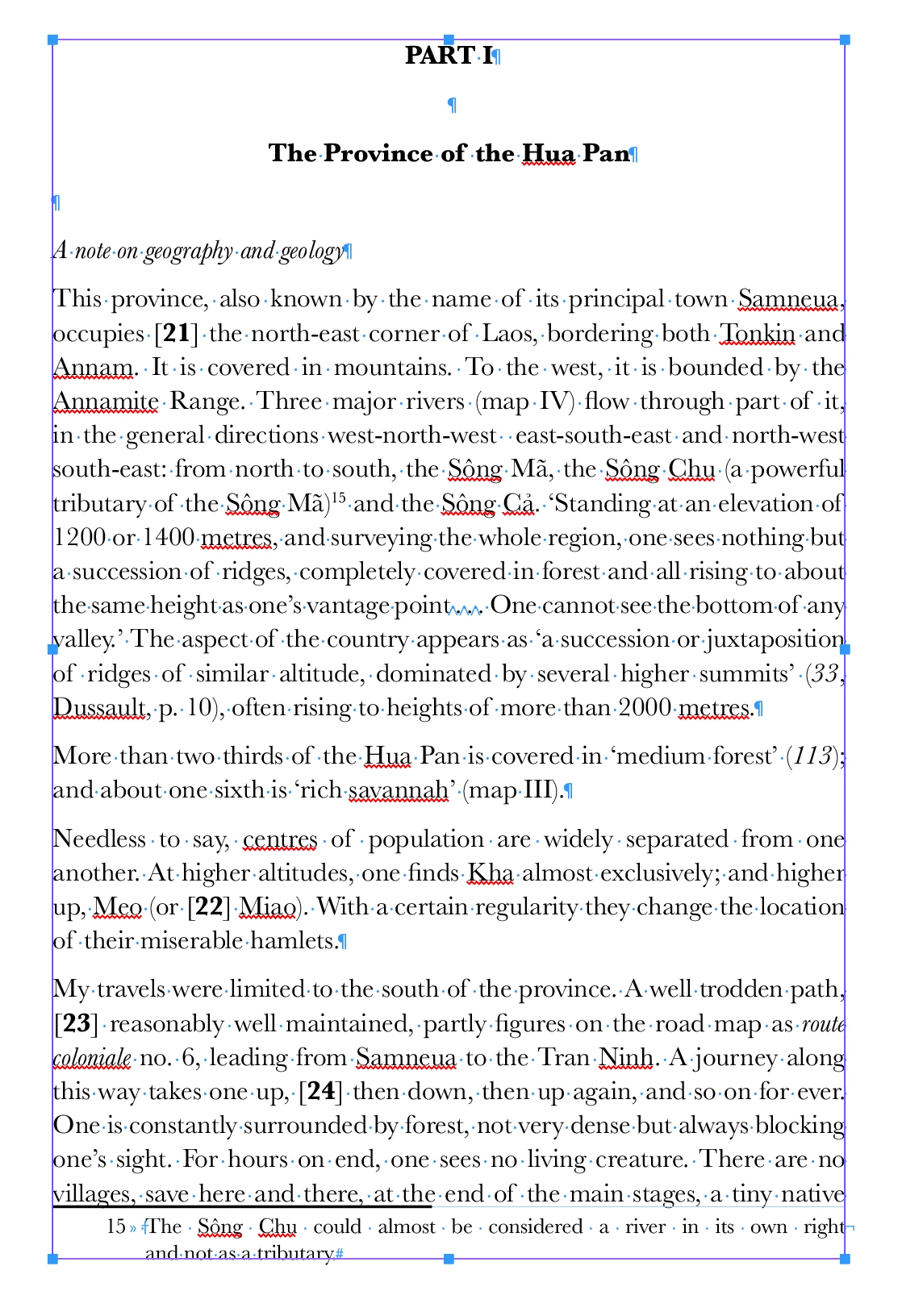
Im having a spacing issue between the body text and the footnote.

I've tried allowing for minimum space before footnotes - but it doesn't seem to be working?

Any tips on how to get consistent space across the document?
This topic has been closed for replies.

1 reply

tpk1982
Legend
December 20, 2016

Post the footnote setting you used..

Few years ago i faced this problem and i solved this with Keep option of above paragraph

lunalisa
lunalisaAuthor
Participant
December 20, 2016

I tried the keep together option too. I found it was leaving too many lines empty, rather then just keeping together the two lines in teh paragraph it was removing say 3-4 lines randomly on some pages. Cant win with this at the moment.

Willi Adelberger
Community Expert
Community Expert
December 20, 2016

You have to change the value in the Spacing Option, increase Space before Footnote.

I see another problem in your screen shot, it is not related to footnotes: You work with empty paragraphs to force space between paragraphs. This is an absolute no go. Create Paragraph Styles with appropriate space before and after in its settings. Otherwise the keep function will fail and it could happen that headlines and follow up content is torn apart to different pages.