
paulc95415842
Known Participant
November 6, 2017
Question

span columns not working ID CC 13

  • November 6, 2017
  • 4 replies
  • 1596 views

I have looked at some answers to others who had this problem, but they do not pertain to my situation.
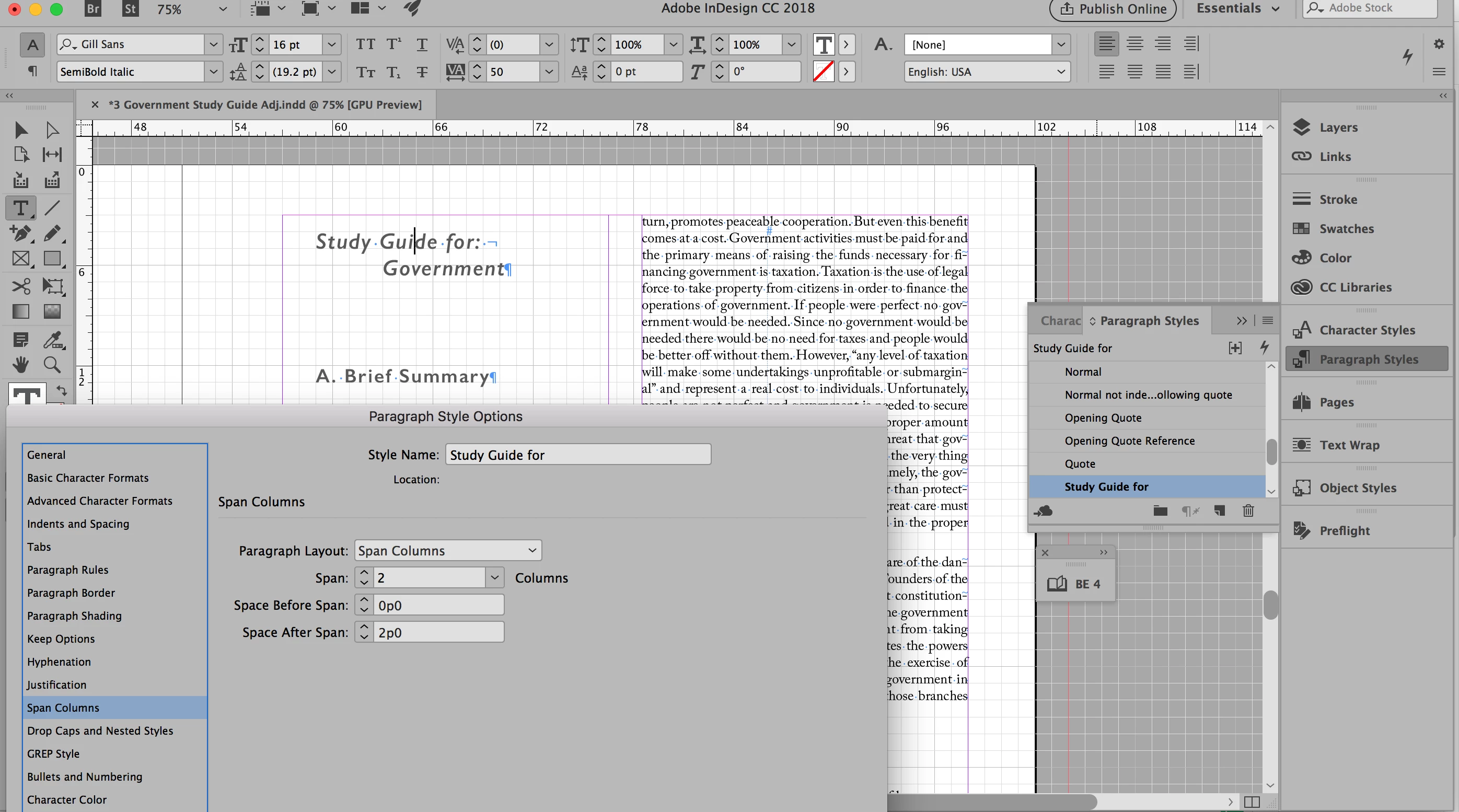
I tried to select Span Columns in the Paragraph Style for the Study Guide for the paragraph. I did this yesterday, but cannot today for some reason! Frustrating. What is overriding?

This topic has been closed for replies.

4 replies

paulc95415842
Known Participant
November 6, 2017

Bob was right. Had to do with how I set up my master page.

BobLevine
Community Expert
Community Expert
November 6, 2017

Glad you got it sorted out. FWIW, I’m working on a document with a lot of spans and splits so it jumped right off the page at me.

BobLevine
Community Expert
Community Expert
November 6, 2017

That looks like a two column page, not a two column text frame.

Steve Werner
Community Expert
Community Expert
November 6, 2017

I think Bob is right. Unless you have two columns below the dialog box that we can't see.

Span Columns only works with multicolumn text frames.

Bill Silbert
Community Expert
Community Expert
November 6, 2017

Try deleting your InDesign Caches. This can be very helpful for fixing interface issue.

To do so:

For Macintosh Users: With InDesign closed launch a Finder Window in column view and click on your home folder. With the Option Key pressed choose Library from the Finder Go Menu. Within the Library folder find the “Caches” folder. Within the Caches folder find and delete the entire file “Adobe InDesign”. I find that deleting the cache file completely leads to a lasting change. 

For Windows Users: On Windows 7 and above the caches files are hidden. To find them go to the Control Panel and open Folder Options and then click the View tab. Then select “Show hidden files and folders” or “Show hidden files, folders or drive options” in Advanced Settings (you may be able to skip the previous steps with Windows 10). Then delete (or rename) the folder at the end of this path: C:\Users\[User Name]\AppData\Local\Adobe\InDesign\Version [#]\<Language>\Cache.

Steve Werner
Community Expert
Community Expert
November 6, 2017

It's been working fine for me in ID CC 2018 (13.0).

You screen capture doesn't show the columns below the headline. I can't see what's going on.