Participant
April 23, 2021
Answered

Span columns with two separate paragraphs above each other?

  • April 23, 2021
  • 1 reply
  • 539 views

I'm taking a course on this software but I'm stuck on making a recipe page using spanned columns. The sample given looks like this
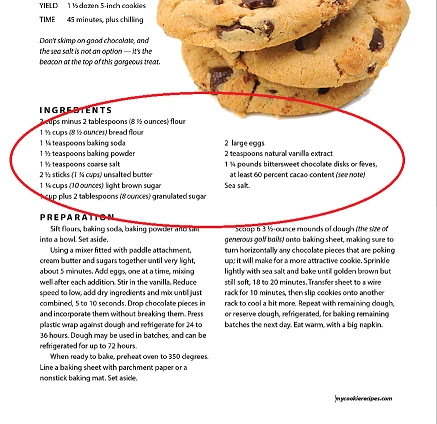
And despite following the intructions given by the textbook / instructor video it just isn't stacking this way? We aren't supposed to make an additional text box or breaks for this - it's all one Placed text that we need to span the two colums, but the ingredients list needs to automatically stack above the next paragraph for the preparation instructions. According to the video we were given you simply need to highlight "Preparation" and select it to span all columns, then the ingredients list just stacks itself on top on its own.

Mine isn't doing that and I'm unsure why. Any ideas?

This topic has been closed for replies.
Correct answer Laubender

Hi Melissa,

do you have one single text frame on your page or two?

There should be only one. One text frame with two columns.


Show your frame with the word "Preparation" selected with the Text tool.

Plus the Control panel; you can activate the Control panel through Window > Control.

Also Frame Edges showing and Hidden Characters.

So change your view on the page to "Normal" with View > Screen Mode > Normal


Thanks,
Uwe Laubender

( ACP )

1 reply

LaubenderCommunity ExpertCorrect answer
Community Expert
April 23, 2021

Hi Melissa,

do you have one single text frame on your page or two?

There should be only one. One text frame with two columns.


Show your frame with the word "Preparation" selected with the Text tool.

Plus the Control panel; you can activate the Control panel through Window > Control.

Also Frame Edges showing and Hidden Characters.

So change your view on the page to "Normal" with View > Screen Mode > Normal


Thanks,
Uwe Laubender

( ACP )

Participant
April 23, 2021

I have the document itself set to two columns. When I placed the text I didn't mess with any of those settings, now that I think about it.  . . the text was still setting itself to the other column so I didn't question it.


That seems so obvious . .. let me try it!