TikiScott1
Participant
July 17, 2019
Question

Special Hidden Character

  • July 17, 2019
  • 4 replies
  • 517 views

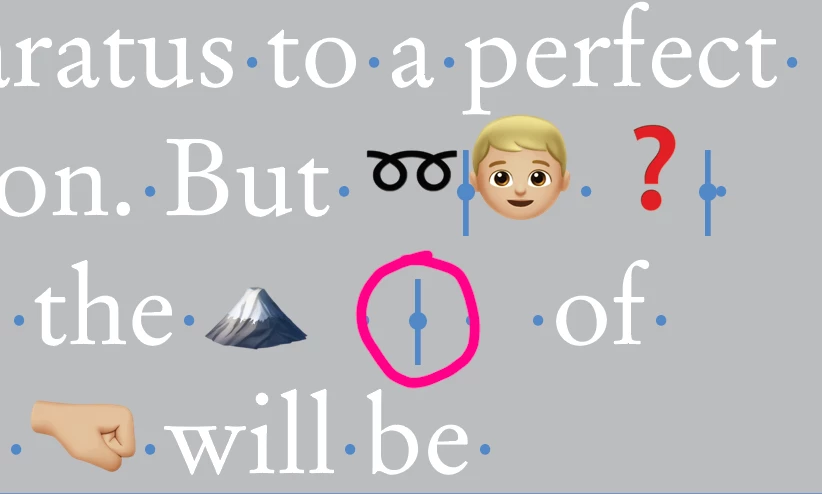
I found this hidden character in an InDesign 2019 file. It seems to cause a printing issue with the font  'Apple Color Emoji.ttc'.

Does anyone know what this is and what it does?

Thank you.
This topic has been closed for replies.

4 replies

TikiScott1
Participant
July 17, 2019

I looked at the Glyphs palette and the character is labeled:

GID: 42

Unicode: FE0F (FE zero F)

Name: variation selector-16

This character doesn't follow all the instances of this font, just some.

I've searched this character and replaced it with nothing and the printing issues are better. I can make a pdf without the characters changing. When printing to our Canon 10000 printers, it crashes the system. So, we have given up on this job.

Thank you to all that have replied.

rob day
Community Expert
Community Expert
July 17, 2019

Did the doc start in a different language? There's this:

https://codepoints.net/U+FE0F?lang=en

When I use the page‘s copy to clipboard and paste into InDesign, I do indeed get an invisible I’ve never seen before.

Community Expert
July 18, 2019

Hi Rob,

thanks for the link.

I think now the purpose of this special character is clear. Quoted from the site:

This codepoint may change the appearance of the preceding character. If that is a symbol, dingbat or emoji, U+FE0F forces it to be rendered as a colorful image as compared to a monochrome text variant.

TikiScott1 ,

if this special character FE0F forces InDesign to crash when printing ( I'm not sure what exactly happens in your system ) then do a detailed bug report at InDesign UserVoice: Adobe InDesign Feedback

Regards,
Uwe

rob day
Community Expert
Community Expert
July 17, 2019

If you select and copy the hidden character and paste it into the Text Find/Change field what do you get? A Discretionary Break and Space would be this:

TikiScott1
Participant
July 17, 2019

It is only one character. I can delete it with one hit of the delete key.

Community Expert
July 17, 2019

TikiScott1  wrote

It is only one character. I can delete it with one hit of the delete key.

Did you look up the Unicode value?

Regards,
Uwe

rob day
Community Expert
Community Expert
July 17, 2019

It looks like a Discretionary Line Break along with a regular Space kerned together?

Community Expert
July 17, 2019

Hi Rob,

hm. The dot in this special character looks a bit larger than the dot that represents a regular space character.

FWIW: Just looked up Marc Autret's font InDesignHidden-Regular.otf and could not find a match.

Indiscripts :: InDesign Hidden Glyphs as a Typeface

Regards,
Uwe

Community Expert
July 17, 2019

Hi TikiScott1 ,

can you select the special character and look up InDesign's Info panel to see the Unicode value of it?

What does the Info panel show?

Regards,
Uwe
