
Known Participant
February 1, 2019
Answered

Spell Check does not work after installing InDesign 15.0.2

  • February 1, 2019
  • 19 replies
  • 16477 views

re: InDesign CC 2019


Spell check is not working. I have read numerous forum posts and this appears to have been an issue for many for years. I don't know what else to check. I do think a picture is worth a thousand words … or in this case a single "word"


As you can see below, "word" is an unknown word with no suggestions.
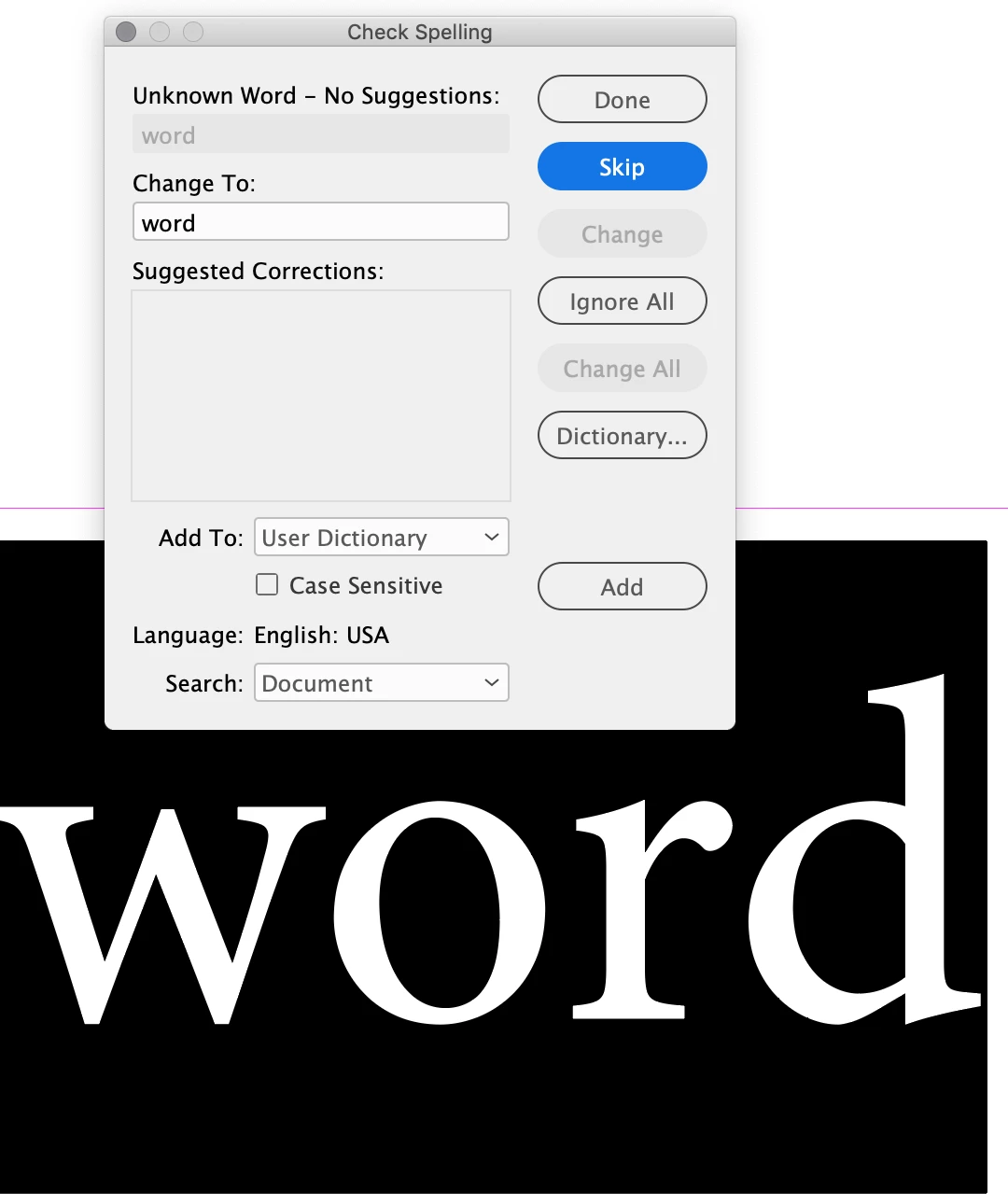


{Renamed by MOD}

This topic has been closed for replies.
Correct answer Srishti Bali

Hi All,


Sorry about the trouble this issue has caused. We've fixed this in the latest release. Please update your InDesign to v15.0.3 to get this fixed.

Here's a link with more details: https://indesign.uservoice.com/forums/601180/suggestions/39843622


Regards,

Srishti

19 replies

Srishti Bali
Srishti BaliCorrect answer
Legend
May 28, 2020

Hi All,


Sorry about the trouble this issue has caused. We've fixed this in the latest release. Please update your InDesign to v15.0.3 to get this fixed.

Here's a link with more details: https://indesign.uservoice.com/forums/601180/suggestions/39843622


Regards,

Srishti

Participant
April 21, 2020

What is the fix for repairing the annoying absence of InDesign Spell Check?  Thanks.


{Renamed by MOD}


Bill Silbert
Community Expert
Community Expert
April 21, 2020

There was a recent update of InDesign in which this was a bug. However, I just updated my InDesign last Friday (April 17) to the latest version (15.0.2) and the spellcheck is working just fine. If you haven't updated recently try that.

Participant
April 29, 2020

The 15.0.2 update did not fix my spellcheck, but changing the dictionary (in preferences) to Hunspell did.  This was suggested by another in this forum.  Thx.

mmyers-designer
Participant
April 17, 2020

I recently updated to both High Sierra and Creative Cloud 2020 and my first issue is that spell check is not working in InDesign. I made sure English USA is selected under preferences before I opened a file and with a current file. No luck. Any suggestions?

Community Expert
April 18, 2020

I think this is a known bug.

https://indesign.uservoice.com/forums/601180-adobe-indesign-bugs/suggestions/39843622-spell-check-not-work-after-installing-indesign-15

There's a beta version of 15.03 available - but I don't like using beta versions on live work.

mmyers-designer
Participant
April 20, 2020

Beta versions make me nervous. Other suggestions?

Participating Frequently
April 15, 2020

Yep, Preferences > Dictinoary > Spelling > Hunspell worked for me too!


P.S. Couldn't it be named "USE THIS DICTIONARY IF YOU LIVE IN NORTH AMERICA" or something that is intuitive? Maybe I'm ignorant but what does HUNSPELL mean?

Participant
March 29, 2020

Using Indesign 2020 can't get spell check to use English

Have applicatiion preferences set to English, Stylesheets and Charactaer sheets also.

Say Hebrew as language

have login in and out

rob day
Community Expert
Community Expert
March 29, 2020

Have applicatiion preferences set to English, Stylesheets and Charactaer sheets also.


Language is a character level attribute, so even if your style sheets are all set to English the document text could be a mix of languages.


Here I have Dynamic Spelling turned on and the spell checker is responding to the different texts’ language settings:


The bottom paragraph passes spell checking because I have set the english text to English, and the french text to French


Participant
March 26, 2020

Hello,

spelling correction no longer appears in InDesign 15.0.2 ... I obviously know how to activate it, but the underlining does not appear in the text, and I can't find a way to have it back... in other words, an incorrect word does not appear as such, with an underline, as it should be. Can you help me ?

Community Expert
March 26, 2020

Are you using View>Screen Mode> Normal

If you are using View>Scren Mode> Preview it won't show.


If that's not the case try resetting your preferences - 

Rebuilding the preference files
  1. (Windows) Start InDesign, and then immediately press Shift+Ctrl+Alt. Click Yes when asked if you want to delete preference files. ...
  2. (Mac OS) Start InDesign, and then immediately press Shift+Option+Command+Control. Click Yes when asked if you want to delete preference files.
Participant
March 19, 2020

It worked! Thank you SO much!

Participant
March 17, 2020

FYI, the latest update of InDesign has somehow disabled spellcheck. I tried all the usual. I restarted InDesign, restarted Mac and then I had others try the spellcheck. I had to switch back to the old version. Thankfully that wasn't a problem.

Bill Silbert
Community Expert
Community Expert
March 17, 2020

This is a known bug with version 15.0.2. You can add your voice to push for a solution here: https://indesign.uservoice.com/forums/601180-adobe-indesign-bugs/suggestions/39843622-spell-check-not-work-after-installing-indesign-15. 

Jane Doe Graphix
Participating Frequently
March 17, 2020

I was having the same issue after a recent update. Thanks for the solution. Good luck to you on this St. Patrick's Day and stay healthy and safe.

Participant
March 13, 2020

I just updated to 15.0.2 and my autocorrect and dynamic spelling quit working. I've checked and rechecked all the settings in Preferences, and they're as they should be. 

Any ideas???


{Renamed by MOD}

Srishti Bali
Legend
April 8, 2020

Hi there,


Sorry about the delay. This issue is currently under investigation. Till the time it is fixed, please upvote this issue here (https://indesign.uservoice.com/forums/601180-adobe-indesign-bugs/suggestions/39843622-spell-check-no...) and try the workaround shared on this link. 

This is the best way of communicating with the Engineering and Product Management teams regarding issues and suggestions so they can be implemented in future releases.


Regards,

Srishti