Inspiring
May 26, 2025
Question

spell check not working!

  • May 26, 2025
  • 5 replies
  • 383 views

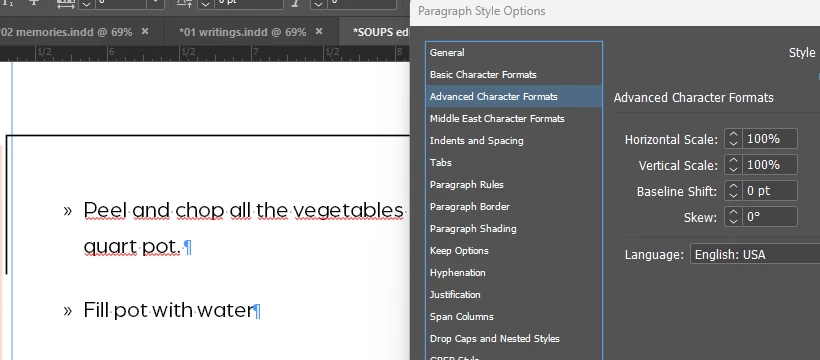
why is the spellcheck not working if it's on engilish language??
 

5 replies

Mike Witherell
Community Expert
Community Expert
May 26, 2025

Hendy, put your Type tool cursor into that same line and look at which Paragraph Style is applied. The style applied, assuming it is the same style you were expecting it to be, should also be defining English USA as your spell check language.

Mike Witherell
Willi Adelberger
Community Expert
Community Expert
May 26, 2025

Sometimes I have a similiar problem. I manually override the language with a wrong language. Then I remove all overrides with the correct paragraph style settings (reapply the styl with holding the option key). After doing that the correct language is accepted.

rob day
Community Expert
Community Expert
May 26, 2025

Hi @hendy_5450 , Also, you are showing the Language setting for a single Paragraph Style not the page’s text. Select all of your text and check the Character panel’s Language setting. Here I have 3 different languages applied to the selected text:


Inspiring
May 26, 2025

this text is clearly 'english usa'


rob day
Community Expert
Community Expert
May 26, 2025

I can’t replicate here. Have you tried clearing your Cashes, or saving as an IDML and reopening?


BobLevine
Community Expert
Community Expert
May 26, 2025

There are ways the text could be overridden and as with your other issues, we'd be in a much better position to help you if you post the file somewhere.

Willi Adelberger
Community Expert
Community Expert
May 26, 2025

Did you apply a character style with different settings?
