
Known Participant
March 15, 2023
Question

Split containers within tags

  • March 15, 2023
  • 2 replies
  • 806 views

I'm struggling with text being split into seperate continers within various tags.

It doesn't seem to be consistent with font weights or sizes, I have checked there isn't rogue tracking or accidental rotations that could be scuppering things but this is really confusing me.
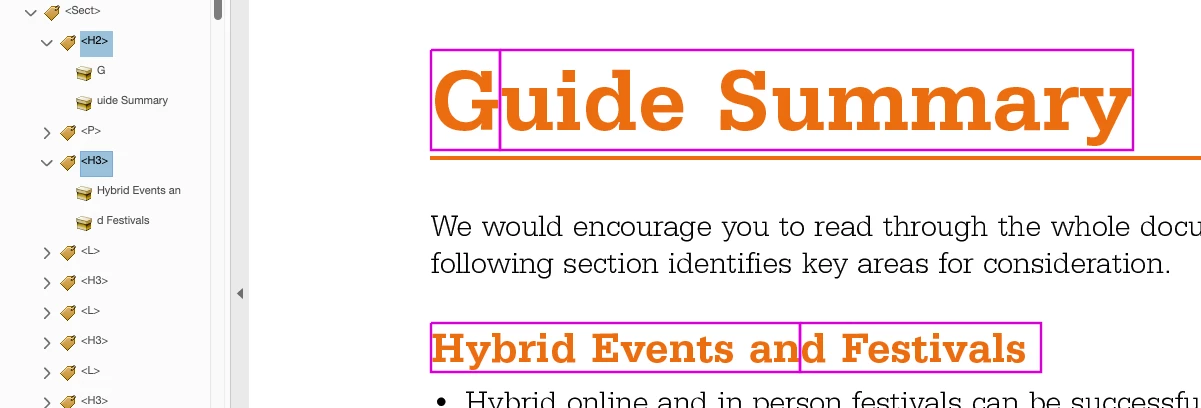
 

I am working on Mac-based InDesign 2023 and ideally want to remedy in InDesign rather than repair in Acrobat after.

This topic has been closed for replies.

2 replies

Bevi Chagnon - PubCom.com
Legend
March 15, 2023

@2BPencils, Generally, you shouldn't have to worry about a paragraph of text being split into two or more yellow content containers; it doesn't usually affect accessibility (or it shouldn't affect accessibility).


InDesign is notorious for splitting paragraphs into separate containers for each line of text. It also splits content when there are character styles applied (such as for hyperlinks).


In your examples, my first guess would be that there is some manual coding/formatting between "G" and "uide", and "an" and "d". Maybe kerning/tracking, no-hyphen mark, or something else.


Turn on the Style Highlighter and any manual overrides will be highlighted in swimming pool green. These will most likely cause split containers in the PDF.

|    Bevi Chagnon   |  Designer, Trainer, & Technologist for Accessible Documents ||    PubCom |    Classes & Books for Accessible InDesign, PDFs & MS Office |
2BPencilsAuthor
Known Participant
March 16, 2023

Thanks Bevi, this is reassuring to hear. I have done a check on any rogue character styles and kerning but nothing is showing up.


Style highlighter is a top tip though, thanks for that!

Bevi Chagnon - PubCom.com
Legend
March 17, 2023

@2BPencils , one thought...

Could be hidden code crud that was imported with a MS Word file. We can't see it, Find/Replace can't get rid of it, but it's there causing wacky stuff like this.


Is it possible to re-import the text file, this time stripping it of everything by using the import options?  Or even saving the Word file as ASCII text and importing that version?


Just a way to diagnose what's causing this, nothing more.


|    Bevi Chagnon   |  Designer, Trainer, & Technologist for Accessible Documents ||    PubCom |    Classes & Books for Accessible InDesign, PDFs & MS Office |
Mike Witherell
Community Expert
Community Expert
March 15, 2023

Are you using paragraph styles for these examples you show?

Mike Witherell
2BPencilsAuthor
Known Participant
March 16, 2023

Hi Mike

Yes, they are using paragraph styles for the headers, subs, body etc, throughout. I've worked on lots of documents in the same way but not come across this before. I can't identify anything in the original word doc either that may be coming through with the text. It's a puzzler