Participant
October 14, 2020
Answered

Split each line inside of a table into separate rows

  • October 14, 2020
  • 3 replies
  • 855 views

Hi there! I have a document which has hundreds of tables in it. I need to split each line into separete rows.

I've attached image which shows exactly what i'm trying to achieve.

Is there a quick and easy solution for this? 🙂
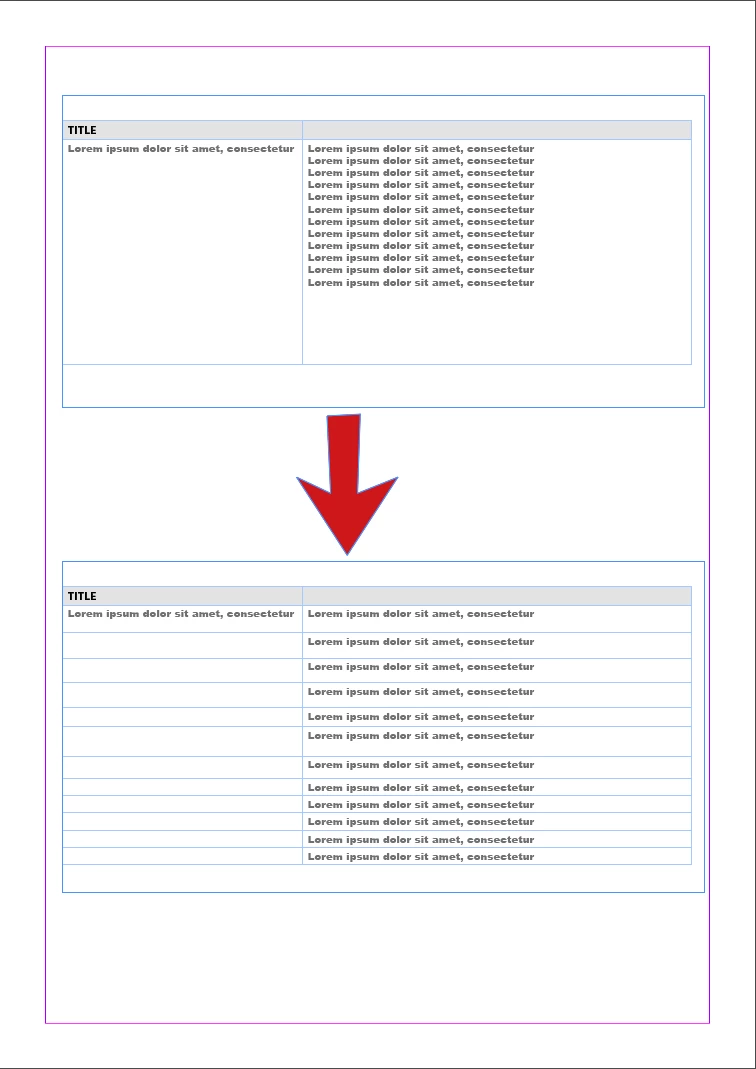


[ attachment inserted as inline image by moderator ]

This topic has been closed for replies.
Correct answer FRIdNGE

Hi Uwe,


I think Jean just wants to get this:


Of course, If he wants to do it on hundreds of tables in his doc, he will just need "1 click"!


(^/)  The Jedi

3 replies

Dave Creamer of IDEAS
Community Expert
Community Expert
October 16, 2020

A manual option would be to convert the table to text, replace the line breaks with paragraph returns within the selection, and convert the text back to tables. This could be scripted or recorded with a OS macro program.

David Creamer: Community Expert (ACI and ACE 1995-2023)
Community Expert
October 14, 2020

Hi Jean,

what's a bit unclear in that situation:

Do you want an extra cell (row) for every paragraph or every line of text in a given cell?

What is the delimiter? A hard return? A return? Something else?


And what should happen if the cell next to the one you are working with also contains text that should be split?
What text should go to the same row?


Your sample screenshot is showing a very simple example.

I'd guess there are others, more complicated ones, where only a human being could decide what to do.


Regards,
Uwe Laubender

( ACP )


Participant
October 15, 2020

Thanks for your reply!

Basicly, every line break should be a new row. There will be empty cells but its fine. I attached second image which hopefully helps.

Community Expert
October 14, 2020

No easy solution that I know of.

I usually convert the table to text.

Then convert back to a Table.


But if you have a lot of tables then perhaps a script would help - and one of the scripters on here would have to take interest in the thread to make it work for you.


Perhaps @Jongware  can help???

Participant
October 14, 2020

Anything that helps would be much appreciated! Of course, it does not need to be free solution. 🙂

The thing is, we have hundreds of tables within the .indd-document and re-creating everything would be very time consuming task. But if there truly is no another way doing this, then it's easier to explain the situation to the customer and proceed.