Okay, that image helped a lot in providing context!
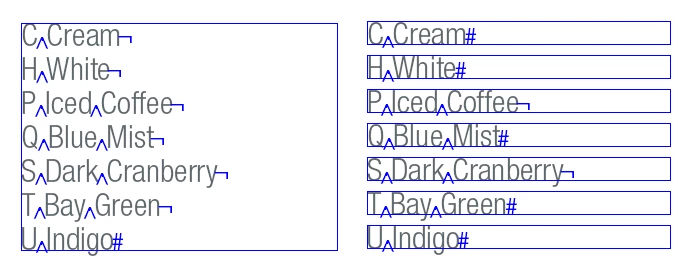
Does this work for you? Select a number of words; these will be split by its regular spaces (I use a slightly different GREP, hope it's of no consequence), then moved into frames of their own alongside your current text frame.
Then it creates a new text frame and inserts tomorrow's lottery numbers ... oh wait, I'm still working on that.
Don't try running this from inside a table or a footnote or really anything at all more complicated than a simple text frame. It'll most likely do something but I'm not sure what.
if (app.selection.length == 1 && app.selection[0].hasOwnProperty("baseline") && app.selection[0].length > 1)
{
 app.selection[0].insertionPoints[0].contents = "\r";
 app.selection[0].insertionPoints[-1].contents = "\r";
 app.findGrepPreferences = null;
 app.changeGrepPreferences = null;
 app.findGrepPreferences.findWhat = " +";
 app.changeGrepPreferences.changeTo = "\\r";
 app.selection[0].changeGrep(); p = app.selection[0].parentTextFrames[0];
 lh = (p.lines[-1].baseline - p.lines[0].baseline) / (p.lines.length-1);
 top = app.selection[0].lines[0].baseline - lh;
 while (app.selection[0].length > 0)
 {
  f = app.activeDocument.layoutWindows[0].activePage.textFrames.add ({geometricBounds:[top, p.geometricBounds[3]+2*lh, top+lh, 2*(lh+p.geometricBounds[3])-p.geometricBounds[1] ]});
  app.selection[0].lines[0].move (LocationOptions.AFTER, f.texts[0]);
  top += lh;
 }
 app.selection[0].insertionPoints[-1].contents = "";
} else
 alert ("please select some text to shred");



 AdChoices