
Split (threaded) text frame with new frame set to specific size & location
Hello Gurus - Please shine some wisdom this way.
Background:
- The project is a book included with 6 CDs.
- The book has song lyrics in 4 languages.
- The spread has 4 columns one for each of the 4 languages.
- Threads link from spread 1 to spread 2 (down) not across so that each language is threaded to itself.
- Each song starts with a Tab & numbered title (and unique style)
- Each song ends with a certain & unique paragraph style (commentary)
- Some songs end with a hard page break to start next song on new page (approximately 1 in 4 or 5 songs)
- width of text frame is constant and known
- bottom right or left corner new text box (created from split) is constant - page margin bottom
Spread of 4 Languages with Frames Threaded Down
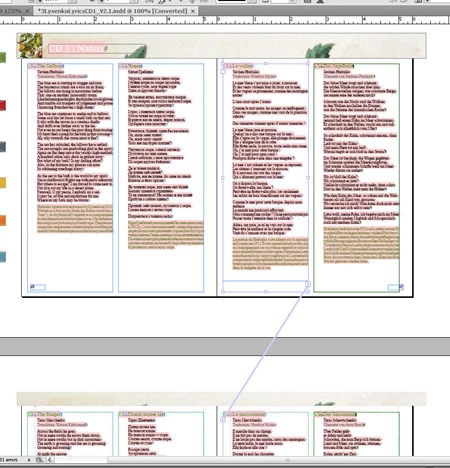
Problem:
The client wants songs to start horizontally aligned. Cannot start each song on a new page (as image shows) as many pages can fit 2 or 3 complete song lyrics. No languages have the same amount of content due to translations. French is usually the longest (frame 3 of 4).
Required:
- auto calculate an exact uniform y-axis location to split the text frame after the commentary (paragraph style). Example 0.025" after paragraph end
- manually choose which language's frame is the longest (French (frame 3) is not always the longest)
- auto create frame (standard width) lined up to bottom of chosen (item 2) frame & maintain the threading
- auto split the remaining 3 language's frames at proper x-axis location (known). Y-axis to start same as manually chosen frame (longest language -usually French)
- global document wide functionality
Systems: CS3 & CS4 on PC
Skills: good programming (scripting skills) just not super fluent with InDesign's language.
Any suggestions or pointing me to something similar would be awesome!
Anyone who can offer to write & charge could be considered but budget is tight (so is timeframe to press) - So I'd rather develop it.
Thanks again - Happy Holidays & Merry Christmas!
Terry
 AdChoices