Participant
July 22, 2017
Answered

Spreads don't work -- URGENT-- can someone help?

  • July 22, 2017
  • 1 reply
  • 315 views

I changed the page size and margins of a document, redid the master pages, etc. Document setup: facing pages. Margin and alyout tab: facing pages. Master pages: spreads. The resulting document: all left-hand pages from the A master. Half the margins are wrong and the running heads don't show. What happened>
This topic has been closed for replies.
Correct answer barbara_a7746676

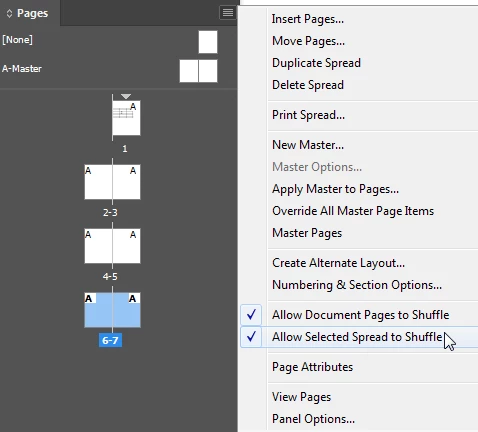
To you have All Document Pages to Shuffle turned on?

1 reply

barbara_a7746676
Community Expert
barbara_a7746676Community ExpertCorrect answer
Community Expert
July 22, 2017

To you have All Document Pages to Shuffle turned on?

Participant
July 23, 2017

I marked this correct because it led me to the solution, but it seemed to be a little more complicated. I had to also select pairs of pages and 'allow spreads to shuffle.' Probably there was an easier way, but thanks!

barbara_a7746676
Community Expert
Community Expert
July 23, 2017

I"m glad it led you to a solution. Thanks for adding that information. It will be helpful to others who might have this issue.