Graphic Squirrel
Inspiring
March 2, 2023
Answered

Stop the Paste Text Only hint

  • March 2, 2023
  • 1 reply
  • 634 views

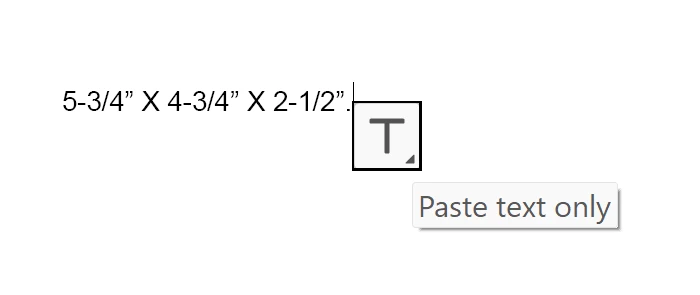
This must be a simple fix, but I have searched and cannot find how to turn this hint off.  It happens when I paste text from somewhere else into In Design.  A little box with a T in it pops up, asking me if I want to paste text only.  How can I stop that from happening?  It's an unnecessary step in my life!  🙂  Thanks!  GS


This topic has been closed for replies.
Correct answer James Gifford—NitroPress

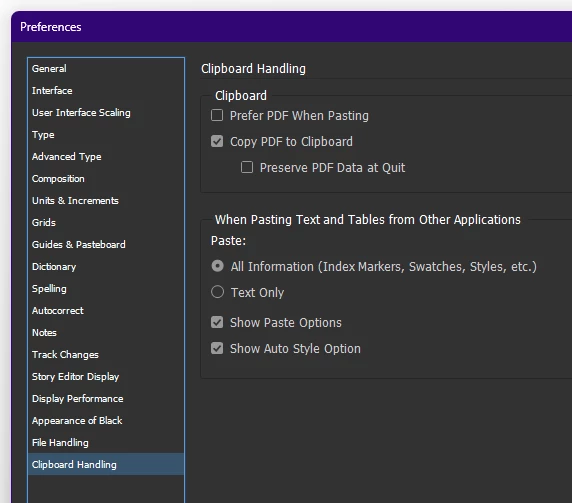
Edit | Preferences | Clipboard Handling:


Not real intuitive. I had to ask, too. But some nice option control there.


1 reply

James Gifford—NitroPress
Legend
March 2, 2023

Edit | Preferences | Clipboard Handling:


Not real intuitive. I had to ask, too. But some nice option control there.


Graphic Squirrel
Inspiring
March 2, 2023

Thank you!  I thought I had looked everywhere, but I guess not.  That worked!