Answered
Story. how to set right to left? can't find the option.
Hi,
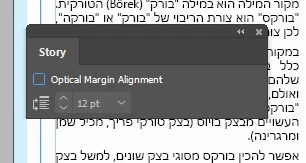
I know that to change the direction of the story I need to go to Type, then Story, and them change the direction. but I don't find that option!
See pic.
Thanks,
Ronen
Hi,
I know that to change the direction of the story I need to go to Type, then Story, and them change the direction. but I don't find that option!
See pic.
Thanks,
Ronen
The right-to-left settings are only available in the Middle East version of InDesign (or Illustrator): Find and install Hebrew or Arabic editions of InDesign CC or Illustrator CC.
Already have an account? Login
Enter your E-mail address. We'll send you an e-mail with instructions to reset your password.
 AdChoices