
jd57497693
Participant
October 28, 2020
Answered

Straightforward script to add entry using paragraph style

  • October 28, 2020
  • 1 reply
  • 839 views

Hello all,

I am a novice to scripting in InDesign. Does anyone know of or can someone create a script that would select an entire paragraph of text given a particular style (Helvetica Bold)?

I have a 1000+ page directory with 33,000+ people listed, where the first paragraph (the person's name, in bold) needs to be added to an index:
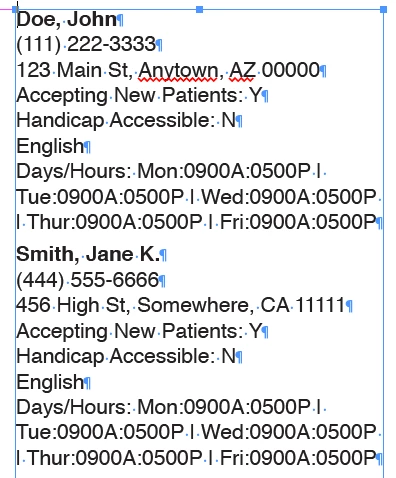
I have been doing this with the Find/Change dialog, searching for the "Provider" style, which selects the whole line (paragraph) so I can then click-add to the index. As you might imagine, this is mind-numbingly tedious.

Help, please! Any already-created scripts out there? I've found one that searches by character style, but then it also reverses a first/last name to last, first along with some other things... I don't know enough about scripts to edit it and I couldn't even get it to run.

This topic has been closed for replies.
Correct answer brian_p_dts

Give this a shot. Note it will add new Page References for already existing items in your index if you already have them. You'll want to start with a fresh index. 


if (!app.documents[0].indexes[0].isValid) {
   var index = app.documents[0].indexes.add();
} else {
   var index = app.documents[0].indexes[0];
}
app.findTextPreferences = NothingEnum.NOTHING;
//change 'indexName' below to the paragraphstyle to find, leaving the double quotes
app.findTextPreferences.appliedParagraphStyle = "indexName";
var finds = app.documents[0].findText();
for (var i = 0; i < finds.length; i++) {
   try {
      var t = index.topics.add(finds[i].contents);
      t.pageReferences.add(finds[i]);
   } catch(e) {
   }
}
app.findTextPreferences = NothingEnum.NOTHING;


1 reply

brian_p_dts
Community Expert
Community Expert
October 28, 2020

Just use the Table of Contents feature to generate your index. It can search via paragraph style, and can be sorted alphabetically. More info: 

https://helpx.adobe.com/indesign/user-guide.html/indesign/using/creating-table-contents.ug.html


Edit: If the name style isn't defined as a Paragraph Style, you'll need to do that first. This can be done via Find/Replace all (1. Highlight one name, go to Paragraph Styles, and give it a name. 2.) Find Helvetica Bold styles. 3. Change style to the created Paragraph Style. 

jd57497693
Participant
October 28, 2020

Thanks so much, but that won't work (I tried!) as there are multiple entries of the same name/person on different pages that I need to be listed as it would be in an index:

Doe, John   33, 105

Smith, Jane K.   50, 52, 104

I also need them under the "traditional" index headings of A, B, C, etc.

brian_p_dts
Community Expert
brian_p_dtsCommunity ExpertCorrect answer
Community Expert
October 28, 2020

Give this a shot. Note it will add new Page References for already existing items in your index if you already have them. You'll want to start with a fresh index. 


if (!app.documents[0].indexes[0].isValid) {
   var index = app.documents[0].indexes.add();
} else {
   var index = app.documents[0].indexes[0];
}
app.findTextPreferences = NothingEnum.NOTHING;
//change 'indexName' below to the paragraphstyle to find, leaving the double quotes
app.findTextPreferences.appliedParagraphStyle = "indexName";
var finds = app.documents[0].findText();
for (var i = 0; i < finds.length; i++) {
   try {
      var t = index.topics.add(finds[i].contents);
      t.pageReferences.add(finds[i]);
   } catch(e) {
   }
}
app.findTextPreferences = NothingEnum.NOTHING;