Strange behaviour when scaling GREP styled text.
In the quest for the perfect scaling script I am running into another problem. I tried to scale my GREP styled text, and it came out like this:
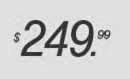
Notice the "$" and "cents" are too small - whereas it should look like this:

Sorry I used a slightly larger image and different value, but I don't that is an issue with respect to this problem.
So on the desktop, I decide to check preference>general tab> when scaling> "apply to content" was checked.
I changed it to "adjust scaling percentage" and my $249.99 came out perfectly proportional to the original set text, (let pretend there is a 2 in front of the $49.99)
So I upload the template to the server and proceed to scale it and I get this:

In this example, the decimal has not scaled and thus allowing the "cents" to jam into the dolllar value. I am also unable to reproduce this error on the desktop.
Can anyone explain what is happening or how to compensate for these errors? Thanks for your help! My script is below:
function myTransform(myPage, myRectangle, myScaleMatrix)
{
app.transformPreferences.whenScaling = WhenScalingOptions.APPLY_TO_CONTENT;
var everything;
var origin;
if ( ssize > 1.0 )
{
//origin = myPage.resolve(AnchorPoint.CENTER_ANCHOR,CoordinateSpaces.PASTEBOARD_COORDINATES)[0];
origin = myPage.resolve(AnchorPoint.CENTER_ANCHOR,CoordinateSpaces.PASTEBOARD_COORDINATES);
myPage.transform(CoordinateSpaces.PASTEBOARD_COORDINATES,origin,myScaleMatrix);
everything = myRectangle.everyItem();
//origin = myPage.resolve(AnchorPoint.CENTER_ANCHOR,CoordinateSpaces.PASTEBOARD_COORDINATES)[0];
everything.transform(CoordinateSpaces.PASTEBOARD_COORDINATES,origin,myScaleMatrix);
}
else
{
everything = myRectangle.everyItem();
origin = myPage.resolve(AnchorPoint.CENTER_ANCHOR,CoordinateSpaces.PASTEBOARD_COORDINATES)[0];
everything.transform(CoordinateSpaces.PASTEBOARD_COORDINATES,origin,myScaleMatrix);
myPage.transform(CoordinateSpaces.PASTEBOARD_COORDINATES,origin,myScaleMatrix);
}
}
 AdChoices