Participant
December 20, 2018
Question

Strange Black borders on cropped images?

  • December 20, 2018
  • 4 replies
  • 312 views

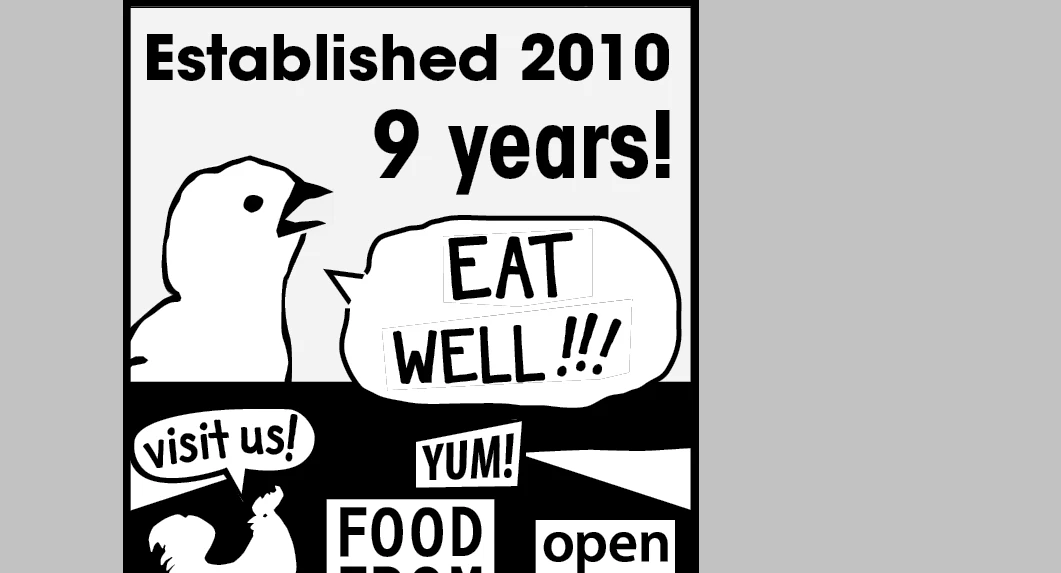
Hi so I'm creating this ad out of a single pdf, just broken into pieces and rearranged and for some reason... there's these black outlines. There is no stroke. And the text I cut out is on a white background so it doesn't explain why these are showing up.

I exported to a pdf since I know InDesign can have some artifacts when you've got some cropped images and printed it and they're still there.

I'm not sure how to fix it. I might just have to find the font and retype it. But any feedback would be awesome in case this happens in the future.
This topic has been closed for replies.

4 replies

Community Expert
December 21, 2018

Hi chroncruik ,

you say, that there is no stroke applied to the cropped images.

Did you set the stroke weight to zero and stroke color is still applied?

Try to set the stroke weight to zero plus make sure that the stroke color is set to "None".

Hope, that helps.

Regards,
Uwe

Willi Adelberger
Community Expert
Community Expert
December 21, 2018

Do you use transparency? Why? Is see no need to use transparency.

Did you export to PDF/X-3 or did you create the PDF via printing? Use PDF/X-4 and export the PDF.

maxwithdax
Community Expert
Community Expert
December 21, 2018

You'd probably have more luck editing this in Illustrator since I am betting the source pdf was created there. Might give that a try first.

- Dax

BobLevine
Community Expert
Community Expert
December 20, 2018

Exported using what settings?