Inspiring
February 25, 2023
Answered

Strange color in loop behaviour

  • February 25, 2023
  • 5 replies
  • 823 views

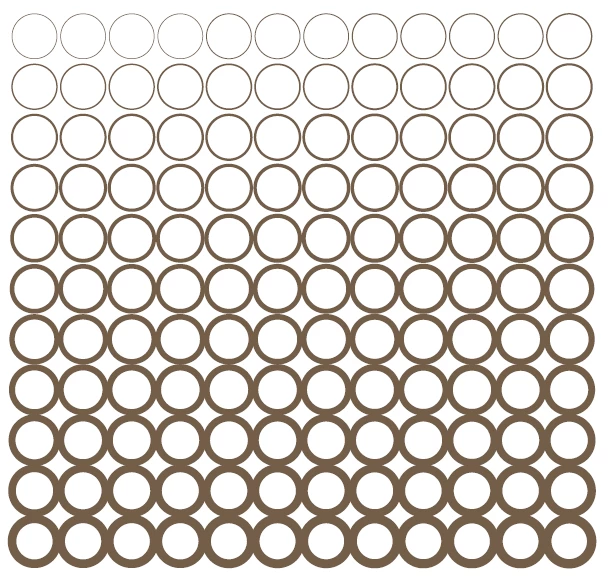
I draw 120 ovals and I want to change their stroke weight and color in a loop. There is no problem with strok weight but colorValue changes all oval color on my page and pasteboard every time. I want each oval stroke in different color. What am I doing wrong?

var my_ovals = app.activeDocument.pages[0].ovals;
var counter = 0.5;
var counterA = 1;
var counterB = 100;
var counterC = 30;
// color values in CMYK
for (var i = my_ovals.length - 1; i >= 0; i--){
	my_ovals[i].strokeWeight = counter;
	my_ovals[i].strokeColor.colorValue = [counterA,counterB,counterC,0];
	counter = counter + 0.05;
	counterA = counterA + 0.5;
	counterB = counterB - 0.25;
	counterC = counterC + 0.38;
}


This topic is closed to new replies. Start a new post to keep the conversation going.
Correct answer m1b

Hi @mateuszp13156491, I've added a bit to your script. I put it in a function (main) and called it using app.doScript because that neatly ties all the actions together and can be undone in a single undo. Setting the color is slightly complicated by this issue (see Uwe's info), but the problem with your script was that you were adjusting the color value of the current swatch, which was applied to all the ovals (it was applied by default when they were created I guess). So you have to make a new color.

- Mark


function main() {

    var doc = app.activeDocument;
    var my_ovals = doc.pages[0].ovals;
    var counter = 0.5;
    var counterA = 1;
    var counterB = 100;
    var counterC = 30;

    // color values in CMYK
    for (var i = my_ovals.length - 1; i >= 0; i--) {
        my_ovals[i].strokeWeight = counter;
        my_ovals[i].strokeColor = getCmykColor(doc, counterA, counterB, counterC, 0);
        counter = counter + 0.05;
        counterA = counterA + 0.5;
        counterB = counterB - 0.25;
        counterC = counterC + 0.38;
        if (i == 0)
            Explr.init(my_ovals[i].strokeColor);
    }

};

function getCmykColor(doc, C, M, Y, K) {

    var c;

    // this will make an unnamed color
    // ie. it won't show up in document
    // see https://community.adobe.com/t5/indesign-discussions/coloring-a-font-with-a-rgb-etc-without-adding-the-color-to-the-document-swatches/m-p/3655060
    if (doc.colors[-1].isValid) {
        c = doc.colors[-1].duplicate();
        c.properties = {
            space: ColorSpace.CMYK,
            colorValue: [C, M, Y, K],
        };
    }

    // this will make a named swatch
    else {
        c = doc.colors.add({
            colorValue: [C, M, Y, K],
            space: ColorSpace.CMYK,
            model: ColorModel.PROCESS,
            name: 'C=' + C + 'M=' + M + 'Y=' + Y + 'K=' + K,
            visible: false,
        });
    }

    return c;
};

app.doScript(main, ScriptLanguage.JAVASCRIPT, undefined, UndoModes.ENTIRE_SCRIPT, 'Adjust colors');


Edit 2023-02-26: fixed a script error.

5 replies

m1b
Community Expert
m1bCommunity ExpertCorrect answer
Community Expert
February 25, 2023

Hi @mateuszp13156491, I've added a bit to your script. I put it in a function (main) and called it using app.doScript because that neatly ties all the actions together and can be undone in a single undo. Setting the color is slightly complicated by this issue (see Uwe's info), but the problem with your script was that you were adjusting the color value of the current swatch, which was applied to all the ovals (it was applied by default when they were created I guess). So you have to make a new color.

- Mark


function main() {

    var doc = app.activeDocument;
    var my_ovals = doc.pages[0].ovals;
    var counter = 0.5;
    var counterA = 1;
    var counterB = 100;
    var counterC = 30;

    // color values in CMYK
    for (var i = my_ovals.length - 1; i >= 0; i--) {
        my_ovals[i].strokeWeight = counter;
        my_ovals[i].strokeColor = getCmykColor(doc, counterA, counterB, counterC, 0);
        counter = counter + 0.05;
        counterA = counterA + 0.5;
        counterB = counterB - 0.25;
        counterC = counterC + 0.38;
        if (i == 0)
            Explr.init(my_ovals[i].strokeColor);
    }

};

function getCmykColor(doc, C, M, Y, K) {

    var c;

    // this will make an unnamed color
    // ie. it won't show up in document
    // see https://community.adobe.com/t5/indesign-discussions/coloring-a-font-with-a-rgb-etc-without-adding-the-color-to-the-document-swatches/m-p/3655060
    if (doc.colors[-1].isValid) {
        c = doc.colors[-1].duplicate();
        c.properties = {
            space: ColorSpace.CMYK,
            colorValue: [C, M, Y, K],
        };
    }

    // this will make a named swatch
    else {
        c = doc.colors.add({
            colorValue: [C, M, Y, K],
            space: ColorSpace.CMYK,
            model: ColorModel.PROCESS,
            name: 'C=' + C + 'M=' + M + 'Y=' + Y + 'K=' + K,
            visible: false,
        });
    }

    return c;
};

app.doScript(main, ScriptLanguage.JAVASCRIPT, undefined, UndoModes.ENTIRE_SCRIPT, 'Adjust colors');


Edit 2023-02-26: fixed a script error.

rob day
Community Expert
Community Expert
February 26, 2023

Hi Mark, I don’t think this is any better, but another approach is to simply make a new named swatch and check if it already exists, then set its properties:


function main(){
    var my_ovals = app.activeDocument.pages[0].ovals;
    var sv = [1,100,30,0] //the starting CMYK color as an array
    var sc, sn, counter = 0.5;
    for (var i = my_ovals.length - 1; i >= 0; i--){
        sn = sv.join(", ")
        sc = makeSwatch(app.activeDocument, sn)
        sc.properties = {space:ColorSpace.CMYK, colorValue:sv}
        my_ovals[i].strokeColor = sc;
        my_ovals[i].strokeWeight = counter;
        sv[0] += .05;
        sv[1] -= .25;
        sv[2] += .38;
        counter += .05
    } 
}

/**
* Makes a new named Swatch 
* @ param the document to add the color to 
* @ param color name 
* @ return the new swatch 
*/

function makeSwatch(d, n){
    if (d.colors.itemByName(n).isValid) {
        return d.colors.itemByName(n);
    } else {
        return d.colors.add({name:n});
    }
}

app.doScript(main, ScriptLanguage.JAVASCRIPT, undefined, UndoModes.ENTIRE_SCRIPT, 'Adjust colors');


m1b
Community Expert
Community Expert
February 26, 2023

Thanks @rob day. I am not an expert on colors in Indesign, but I wrote it that way in an attempt to create the colors for the OPs purpose without adding swatches to the document—as there may be hundreds. Turns out it isn't straightforward. - Mark