
July 20, 2021
Question

Strange difference when convert texts to outline in two different way

  • July 20, 2021
  • 3 replies
  • 1072 views

Hi I don't know if anybody finds out that when you convert the text to outline, if you click the text frame or you double click the text frame and then select all the text you want, the result would different. The first way( click the text frame only) would normal convert the shape without any fonts; while the second way(click into the text frame and then select all the text within the text frame) would result in keeping the fonts and the text frame to be editable. In the second situation, you cannot ungroup the texts but the texts look like grouped together. 
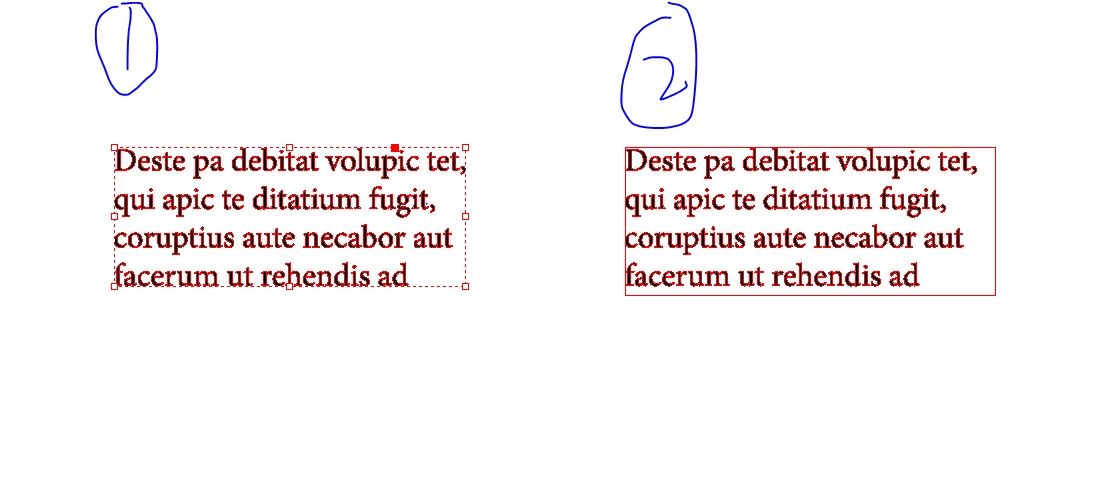


I'm glad I finnally figure it out after two hours but I still don't know the reason behind this. Is that because the second way doesn't chage the text frame to shape? And is there any way on the second situation that I can change the text frame or delete it?


And hope this could help someone like me struggled with why there is still fonts being used in the file after I convert all the text into outlines.


This topic has been closed for replies.

3 replies

Joel Cherney
Community Expert
Community Expert
July 21, 2021

I think that the other folks in your thread have covered the high points, especially Peter's "leftover from Quark" hunch, and Brad's "Wow." Indeed, wow. But I see that you have questions in your original post that are still unanswered, so I'm going to pretend that what you are being asked to do by the magazine company is Cool and Good. It's not, but I'm pretending. 


Anyways: when you use the second method you describe, you're selecting text with the Text tool and converting it to an inline object. So when you select all and convert to outlines, it's actually a graphical object in a text flow. You can select just one word with the Text tool and convert to outlines, and it'll behave as if you pasted a graphic into the text flow.  I used to do it all the time, back in the Old Days, when I'd have just an occasional Arabic word showing up in the middle of a bunch of English text. 


This means that, when you select all text with the Text tool and convert to outlines, that you have a text frame with no live text and a single graphical object inside of it. So you can change that text frame, but you can't delete it. I'm not sure what changes to the text frame you'd want to make, but there you go; it's possible. 


When you observe that the texts look grouped together but can't be ungrouped, that's because they are a single compound path. You could un-anchor your outlined text and then Release Compound Path, but that's not likely to be useful to you, because many outlined letters are also compound paths, and when you release 'em they look like this:


You can also concievably select individual letters of your outlined text with the Direct Select tool (the white pointer) and copy/paste them out of the outlined text, but I can't advise that you subject yourself to that tedium. 

July 21, 2021

Ahhh thank you so much! This is amazing! 

July 20, 2021

Hi thanks all the feedbacks:). But that company doesn't accept pdf, only Indesign CC or EPS. And this time we luckliy don't have any underlines or whatever, so the outline in Indesign(as that company asked for) can work.

Brad @ Roaring Mouse
Community Expert
Community Expert
July 20, 2021

I know it's them and not you, but...Wow. Can't even fathom what their workflow would be to justify that.

- Brad

Brad @ Roaring Mouse
Community Expert
Community Expert
July 20, 2021

Why are you doing this??  There is no reason to convert to outlines in this day and age unless you're doing something very specific graphically.

July 20, 2021

I don't want to do that but the magzine company ask for that. I don't have an option. I know there is better way.[sigh

Peter Spier
Community Expert
Community Expert
July 20, 2021

Best way is probably to do it with the transparency flattener in Acrobat. Doing it directly in ID loses any text enahancements like rules or underlines along with any custom spacing you might hace done.