M_ries_Lab
Inspiring
May 5, 2017
Answered

Strange icons appear in file - how to get rid of them?

  • May 5, 2017
  • 7 replies
  • 3272 views

I have some InDesign files who act very strange. When I copy some of the textframes, I was noticed about this problem because you can't see it otherwise.

The text was left aligned and after pasting into another file it's right aligned?!

No use of styles, no specials into the textfame-options,....?

When making another textframe, it also appears! Where does it come from? And even more, how can I delete it?

I can't select it, can't do anything with it in the Story Editor, nor see it in the file itself.

Many thanks already to help me!
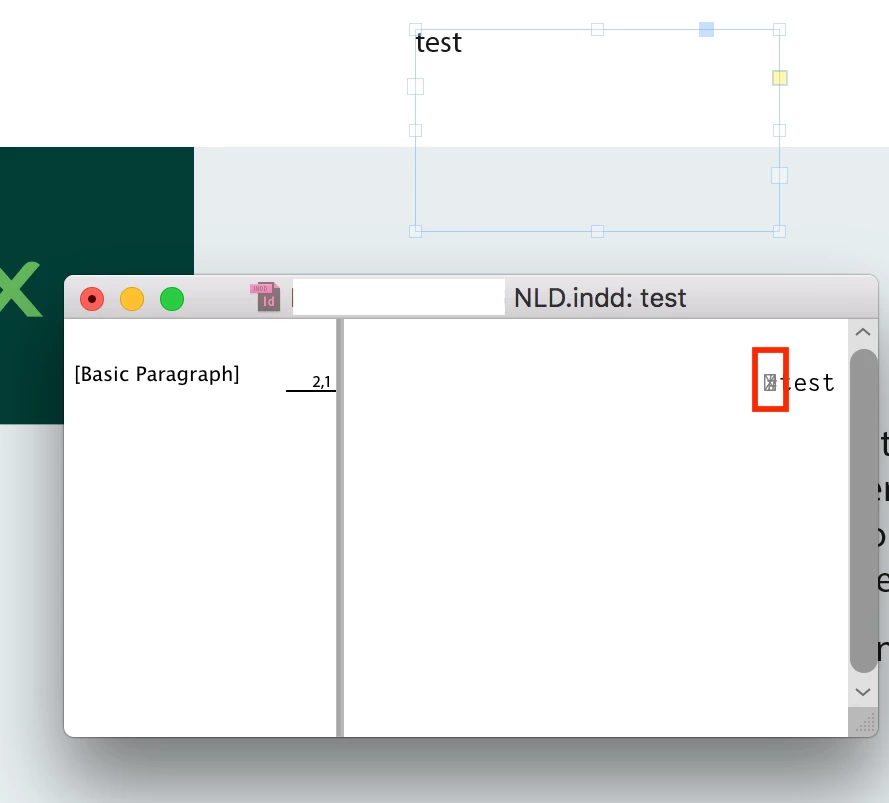
    This topic has been closed for replies.
    Correct answer M_ries_Lab

    solved: it was made with an Arabic- version of InDesign.

    I installed the language-settings of English-arabic and reopened the file without any issue.

    I hoped this could be done in an other way. There are much more features in paragraph-settings and binding-settings it isn't comfortable for some or our customers to work this way.

    Thanks for all of your replies!

    7 replies

    Jeremy bowmangraphics
    Inspiring
    April 11, 2018

    For what it's worth, I've never had anything to do with Arabic InDesign. I get the symbols with fresh documents made with a brand-new installation of InDesign CC 2018, as soon as I insert a table. Only on a Mac (ID 13.1 on OS 10.13.4). Windows seems fine.

    M_ries_Lab
    M_ries_LabAuthorCorrect answer
    Inspiring
    May 8, 2017

    solved: it was made with an Arabic- version of InDesign.

    I installed the language-settings of English-arabic and reopened the file without any issue.

    I hoped this could be done in an other way. There are much more features in paragraph-settings and binding-settings it isn't comfortable for some or our customers to work this way.

    Thanks for all of your replies!

    M_ries_Lab
    Inspiring
    May 7, 2017

    It had nothing to do with tables. It appears in every textframe.

    it has something to do with the Adobe composer vs word composer. And RTL like Bob said.

    I however can't find how you can fix this without installing Arabic/hebrew or CJK languages.

    If I receive files like this, I want to change the RTL into LTR without any issue (I don't need the language change).

    If I change the paragraph to Adobe composer, no issue is shown. But only for new textframes, how can  I change the aligment of existing frames? And preferably without language-installs.

    I have found some scripts for Illustrator, but this must be already into InDesign I really hope so!

    someone? Thanks already!

    Community Expert
    May 7, 2017

    Some things you could test perhaps:

    1. Would the problem go away, if you drag the text to a new text frame?
    Then this bug is coupled directly with the text frame from the MENA version.
    You can enable dragging selected text in the Preferences panel.

    2. Export the document to IDML and open again in InDesign.

    Regards,
    Uwe

    Community Expert
    May 6, 2017

    Hm…

    Looks similar to the strange character in this thread:

    6. Re: InD CC 2017: Tables - Header & Footer disappears when duplicating the table.

    https://forums.adobe.com/message/9496853#9496853

    Also have seen this with table cells in my German version of InDesign CC 2017.
    But never in a usual text frame.

    Regards,
    Uwe

    Community Expert
    May 7, 2017

    What does this sign/icon means? RTL alignment?

    the strange file is LTR when pasting into a fresh page of any other .indd it changes the text to RTL alignment. Then it starts to act strange... even any new textframe in this file has this issue...

    I'm not sure, but I think the problem with the "special character" showing in table cells when viewed by the Story Editor is gone with CC 2017.1 version 12.1.0.56.

    Did some tests with older CC 2017.0 documents where this was a problem and I cannot see the special character in the latest version of InDesign. I have both versions installed side by side.

    Document opened in CC 2017.0 showing the "special characters":

    Same document opened in CC 2017.1 not showing the "special characters":

    If the OP provides the document on a download service like Dropbox and post the link I'd like to see into this.

    At least the bug showing the special characters in table cells with the Story Editor seems to be fixed.

    // EDIT POST:
    Tested with German InDesign versions on German OSX 10.10.5.

    Regards,
    Uwe

    Community Expert
    May 7, 2017

    Maybe in other locale versions or in the international version this is not fixed yet?

    In this thread as mentioned above:

    InD CC 2017: Tables - Header & Footer disappears when duplicating the table.

    the phenomenon of showing a special character in Story Editor is still visible and the version must be 12.1.0.56 because it is discussing a bug showing up with duplicating tables that is version-12.1.0.56-only.

    Regards,
    Uwe

    M_ries_Lab
    Inspiring
    May 5, 2017

    It's somewhere in the file. Any new textframe has the same issue...

    BobLevine
    Community Expert
    Community Expert
    May 5, 2017

    Looks like you're pasting into a file with some kind of Right to Left language enabled.

    M_ries_Lab
    Inspiring
    May 5, 2017

    Hi Bob, also an option! how can it be disabled?

    I work in cc17 - it was an option (document settings) in cs6, but I can't find it anymore?

    BobLevine
    Community Expert
    Community Expert
    May 5, 2017

    First off, is your version of InDesign capable of RTL? If so, it should be in the paragraph/paragraph style options, but to be clear, I'm not 100% sure that's what this having never used those features.

    Steve Werner
    Community Expert
    Community Expert
    May 5, 2017

    How was the file created? Was it imported from Word? Also, what version of InDesign are you using (exactly)? What happens when you create a file from scratch: does it always occur?