
Known Participant
September 7, 2021
Answered

Streamline multiple documents - update to new look

  • September 7, 2021
  • 3 replies
  • 447 views

Hi. I am on a MacBook using InDesign 2021. 


I have several two page documents that are basically cut sheets for different products. I want to update the design of all of them. The design will be the same look and feel across the board. What I have done in the past is just update the master pages by copying and pasting the new design elements onto the master page of each document. Then I would load the new paragraph/character styles in as well, etc. I feel like this might be barbaric nowadays? Is there something more efficient I could be doing? 

I have read things on Books and Libraries, but maybe I am missing the picture.


For us, it is important to have a folder of the INDD file, with fonts, links and a pdf. The only reason I mention this is I got the impression with Books, that the documents are all in one file.
This topic has been closed for replies.
Correct answer Barb Binder

Hi @newwave88:


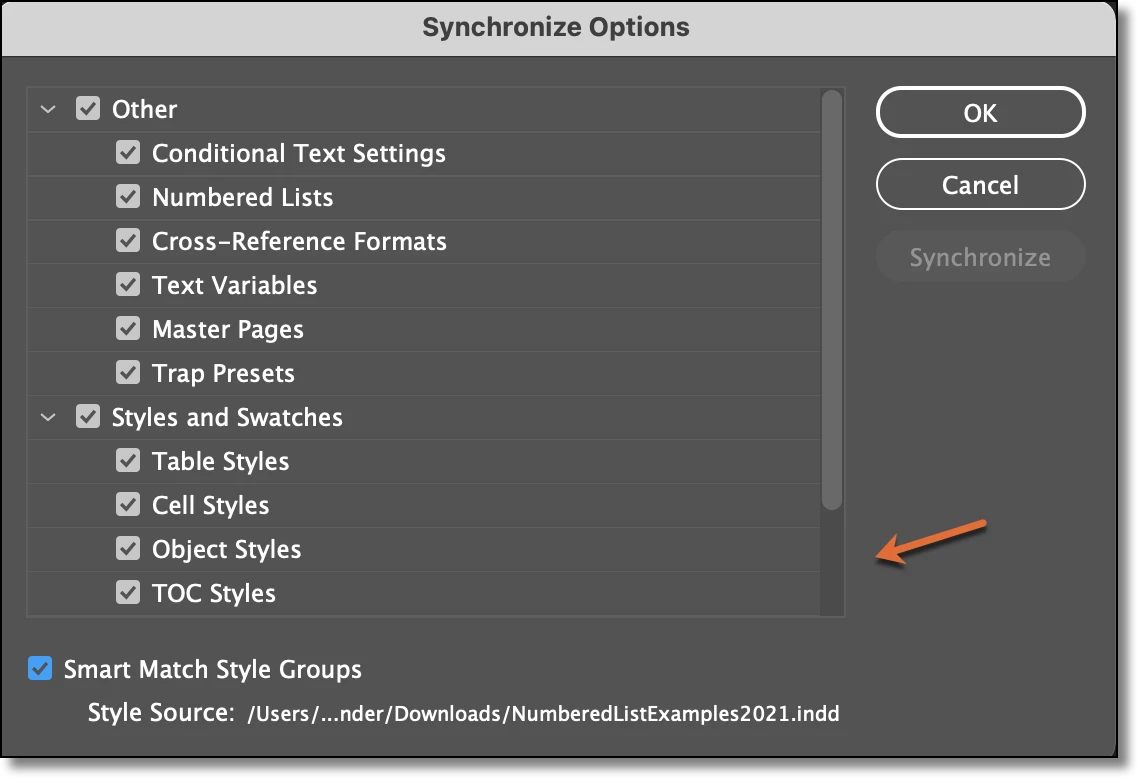
An InDesign book (.indb file) is just a list of InDesign documents (.indd files). You can combine your cut sheets into a book, edit one of them and then use the Synchronize Options command to standardize the layout across the other files in the book. That would be more efficient than the current method of copy/paste and loading styles. (The arrow is pointing out that a few options are not included in my screen shot: paragraph styles, character styles and swatches.)


CC Libraries will let you save assets for reuse in other documents: color swatches, color groups/themes, paragraph styles, character styles and graphics. Certainly worth exploring but perhaps not what you need in this situation. 


Another feature worth considering is snippets. A snippet is a collection of frames that you can export to a file and place in other documents. Let's say your master pages have 2 header frames, 2 footer frames and a logo. Rather than using copy/paste to copy the 5 frames from one file to another, you can export the collection as a snippet and place them into other files. 


~Barb 

3 replies

Barb Binder
Community Expert
Barb BinderCommunity ExpertCorrect answer
Community Expert
September 9, 2021

Hi @newwave88:


An InDesign book (.indb file) is just a list of InDesign documents (.indd files). You can combine your cut sheets into a book, edit one of them and then use the Synchronize Options command to standardize the layout across the other files in the book. That would be more efficient than the current method of copy/paste and loading styles. (The arrow is pointing out that a few options are not included in my screen shot: paragraph styles, character styles and swatches.)


CC Libraries will let you save assets for reuse in other documents: color swatches, color groups/themes, paragraph styles, character styles and graphics. Certainly worth exploring but perhaps not what you need in this situation. 


Another feature worth considering is snippets. A snippet is a collection of frames that you can export to a file and place in other documents. Let's say your master pages have 2 header frames, 2 footer frames and a logo. Rather than using copy/paste to copy the 5 frames from one file to another, you can export the collection as a snippet and place them into other files. 


~Barb 

~Barb at Rocky Mountain Training
newwave88Author
Known Participant
September 9, 2021

Wow, thank you @Barb Binder !! This is awesome. I am so grateful. Did not know about snippets either. Going to dive in now 🙂 

Geоrge
Legend
September 9, 2021

>>  Is there something more efficient I could be doing? 

https://youtu.be/jCitW3OHmJE


https://helpx.adobe.com/indesign/using/alternate-layouts-liquid-layouts.html


Remember, never say you can't do something in InDesign, it's always just a question of finding the right workaround to get the job done. © David Blatner
newwave88Author
Known Participant
September 9, 2021

Thank you for this. The docs will all be the same size, however, I did forget about this feature and it will be useful to me in the future.

Mike Witherell
Community Expert
Community Expert
September 8, 2021

With Books, the separate documents are all in one folder. One document is set to be the main style document, and the other documents can be synchonized to the main document to achieve the same look and feel of your typesetting.

Mike Witherell
newwave88Author
Known Participant
September 9, 2021

Thank you! Looking more into Books now!