Inspiring
May 26, 2025
Question

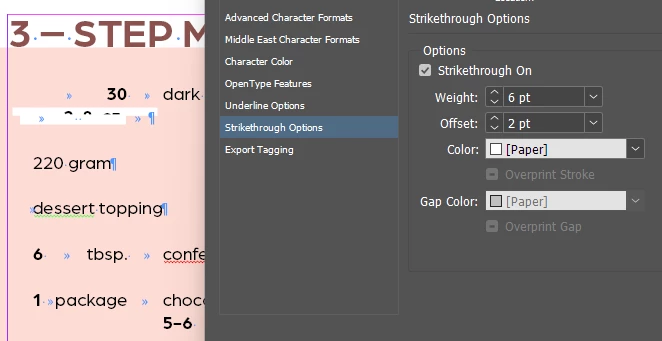
strikethrough should be behind text

  • May 26, 2025
  • 3 replies
  • 690 views

any way to get the strikthrough to be behind the text instead of on top?
 

3 replies

Colin Flashman
Community Expert
Community Expert
May 28, 2025

I've written an article about character/paragraph rule stacking orders for CreativePro that may help:


https://creativepro.com/understanding-the-stacking-order-of-paragraph-rules/


From the article directly is a lookup table based on stacking height (top row of the table being the highest layer, bottom row of the table being the lowest layer) as well as where the type sits within the stacking height.


In terms of its up/downposition, that can usually be adjusted with the offset value.

If the answer wasn't in my post, perhaps it might be on my blog at colecandoo!
rob day
Community Expert
Community Expert
May 26, 2025

any way to get the strikthrough to be behind


Hi @hendy_5450 , Use Underline Options rather than Strikethrough Options if you want the color to be behind  the text characters:


Inspiring
May 28, 2025

Attatched are two separate documents.

One, the strikthrough rule is working perfectly and the other it doesn't do the offset right.

Can't figure out why.


> soups and layout: works!

> desserts to format: not working


Inspiring
May 28, 2025

Here I have a few of the stlyes, only the last one is right.

Any idea why?

Does it have to do with that it's paragraph shading on top of shading??


Mike Witherell
Community Expert
Community Expert
May 26, 2025

Hi Hendy,

Make sure you are doing this in a paragraph style:

Instead of Strikethrough which is on top, try any of these:

Underline plus Underline Options where you Offset the underline to suit the position you wish.

or also Paragraph Rules (either Rule Above or Rule Below) where you Offset the ruled line to the position you wish.

These go behind your text when offset in vertical positioning.

Always tend to work in Paragraph Styles for your text.

Mike Witherell
Inspiring
May 28, 2025
i'm doing this the entire time,
but only the negative offset works, not regular numbers
