

Struggling with colour consistency
Hello all,
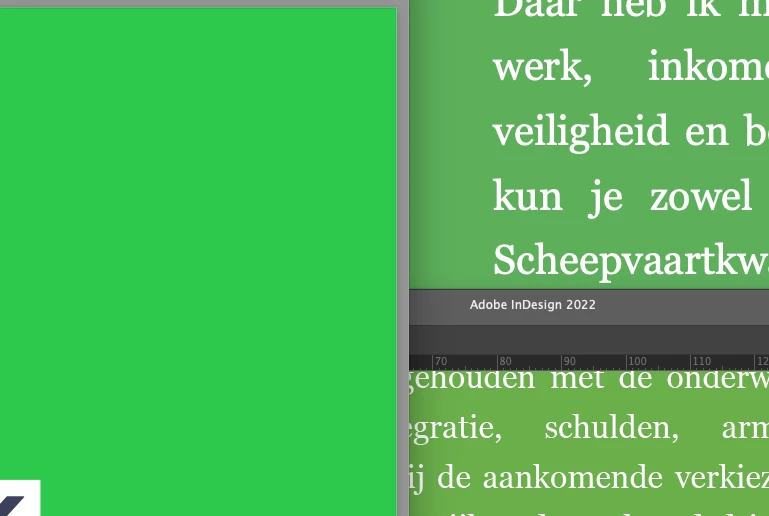
I'm a beginner with InDesign and I am struggling with understanding (and properly using) colour settings. I am designing a flyer that requires a specific colour of a brand. I'm using the swatch for this colour I received from the brand, so that should be in order. However, the colour in InDesign differs wildly from what it should be; and when I export a PDF from InDesign, the colour is not only incorrect but also differs from what I see in InDesign.
Of course I have tried finding solutions online, but for some reason I just can't get it to work/wrap my head around how colour management works. So I was hoping someone could help me see the light and get the right colours in my export 🙂
In this picture, the green on the left is the correct green. The bottom right is the green as seen in InDesign, and the top right is the green in the PDF. Ideally, all greens look like the green on the left.
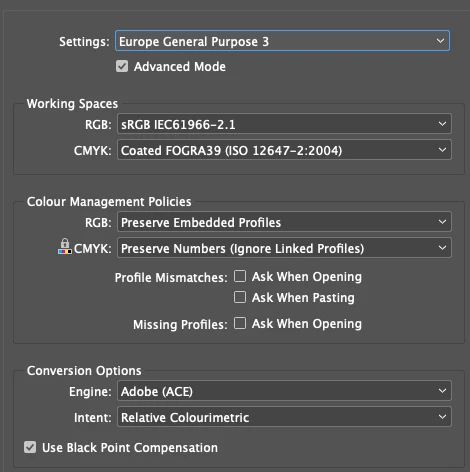
My colour settings in InDesign are as follows. When I export the PDF, I select 'No Colour Conversion' in the export dialog in the 'output' tab.
Best,
Laurens
 AdChoices