
Inspiring
January 8, 2025
Answered

Suddenly entire text become Overset text

  • January 8, 2025
  • 5 replies
  • 1741 views

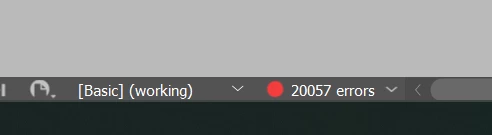
I have completed working on 250 pages on Indesign, this morning opened my file and saw entire document is had 20057 Overset text...looks like all of the fonts looks bigger than it was before. 

I use Gesta Font from Adobe stock. Font values are still the same. Every version that I have saved now has the same problem.

I don't know what to do at this moment. Probably getting fired, they are not gonna understand what happened or belive me. Asking them manually 2-3 days to fixing it not an option.


Correct answer RobFrease

Problem solved with downloading and adding fonts manually into MAC OS System. I will never work with Adobe Fonts again.

5 replies

RobFreaseAuthorCorrect answer
Inspiring
January 8, 2025

Problem solved with downloading and adding fonts manually into MAC OS System. I will never work with Adobe Fonts again.

Conrad_C
Community Expert
Community Expert
January 8, 2025

Good to know it got solved, thanks for passing on the solution.


Thousands of people (and Mac users, including many of us here) work successfully with Adobe Fonts, even when offline. So it might be worth continuing to investigate why they didn’t work, like if they weren’t connecting to the Adobe Fonts server. If you could solve that, you wouldn’t be cut off from that resource. And, you might have an interest in making sure the root cause doesn’t continue to cut off other resources/services you might not have the option to stop using.


Based on what solved it, what I would look for is if there is some kind of content blocker, anti-malware, network filter, or network firewall software that might be installed on the Macs, such as Little Snitch, that might have accidentally been set to block some network connections that include Adobe Fonts servers. Because the problem was very odd, a problem that doesn’t happen on a typical Mac configuration. It’s just not a common problem. Another idea is maybe the the permissions got screwed up for the local folder where Adobe Fonts get cached, because we do see a fair amount of macOS permissions issues since that’s gotten more complex.

RobFreaseAuthor
Inspiring
January 8, 2025

Thank you to everyone who has offered their help in resolving my problem.@Robert at ID-Tasker  @Conrad_C @Eugene Tyson @Michael Bullo 

Robert at ID-Tasker
Legend
January 8, 2025

@RobFrease


Can you post a screenshot of a whole page / spread - but not in Preview mode? 


Can you select 1st TextFrame of any bigger Story and then open Story Editor and post another screenshot? 


Can you select any bigger portion of text and check if you've No Break applied? 


Conrad_C
Community Expert
Community Expert
January 8, 2025

If so much text is overset that you can’t see it on the layout, select a text frame and go into Story Editor. Use that to start going through the text.


Try reformatting the first paragraph you find with a different font or resetting it to default type specs. If that brings it back (no longer overset), you’ve started isolating what’s causing it.


You can also go through the text inspecting paragraph options, especially Keep Options. Watch out for any formatting that might lock words or paragraphs together, like Keep With Next, Keep Lines Together, nonbreaking spaces, etc. You’re looking for combinations that might tie more and more paragraphs together and keep pushing them to the next frame or next page.


In other words you want to use a process of elimination to isolate and change whatever formatting is oversetting everything.


If this is what's happening, and if formatting causing it was applied with paragraph and character styles, you might be able to fix it in seconds just by redefining a few styles (if so, your job is saved). If styles were not used, you might try doing targeted mass reformatting using Find and Change.

RobFreaseAuthor
Inspiring
January 8, 2025

I have 52 different save files each day I worked on the file, they all have same issue when I open. I tryed 2 pc and 2 macs to find out what's going on. Uninstalled / Installted the fonts 10 times already. Replacing the same font with Find/Replace dosen't fix the problem. If it was a misslick yesterdays saved version wouldn't have that issue. Something is wrong with Adobe Font's for sure.

Michael Bullo
Community Expert
Community Expert
January 8, 2025

As a test, within the Paragraph Style, have you tried replacing the font with something that you have on your system by default (ie a non Adobe font)?

Michael Bullo
Community Expert
Community Expert
January 8, 2025

I just downloaded Gesta Regular to my system and it is working in InDesign.

Michael Bullo
Community Expert
Community Expert
January 8, 2025

Have you checked if Gesta Font is still OK? Is it properly synced to your machine? Can you use it in a new document?


Have you used Paragraph Styles? If so, open up the odd looking styles, try a different font and see if that solves the issue.

RobFreaseAuthor
Inspiring
January 8, 2025

Yes, I use Paragraph Styles.

I try to open my document 2 different PC and 2 different MAC... I have activated adobe font family before opening file, Installed / unisntall numerous time... I replace the fonts nothing fixes the problem. They still look larger than before with same size values before.

Community Expert
January 8, 2025

It's clear the font is not loading and is missing.


On your computer go to InDesign and go to the Help Menu and choose log out.

Close InDesign


Go to the Creative Cloud desktop app on your computer and log out there


Go to the Creative Cloud online and log out there


Restart your computer


Login to Creative Cloud Online
Login to Creative Cloud Desktop App

Open InDesign and go to the Help and ensure you're logged in


Try activate the font now.

Try opening your document and see if the font is now loading for you.