
Juan Cano
Inspiring
July 29, 2024
Answered

Suddenly, placed Vector logos have white background

  • July 29, 2024
  • 3 replies
  • 2629 views

A litle help here; today suddenly, I've placed several logos and icons created in Illustrator, and they are showing a white background instead of being transparent. I thought it was a redraw issue so I quit everything and sitll the issue. Then I restarted and I still see it. Have placed other logos and same issue.


Worst, the PDF is exporting with this white background!!!


• Display is set to high Quality Display

• Fill for placed logo is set to none, both on bounding box and object

• Other logos placed before today don't have the issue.

• Made a new file, placed a different vector, same issue.


What gives??? Any clues?


InDesign 19.3 (yes I know there's a new version but it was giving me the issue of not bveing able to save)

Mac OSX Sonoma 14.5

Appli M1 Max 32GB
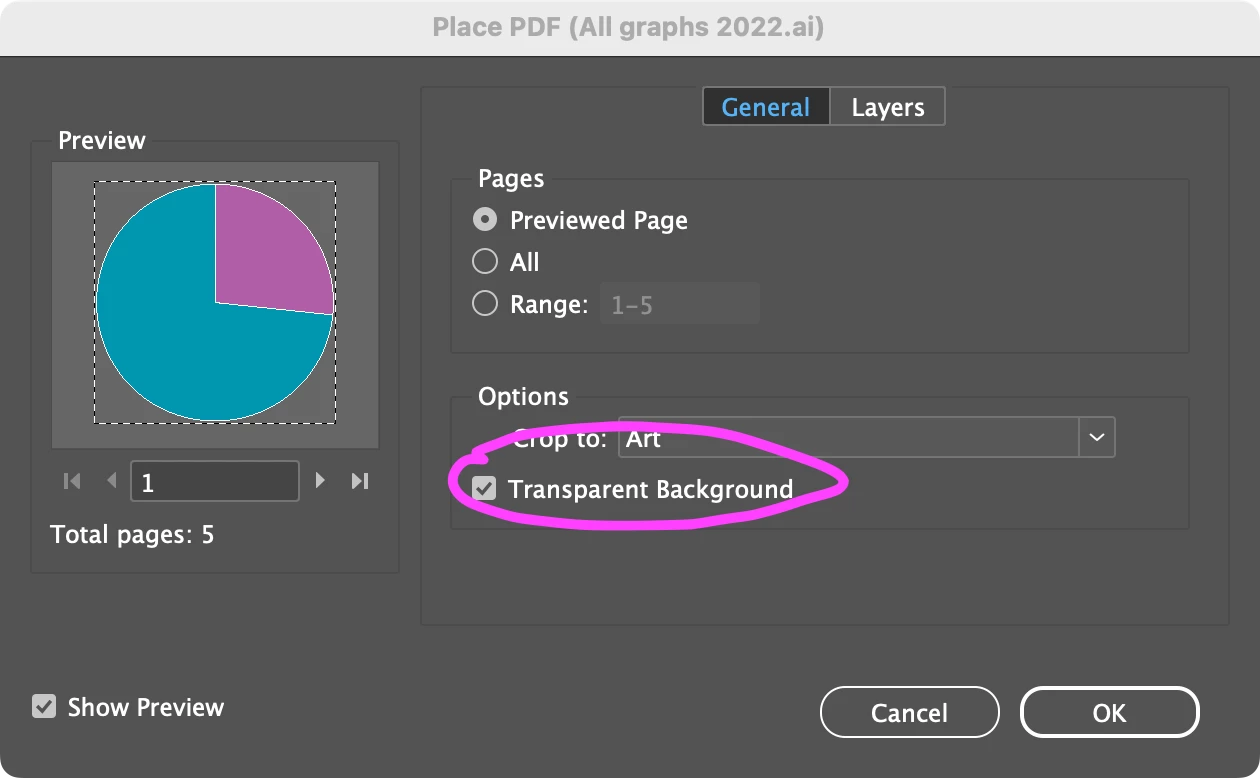


Correct answer Scott Falkner

Hold Shift as you click Place in the place dialogue or click on Show Import Options. See if Transparent Background had been turned off. Changes in this dialogue are sticky.


3 replies

Scott Falkner
Community Expert
Scott FalknerCommunity ExpertCorrect answer
Community Expert
July 30, 2024

Hold Shift as you click Place in the place dialogue or click on Show Import Options. See if Transparent Background had been turned off. Changes in this dialogue are sticky.


Juan Cano
Juan CanoAuthor
Inspiring
July 30, 2024

Sonofgun that was it. It must've been clicked at some point and turned transparency off. Duh. Simple fix, easy. Thank you for your help.

Robert at ID-Tasker
Legend
July 30, 2024

@Juan Cano


You can / should mark @Scott Falkner's reply as a "Correct Answer".


Robert at ID-Tasker
Legend
July 29, 2024

Just in case - you use Place, not copy&paste from Illustrator? 


Can you share a sample logo? 


Juan Cano
Juan CanoAuthor
Inspiring
July 29, 2024

Place, although copy/paste works well and never had an issue. Here is one, it's an .ai file. This is a newer (withing the last week) file, but the other ones have been created for years. 

Robert at ID-Tasker
Legend
July 29, 2024

You need to upload it somewhere and post a link - or change extension to TXT before uploading. 


Derek Cross
Community Expert
Community Expert
July 29, 2024

Have you tried exporting the images from Illustrator SVGs?

Juan Cano
Juan CanoAuthor
Inspiring
July 29, 2024

This is happening to any vector I have placed, is not an issue with a single file. The issue seems to be InDesign not reading the files suddenly?