
Superscript numbers in endnotes acting strangely. I can't delete them.
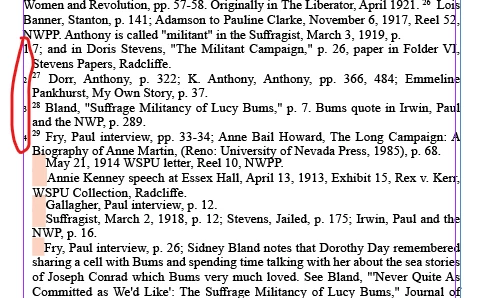
I scanned a chapter of a book in Acrobat Pro and then opened it in InDesign. In appeared that the superscript endnote numbers in the endnotes pages (not the chapter itself) where missing. I began to type the numbers in manually. Suddenly the superscript numbers appeared but starting in a later endnote. I cannot select these numbers (circled above) to continue to edit the endnotes. After editing about 22 notes, when I delete the pink box and then return the carriage to get to a new line the now another superscript number appears.
I think I tried all of the suggestions for not being able to select the text, locked frames, objects, etc. I also tried to copy the text (since the unwanted endnote numbers were not selected) and pasting it in some inserted pages that were unthreading to the endnote. The unwanted superscript numbers still appeared.
I assume the program recognized these numbers as notes and that is the problem.
I would like to be able to correct this even if I cannot figure out how to recover the superscript numbers and must continue editing manually.
Thanks,
Ira


 AdChoices