
Participant
December 7, 2016
Answered

Superscript text in numbered lists

  • December 7, 2016
  • 1 reply
  • 2244 views

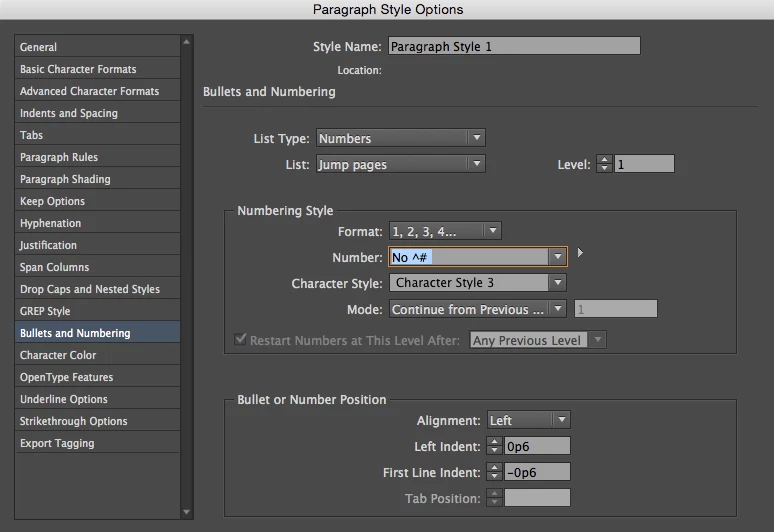
Hello. I was wondering if anyone knows how to superscript text preceding a number in a numbered list? I am trying to make a French numbered list where the numbers are preceded by "No" (o needs to be superscripted). I am trying to input this in Paragraph Style > "Bullets and Numbering" > "Numbering Style" > "number" field, but cannot find any way of superscripting the text I input there. Thanks.
This topic has been closed for replies.
Correct answer SJRiegel

If you are on a Mac, you can access already superscripted º character for the Nº by typing Alt+0 

There is a way to access it on other systems as well --from Wikipedia:

In Windows keyboards, “º” can be obtained by pressing Alt, 0, 1, 8, 6 (on the numeric keypad) and “ª” can be obtained by pressing Alt, 0, 1, 7, 0 (on the numeric keypad).

In English (International) layout, “º” can be produced through AltGr+⇧ Shift+X+O, and “ª” can be produced through AltGr+⇧ Shift+X+A.

In Linux, “º” can be obtained by pressing AltGr, Shift, M and “ª” can be obtained by pressing AltGr, Shift, F.

1 reply

SJRiegelCorrect answer
Legend
December 7, 2016

If you are on a Mac, you can access already superscripted º character for the Nº by typing Alt+0 

There is a way to access it on other systems as well --from Wikipedia:

In Windows keyboards, “º” can be obtained by pressing Alt, 0, 1, 8, 6 (on the numeric keypad) and “ª” can be obtained by pressing Alt, 0, 1, 7, 0 (on the numeric keypad).

In English (International) layout, “º” can be produced through AltGr+⇧ Shift+X+O, and “ª” can be produced through AltGr+⇧ Shift+X+A.

In Linux, “º” can be obtained by pressing AltGr, Shift, M and “ª” can be obtained by pressing AltGr, Shift, F.

JosteinAuthor
Participant
December 7, 2016

Perfect! So simple... Thank you very much!