

Swarm of Hyperlink Bugs - Hyperlinks not appearing in hyperlink window
I have been pushing Hyperlinking to its limits with this project. At one point I had well over 1000 hyperlinks in a single 160+ page guide. More than once I have encountered strange issues where one hyperlink will work in InDesign but fail when converted to PDF, along with all Hyperlinks alphabetically listed after the broken hyperlink. In the past, I was able to hunt down the issue by systematically deleting chunks of hyperlinks and testing (Bug 1).
I'm at a loss this time. So, I've decided to completely nuke and reorganize my hyperlinks. I deleted ALL hyperlinks using the hyperlink panel. Then I "deleted all unused destinations". After deleting all unused destinations, a dozen or more remained and had to be deleted manually in the "hyperlink destinations" window (Bug 2).
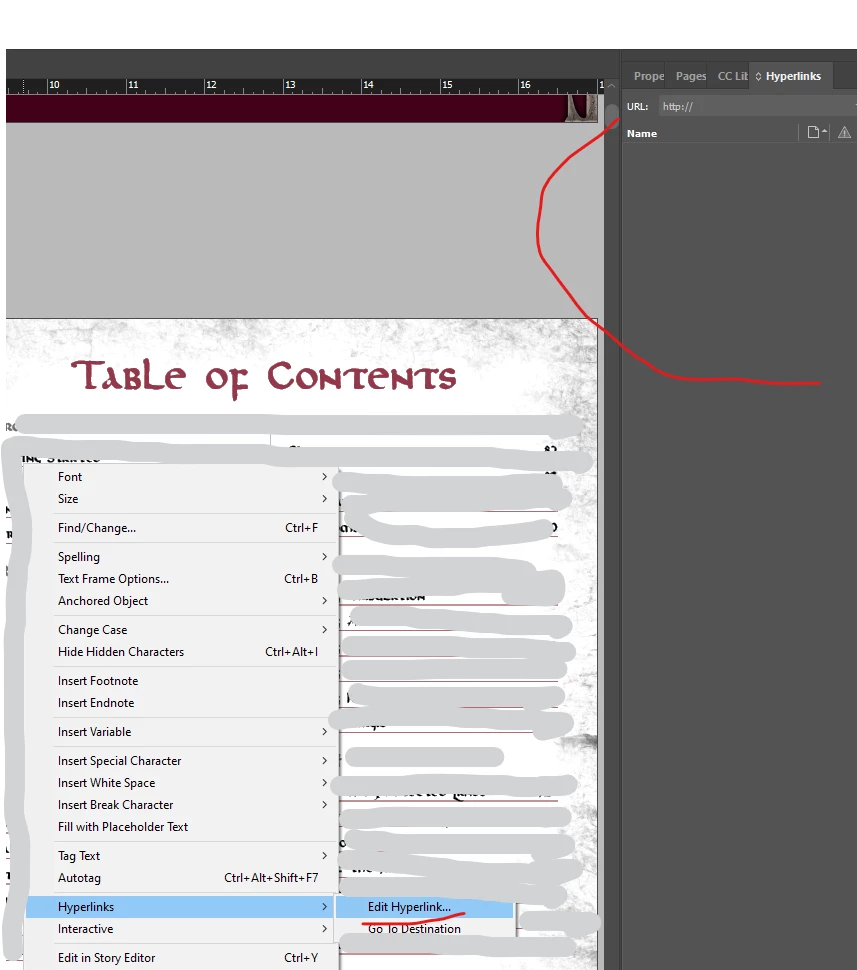
With that complete, I created all hyperlink destinations I intended to use. This time I standardized the naming a bit and trimmed the fat. With those in place, I started to go through the Table Of Contents section of the book and hyperlinking each to a chapter header. There I started to notice something strange. Some of the hyperlinks were not showing up in the hyperlink window after being created! Some still would not let me create new hyperlinks, but instead edit existing ones of which there should be none! (Bug 3) I would like to manage my hyperlinks to better detect and correct emerging issues. But even from the very start - Tabula Rasa - I am encountering confounding bugs. How can I go about getting this addressed? Is there something I am missing here?


 AdChoices