Participant
February 12, 2023
Question

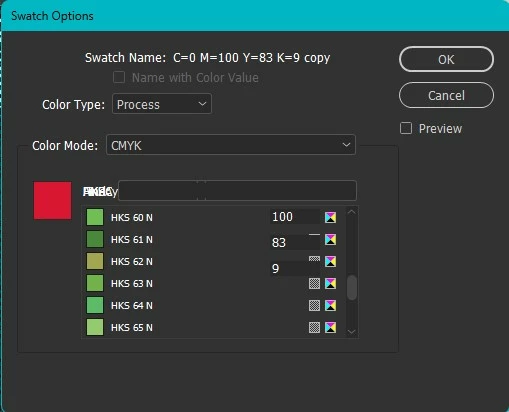
Swatch bug

  • February 12, 2023
  • 2 replies
  • 160 views

When I try to adjust the color this is what shows up. Not quite sure what happened. I tried to uninstall and reinstall but that did not work. 

This topic has been closed for replies.

2 replies

rob day
Community Expert
Community Expert
February 12, 2023

Also try clearing your Caches, which often cause UI problems. Instructions are in the link Eugene posted.

Community Expert
February 12, 2023

Try resetting your preferences:

Windows: Start InDesign, and then press Shift+Ctrl+Alt. Click Yes when asked if you want to delete preference files.
macOS: While pressing Shift+Option+Command+Control, start InDesign. Click Yes when asked if you want to delete preference files.
A dialog will appear asking to delete the InDesign Preferences, select 'Yes' on this dialog.
Further info and instructions here if needed:
https://helpx.adobe.com/in/indesign/kb/indesign-preferences-support-file-locations.html


----

Reinstalling rarely fixes everything - you can do a complete reinstall using the
Creative Cloud Cleaner Tool https://helpx.adobe.com/creative-cloud/kb/cc-cleaner-tool-installation-problems.html