
Inspiring
August 15, 2022
Answered

Sync same text between 2 text boxes

  • August 15, 2022
  • 3 replies
  • 1261 views

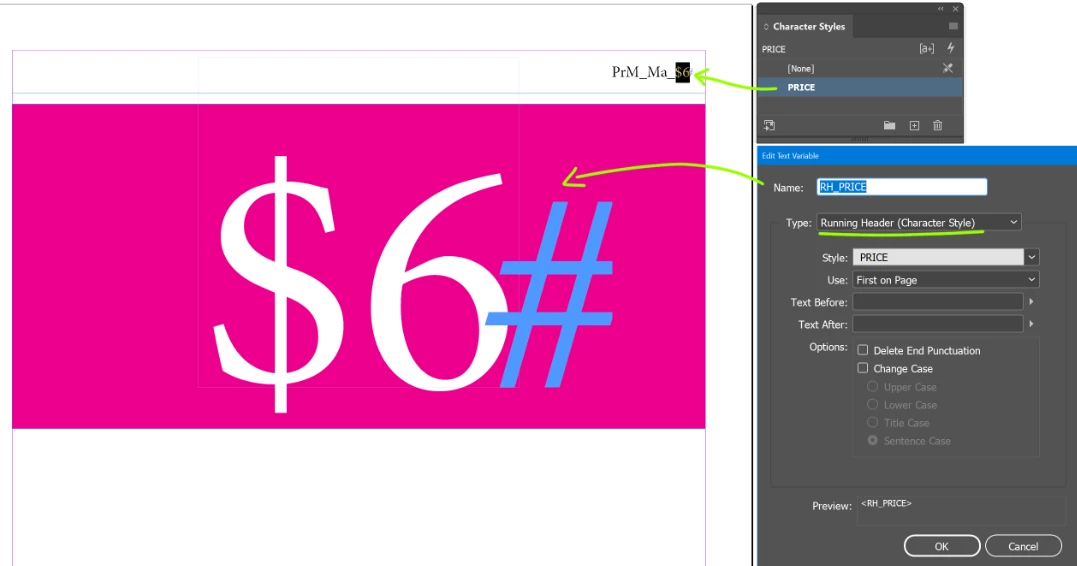
I am setting up a doc with a single price on each page. 

In the top corner is a code which has the price included in the text string.

Is there a way to automate it so that when the main text box is updated the change is relected in the second frame? 

Running header doesn't work, and Place & Link doesn't work as it's not live.
 

This topic has been closed for replies.
Correct answer Marc Autret

Hi @BeDazzle 


Running headers definitely work at the Page level. Select Use: “First on Page”. Note however that the variable does not instantly update as you type something new in the styled source, the display needs some refresh. I usually press Ctrl + / Ctrl - (Zoom In / Zoom Out) to get it done.


Best,

Marc

3 replies

Peter Spier
Community Expert
Community Expert
August 15, 2022

You could define a custom variable for every item, then update the variables, but that seem more cumbersome than just doing it all manually. Have you explored setting this up so that you have only one item per page in a base document so that the running head variable can be used, then placing those pages into a delivery document as a linked file?

m1b
Community Expert
Community Expert
August 15, 2022

Hi @BeDazzle, tell us a bit more about your case. Do you have many pages? Are they all the same as your example?

- Mark

BeDazzleAuthor
Inspiring
August 15, 2022

I may have this wrong but a running header references the first or last instance of a style in a section. This would mean every page is it's own section.

All the pages in the doc are the same as the example but with different prices and there are 61 pages.

It's not a difficult thing to do manually but it usually gets updated in a hurry and the code gets overlooked, so I thought automating might solve the issue.

Thanks both for responding.

Peter Spier
Community Expert
Community Expert
August 15, 2022

I'm actually a little confused at this point. It's not clear how many items there are per page. If it's only one the running header variable will work. If it's two, the running header variable will work as well -- one set to first on page, the other to last on page.  For more than two items it gets complicated and if this is a commercial catalog of some sort you probably should be looking into purchasing one of the commercial catalog plugins.

Peter Spier
Community Expert
Community Expert
August 15, 2022

Why is it that the running header variable will not work? What happens when you try to use it?