Inspiring
February 23, 2023
Answered

Synching Style Sheets across documents

  • February 23, 2023
  • 1 reply
  • 664 views

Hi,

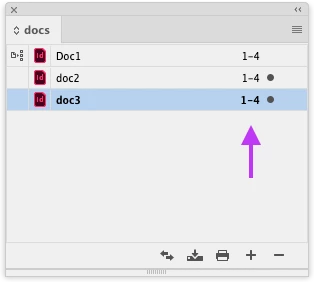
I have a series of documents that keeps growing. They use many of the same style sheets, with particular ones showing up here and there. I don't want to add them all to a book, because they need to live separately with separate pagination. Is there a way to link them all to a specific master set of text styles such that if I update/add something to one document, it will appear when I open a sister document?  If I add them to a book would that essentially merge all the stylesheets? If I do that, can I keep each doc with its own pagination starting at 1?

(I guess I could import styles into each doc after I happen to change styles in one, but that seems kind of clunky.)

Thanks,

Stuart
This topic has been closed for replies.
Correct answer Rene Andritsch

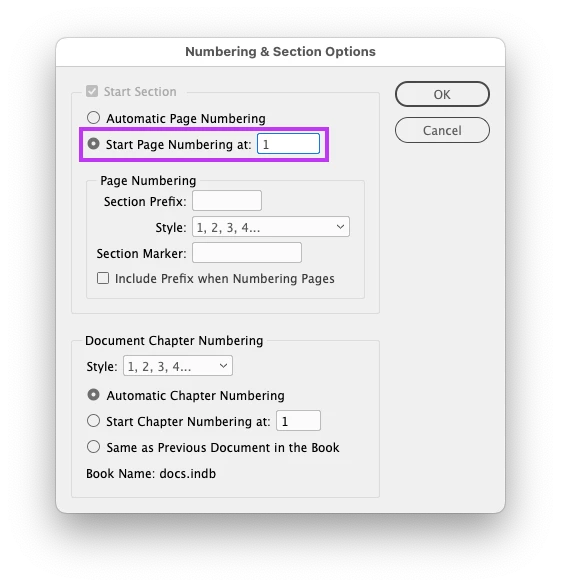
Have you tried the “Numbering & Section Options…” in the Pages Flyout-Menu for the separate documents? If you deselect automatic numbering you can give your documents any pagination.

1 reply

Rene Andritsch
Community Expert
Rene AndritschCommunity ExpertCorrect answer
Community Expert
February 23, 2023

Have you tried the “Numbering & Section Options…” in the Pages Flyout-Menu for the separate documents? If you deselect automatic numbering you can give your documents any pagination.

SilbStuAuthor
Inspiring
February 23, 2023

Thanks...that does what I needed. Then I can just synch my style seets across.

Rene Andritsch
Community Expert
Community Expert
February 23, 2023

If that solves your question can you please mark it as correct so others may benefit from it as well? Thanks.