
Inspiring
October 30, 2017
Answered

Table cell containing a multiple columned text box....

  • October 30, 2017
  • 5 replies
  • 7717 views

Hi all,

I've been scouring the internet for a way to do this, and it seems odd that there isn't an obvious answer?

What I want to do is create a table, with the cells acting as overflow text boxes with 2+ columns (example below). It seems strange that currently the only way to achieve this is to manually meter the list length between 2 merged cells?? Surely this isn't an impossible request I'm asking!
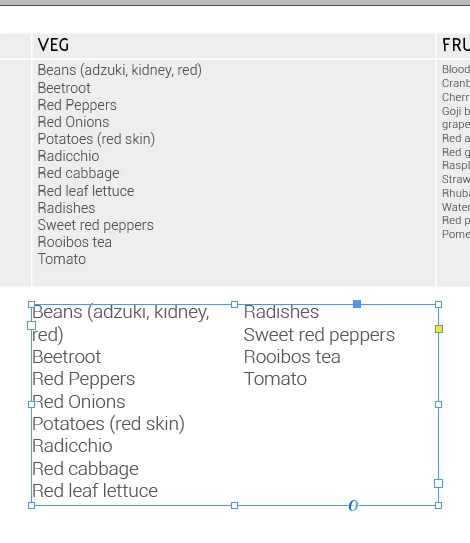
Above is the current table formatting, but I want the cell to act as the textbox formatting has, with 2 defined columns that overflows!

TIA

Charlie

This topic has been closed for replies.
Correct answer Barb Binder

I think you found the best solution. I tried everything I could think of, but you are absolutely right—split and span do not work on text within a table cell.

You can add items to a wishlist for future versions here:

Adobe InDesign Feedback

~Barb

5 replies

Participant
July 3, 2023

I assume what you mean is when you convert text to table you have 2 columns. You would like to have numerous columns such as index of a book. You can add multiple columns by click the red [+] at the bottom of the table and resizing it.

Participant
August 19, 2019

I've had this issue for quite some time. There is no way to do what you are trying to do until Adobe introduce it into the cells.

However my work around as simply been to use a normal text box that mimics that of the table and its cells. Eg: same line width/colour and inset margin settings. Then simply flow in your text and apply the slit 2 or span 2 format. Once you have applied all the formatting simply drop it under the table in the correct position.

Barb Binder
Community Expert
Barb BinderCommunity ExpertCorrect answer
Community Expert
October 31, 2017

I think you found the best solution. I tried everything I could think of, but you are absolutely right—split and span do not work on text within a table cell.

You can add items to a wishlist for future versions here:

Adobe InDesign Feedback

~Barb

~Barb at Rocky Mountain Training
Inspiring
October 31, 2017

Thanks Barb - I thought as much!

Submitted it now

Inspiring
October 30, 2017

UPDATE

For the time being, have had to move all of that text into column'd textboxes to remain functionality (shown below), but obviously still very interested in finding this functionality in a table itself, rather than manually creating the table with textboxes just for column functionality....

Kasyan Servetsky
Legend
November 1, 2017

How about the following approach?

Set cell insets to 0 and turn clipping on

Cut/copy the text frame

Place the cursor into the cell and paste it to make it an inline object

Adjust either the frame's right and bottom border...

... or the cell borders

I think the last step can be easily scripted: e.g. fit all text frames in cells in all tables in the current document

— Kas

Mike Witherell
Community Expert
Community Expert
October 30, 2017

Have you read about and experimented with Split and Span Columns?

Mike Witherell
Inspiring
October 30, 2017

Hi Michael - thanks for replying

Splitting the column doesn't seem to let me overflow the text into the next, as if it were still one input box - haven't experimented with span yet, but on the split side it still seems to only point towards manually inputting each required amount of text to balance the cells out accordingly