
Inspiring
August 10, 2016
Answered

Table Cells oveflows detection - again

  • August 10, 2016
  • 1 reply
  • 938 views

Hi,

I'm back to my old problem from this thread:

Detect Overset in Cell and/or Force Wrap

I encountered a situation where the old workaround no longer works in Adobe InDesign CC Server 2015 (same script works fine in CS5.5). The overflows property never is true, even if there is overflow in the table cell.

I already tried using a higher sleep timer to make sure it isn't a timing problem again, but even 500ms did not help. I also tried checking for overflow in each cell after the row has been finished, still no success. It doesn't seem to be a general problem, since in the same table the overflow detection works on cells in later rows and in other tables as well. In this screenshot you can see the result on InDesign Server (left) and CS5.5:
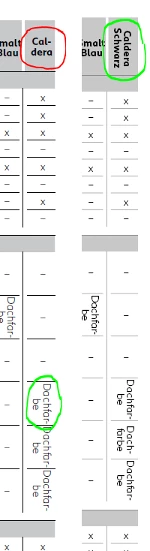
CS5.5 detects the overflow and rotates the text, InDesign server doesn't in the first row, but it does so in later Rows. Are there any other ways to detect overflow apart from cell.overflows?

Thanks a lot

This topic has been closed for replies.
Correct answer Laubender

Do you see a red dot in the overflowing cell after opening the document with InDesign Desktop?

Another way, perhaps a bit more calculation intensive, would be to get the horizontal offsets of every insertionPoint of the text in a cell. If an insertion point is in overflow, horizontal offset should return an error.

Just a test snippet to illustrate my point:

/*

    Test with:

    document with one story,

    one table and text in cell one that overflows

*/

var myInsertionPoints =

    app.documents[0].

    stories[0].

    tables[0].

    cells[0].

    texts[0].

    insertionPoints.

    everyItem().getElements();

// Loop from the end of the text:

for(var n=myInsertionPoints.length-1;n>=0;n--)

{

    try{

        myInsertionPoints.horizontalOffset;

        }catch(e){

            $.writeln(n+"\t"+e.message);

            $.writeln("ERROR: Cell overflows!");

            break

        };

}

//EDIT: Removed $.writeln in line 21.

Regards,
Uwe

1 reply

LaubenderCommunity ExpertCorrect answer
Community Expert
August 11, 2016

Do you see a red dot in the overflowing cell after opening the document with InDesign Desktop?

Another way, perhaps a bit more calculation intensive, would be to get the horizontal offsets of every insertionPoint of the text in a cell. If an insertion point is in overflow, horizontal offset should return an error.

Just a test snippet to illustrate my point:

/*

    Test with:

    document with one story,

    one table and text in cell one that overflows

*/

var myInsertionPoints =

    app.documents[0].

    stories[0].

    tables[0].

    cells[0].

    texts[0].

    insertionPoints.

    everyItem().getElements();

// Loop from the end of the text:

for(var n=myInsertionPoints.length-1;n>=0;n--)

{

    try{

        myInsertionPoints.horizontalOffset;

        }catch(e){

            $.writeln(n+"\t"+e.message);

            $.writeln("ERROR: Cell overflows!");

            break

        };

}

//EDIT: Removed $.writeln in line 21.

Regards,
Uwe

Community Expert
August 11, 2016

Or just address the last insertion point and check for horizontalOffset or baseline (the "vertical offset").

/*

    Test with:

    document with one story,

    one table and text in cell one that overflows

*/

var myInsertionPoints =

    app.documents[0].

    stories[0].

    tables[0].

    cells[0].

    texts[0].

    insertionPoints.

    everyItem().getElements();

try{

myInsertionPoints.pop().horizontalOffset();

}catch(e){$.writeln(e.message)};

Uwe

Inspiring
August 11, 2016

Yes, this worked.

While I tested it, I found out another method that doesn't need to trigger and catch an error:

I let InDesign output the content of the cell to check if the error is triggered on the correct cell and saw, that cell.contents only contains the text that's actually displayed on screen, while cell.texts[0].contents contains the complete string. So, if I compare cell.texts[0].contents with cell.contents I can find out overflow text as well.

Thanks again!