
Inspiring
July 20, 2022
Answered

table formatting help - specific example

  • July 20, 2022
  • 2 replies
  • 1254 views

Hi- I'd love to get opinions on the easiest way to create this table (example attached). This picture is something someone else created in the past. I have new data to input and need to create my own table. I already have a table style similar to this table - it just doesn't have the extra black outlined cells within the bigger cells (the areas that say # of storers and VPO). Would it be best to create a table with 10 rows to include that extra data, and then merge cells so it looks right? I am slow and kind of meticulous about my tables. I have a cell style and paragraph style for everything. I just like to work that way. But I get tripped up sometimes with formatting the outlines for cells. They never seem to show what I have asked for! Thank you, everyone.
This topic has been closed for replies.
Correct answer Barb Binder

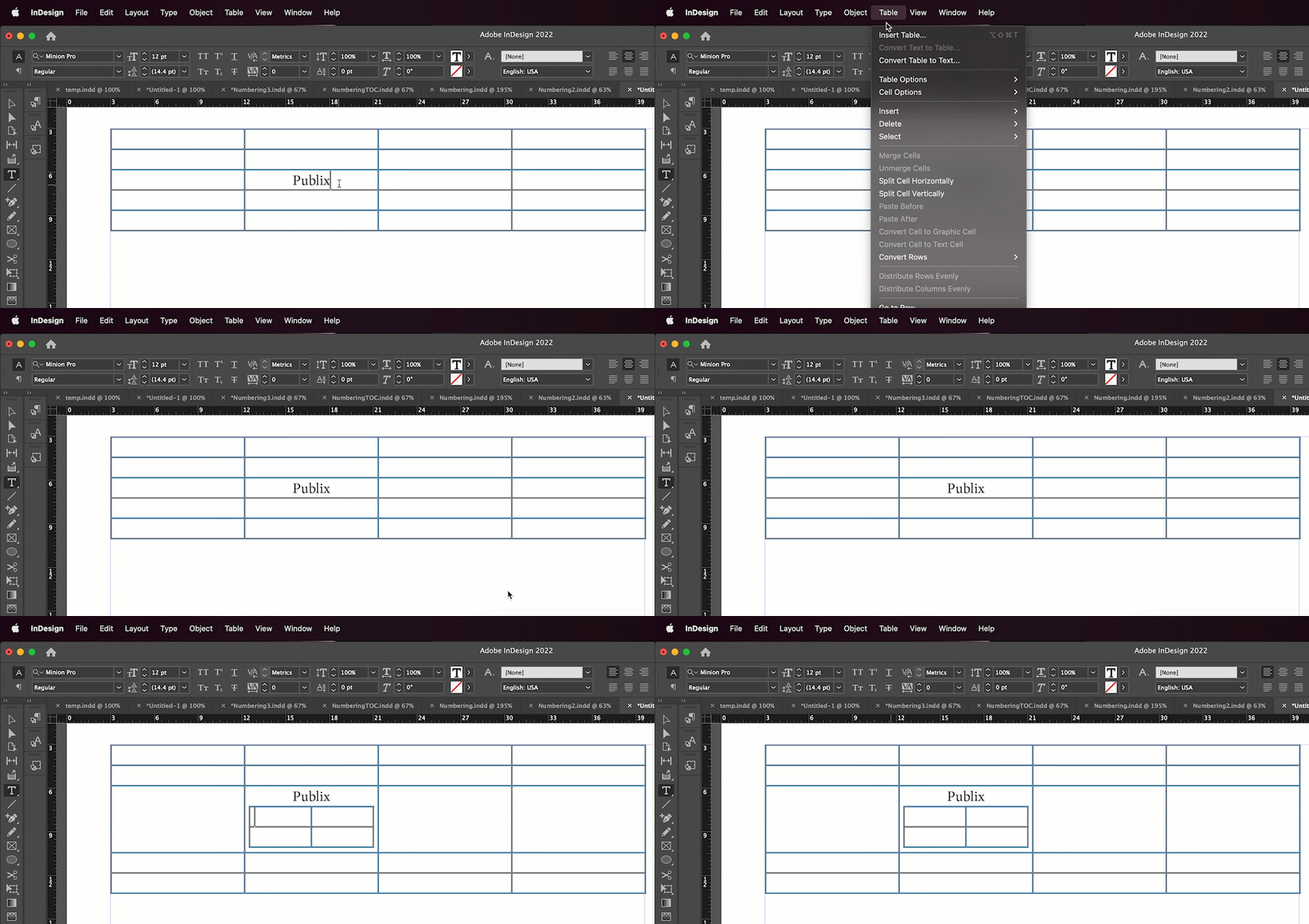
I think it would be quicker to insert little tables within the larger table. And yes, use table, cell and paragraph styles for both the small and large tables. A properly constructed table style can nest the cell and paragraph styles in it, so that you can format each table just by assigning the correct table style. 


~Barb


2 replies

Rishabh_Tiwari
Legend
July 20, 2022

Hi @CarinTMCLG ,


Thanks for reaching out. Please try the suggestion shared by Barb Binder. In addition to that, I found this great article on setting up a table in InDesign which you can refer to https://creativepro.com/indesign-how-mind-your-table-manners/ 


Regards

Rishabh
 

Inspiring
July 20, 2022

Thank you, Rishabh, I will check that out!

Barb Binder
Community Expert
Barb BinderCommunity ExpertCorrect answer
Community Expert
July 20, 2022

I think it would be quicker to insert little tables within the larger table. And yes, use table, cell and paragraph styles for both the small and large tables. A properly constructed table style can nest the cell and paragraph styles in it, so that you can format each table just by assigning the correct table style. 


~Barb


~Barb at Rocky Mountain Training
Inspiring
July 20, 2022

oh wow - I didn't know you could do that! I love this community. So I guess I would go ahead and make cell styles, etc for that little one that's being insterted? And a table style? Did it just default to the black outlines or did you assign them? Also, doesn't it usually ask how many rows and columns you want when you select "insert table"? Just wondering if you did anything before this. Thanks!

Barb Binder
Community Expert
Community Expert
July 20, 2022

Hi @CarinTMCLG:


You can use the default rules or you can set your own. If you aren't sure how to control the rules, show us an example of what is happening and we can explain what you need to do. Not having seen your file, I don't know where to start the explaination of how they work. 


And yes, you will see a dialog box when you insert a table asking how many rows and columns—I suspect mine was sitting just outside the screen capture and I didn't notice it. Sorry about that. 


~Barb

~Barb at Rocky Mountain Training