

karthikS
Inspiring
June 22, 2020
Question

Table - How to distribute column space based on the cell text. (InDesign)

  • June 22, 2020
  • 10 replies
  • 1952 views

Hi Friends,


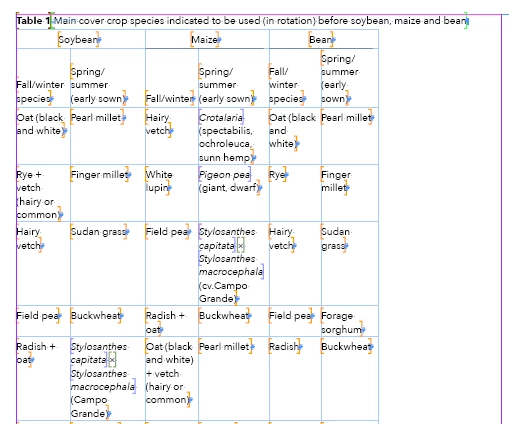
How to distribute column space based on the cell text (not equal distribute option). I need to set each column as different width. If you have any formula is there (or) any ideas your side, please share with me.


Thanks,

Karthik 


This topic has been closed for replies.

10 replies

Community Expert
June 25, 2020

Hi Karthik,

look into Jongware's script and test this with your tables.

Before unrotate all the text frames that hold a table ( table 2 for example ) and change the width of the table to the preferred one. Then run the script to optimize colum width.


Regards,
Uwe Laubender

( ACP )

karthikS
karthikSAuthor
Inspiring
June 25, 2020

Hi Uwe,


Okay! sure


Thanks,

Karthik S

Community Expert
June 25, 2020

Hi Karthik,

funny enough I thought this morning also on a solution of counting characters.

But this will not take into account the text's behavior with text composition ( e.g. hyphenation and other setting like keepWithNext or noBreak ). It also will not tell anything about the space a text would need: Different point sizes, cell insets, other paragraph insets and so on.


Before you start best make sure:

[1] No overset of the story of the table.

[2] No permanent overset of table cells.

[3] For every cell set autoGrow to true.

[4] Check values for maximumHeight and minimumHeight of the cell.


Regards,
Uwe Laubender

( ACP )


karthikS
karthikSAuthor
Inspiring
June 25, 2020

HI Uwe,


Thanks!

YES, you are right! that's why, I search another solution. Anyway, i will followed your guidelines.


Thanks,

Karthik S

Community Expert
June 24, 2020

Karthik said:

"…You got any solution?"


No. Just had no time looking very deep into my repository of functions to dig up something reasonable.


Had a function at hand, but only for a particular project where it was clear from the start that the contents of every cell in the table was one single line of text only. And it was only working with not rotated tables or not rotated text in table cells, because I used properties like endHorizontalOffset and horizontalOffset for ease of use and efficiency.


Ten years ago I also played around with trying to permanently calculate whitespace in tables while changing table column width also having an eye on the overall height of a table. Minimizing whitespace could be an aim, but you could also overdo things.


Because: there is yet another thing on top of all the efforts on optimization of space and doing calculations of any kind:

Readability. It could be that a table with optimized height and optimized column width is less readable or digestable by the average reader. Avoid rotated tables could be one aim for example.


FWIW: This is a major project you could invest weeks and months.


Regards,
Uwe Laubender

( ACP )

karthikS
karthikSAuthor
Inspiring
June 25, 2020

Hi Uwe /Jongware


Thanks for your best effort.


I have find out one solution. But, i need another better solution for this game.

Step by Step:

  for loop all tables

     for loop all columns

       for loop each column cell

         get max count of characters in the array for all columns  (Exp: Total character count 125)

           get available table width (Exp: 200 points)

             for loop, get max character length in the first column (Exp: character length 24)

My formula start below:

Step 1: 200 * 24 = 4800 pt

Step 2: 4800 / 125 = 38.4 pt

Answer:  Applied column width = alredy cloumn width + 38.4 pt.


Note: This formula working fine in the "portrait and landscape" tables. But, i am searching best one. Could you please suggest good one.


Thanks,

Karthik S


Jongware
Community Expert
Community Expert
June 24, 2020

As Uwe said, this has been discussed endlessly. I mention a strategy in my 2013 InDesignSecrets article: https://indesignsecrets.com/tackling-tables-through-scripting.php -- first, tighten all columns as much as possible, then divide the remaining space over the columns.

Here is your sample table 1:


but it does not work nicely for that huge rotated table 2 (presumably because to fit, all lines need to wrap; you will have to think of something for that on your own). A nicer example is your table 3, where everything fits on a single line, with room to spare:


Community Expert
June 23, 2020

Thanks. That worked.


Regards,
Uwe Laubender

( ACP )

karthikS
karthikSAuthor
Inspiring
June 24, 2020

Hi Uwe,


You got any solution?


Thanks,

Karthik S

Community Expert
June 23, 2020

Hi Karthik,

something went wrong witth your attachment. Perhaps the file size was too large?

Try Dropbox for sharing with a public link. I know, that will work.


Screenshot from the thread. You added an image:

Regards,
Uwe Laubender

( ACP )

karthikS
karthikSAuthor
Inspiring
June 23, 2020

Hi Uwe


Try bleow link:


https://www.dropbox.com/s/3ns61hdl0yee0kj/Sample-Doc.indd?dl=0 


Thanks,

Karthik S

Community Expert
June 22, 2020

You could attach the document to your reply in the forum.


Thanks,
Uwe Laubender

( ACP )

karthikS
karthikSAuthor
Inspiring
June 23, 2020

HI Uwe,


Okay, my attachement below: I have placed screenshot for your reference.


Thanks,

Karthik 

Community Expert
June 22, 2020

Hi Karthik,

cannot download your sample doc without a password.


Regards,
Uwe Laubender

( ACP )

Community Expert
June 22, 2020

Ah. And please give some guide lines like:


A. Overall width of table should be the same.

B. Maximum width of table should be text frame width.

Something like that.


Please attach a sample document we can discuss.


Regards,
Uwe Laubender

( ACP )

karthikS
karthikSAuthor
Inspiring
June 22, 2020

Hi Uwe,


Thanks your reply!

I have attached the "indd" sample document below.

In document all details is there. (Portrait and landscape tables).

InDesing version CC 2018


https://drive.google.com/file/d/1EywM8F2X7rwAKsPeUA-cEMuPnZPgPs-k/view?usp=sharing 


Thanks,

Karthik S

Community Expert
June 22, 2020

Hi Karthik,

there are so many variables in this game, so that you should aim for a solution, that stops after a given time and use the best solution in that amount of time. What time frame would you think is bearable for the usage? Two minutes per table? Five minutes? 10 minutes?


Search the forum. We already discussed that issue 10 years ago, I think.

Hm. But so many threads from the old InDesign scripting forum were not moved over to this new InDesign forum, so we may start over again here…


Also see into this basic technique:

https://www.indiscripts.com/post/2016/03/on-dichotomic-divide-and-conquer-algorithms


Regards,
Uwe Laubender

( ACP )