vinny38
Legend
June 20, 2017
Answered

Table of contents: get rid of the extra returns

  • June 20, 2017
  • 1 reply
  • 1158 views

Hi Community!

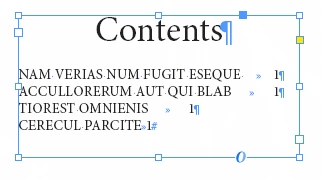
This is something that really annoys me: why Indesign keep generating two extra paragraph returns at the end of a generated TOC?

I can't see any good reason for that (maybe there is one...)

In the best case, it's just ugly.

In a bad case, it generates a text in excess error.

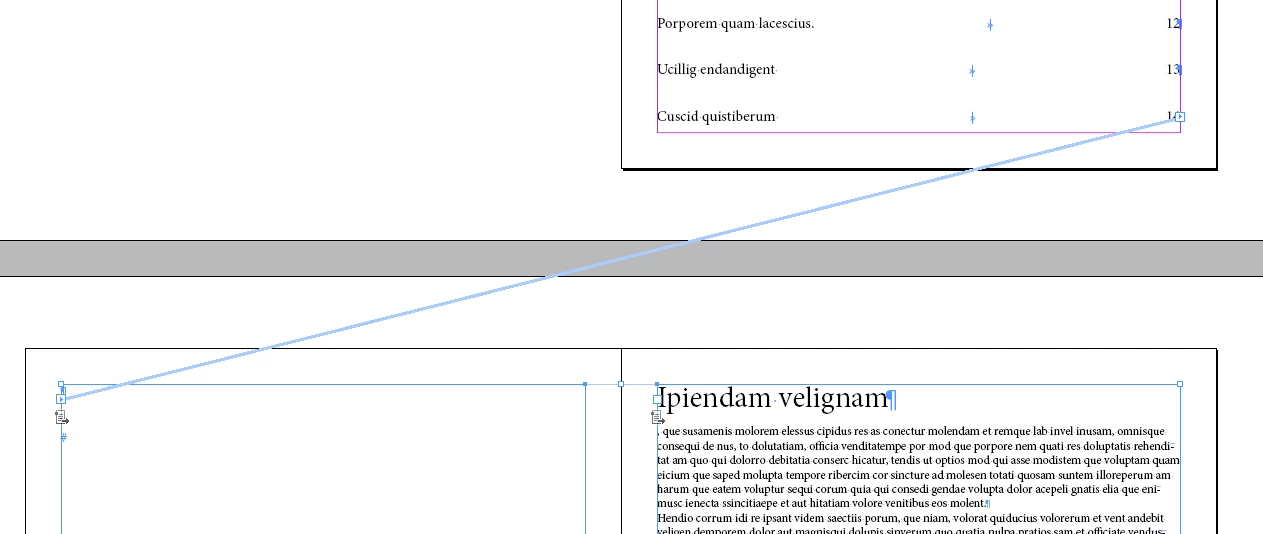
And in the worst case (see pic below), it can even autoreflow and create a blank page...

Googling this question didn't help to find any satisfying solution to automatically get rid of them.

Would anybody have an idea on how to tweak this annoyance (or at least can someone tell me if there is a reason for it) ?

Thanks

Vinny
This topic has been closed for replies.
Correct answer winterm

Yep, I know that, but believe me, even if there is no empty paragraph, TOC still generates two extra returns.

See this ultra-minified example:

I thought it was a well-known "issue", but since you don't seem to find it "normal" behavior, I wondered if you don't get this behavior, and if not, what was your Indd version.

Cheers


Seems like it's a "feature" of earlier versions... On Win7/CS6 I have a TOC exactly as yours (with extra returns). However, on Win10/CC2017.0 (12.0.0.81 x64 build) it originally looks like you want:

1 reply

cinziamarotta
Participating Frequently
June 20, 2017

Hi

You probably have two paragraph returns in your text document on which you applied paragraph style that is included in the table of contents...

vinny38
vinny38Author
Legend
June 20, 2017

Hi, Thanks for your answer.

Nope there is no paragraph return in the text document.

Can't you reproduce this? Maybe it's a question of version then... I'm using CS6

cinziamarotta
Participating Frequently
June 20, 2017

InDesign detects the text that is associated with the paragraph style specified in the table of contents, including the empty paragraphs (end paragraph symbol) also for the CS6 version