
January 9, 2019
Answered

Table of Contents not styling all text

  • January 9, 2019
  • 1 reply
  • 665 views

Hi,

I have made my table of contents and it all works except for one section.

My first 3 sub headings, level 2, the page numbers are not moving to the right of the contents.

the level 1 does and all the level 2 after the first 3 sub headings move to the right just fine. Example below.
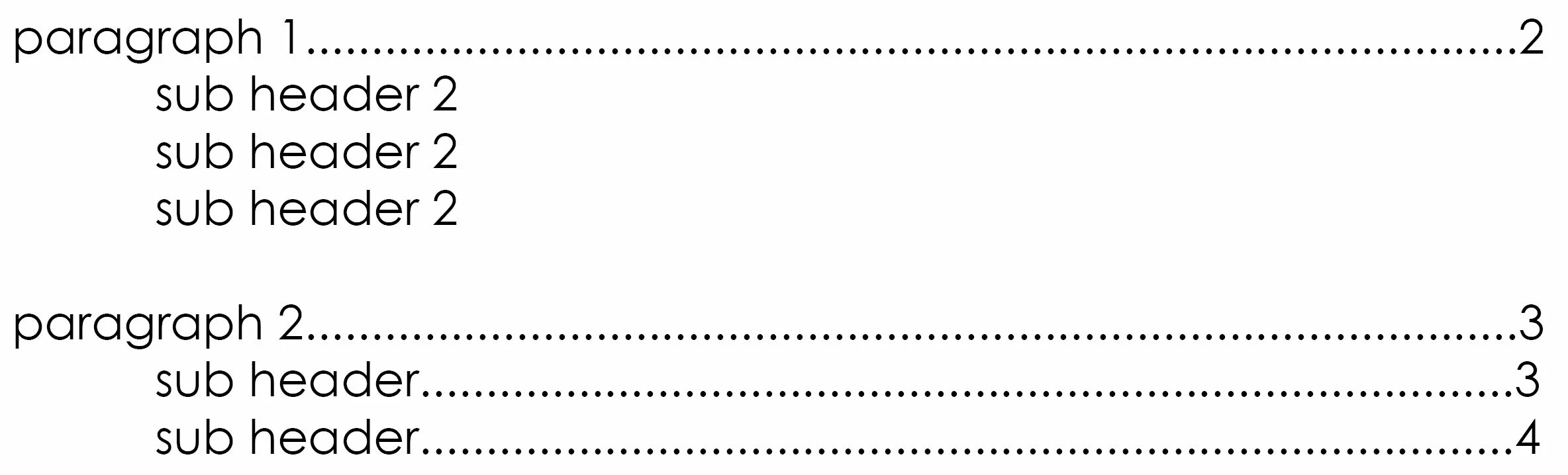
I have deleted the TOC and remade it from scratch same issue. I have also deleted the 3 sub headings from the document and remade them using a working one as a template, still no success.

Thanks.

This topic has been closed for replies.
Correct answer BobLevine

Yes, but the because the word is shorter then the distance to that first tab the number is only going to the spot of the first tab. I want it to be on the right like the rest of the TOC without manually having to change it each time I update the TOC. Each time i update the TOC it automatically inserts that 30mm tab.


Then it's in the style. Remove it there.

1 reply

vladan saveljic
Inspiring
January 9, 2019

can you share your InDesign file with us?

In that way we can check the file

January 9, 2019

Due to some privacy of the client i cant.

But i have now figured out that if i add another word to the text of the sub headers it works fine. these 3 are the shortest of all sub headers in the whole document.

The 3 sub headers that are causing the issue are Purpose, Values, Vision. If i add 'The' before each it works. Which leads me to believe that the issue is TAB related but I don't know how to fix this.

Thanks

January 9, 2019

I can also go in to the TAB options and move the tab to the same point as the other numbers adding in the leader.

This defeats the purpose of an automated table of contents though.