
Participant
January 17, 2023
Answered

Table of Contents - tabs and line breaks

  • January 17, 2023
  • 2 replies
  • 1738 views

Hi there,

Am setting up a TOC. As I often find, my headings can run on a bit long, which translates to a cramped TOC entry. Specifically, as I sometimes like to run my TOCs in columns, the headers either result in line breaks that leave a 'runt', or just fit in one line, but bunch up hard against my page number - see attached.

My question is: is there a way to specify the end of the line of header text independently of the text box width - apologies thats rather cryptic, but if you refer to the screen grab, what I mean is, can the text be made to line break at the red dashed line, so that the words 'IMPROVED' and 'FOR' would bump to the line below? Result being a look more like the top entry, p '6'....

Thanks for any help.
Correct answer SJRiegel

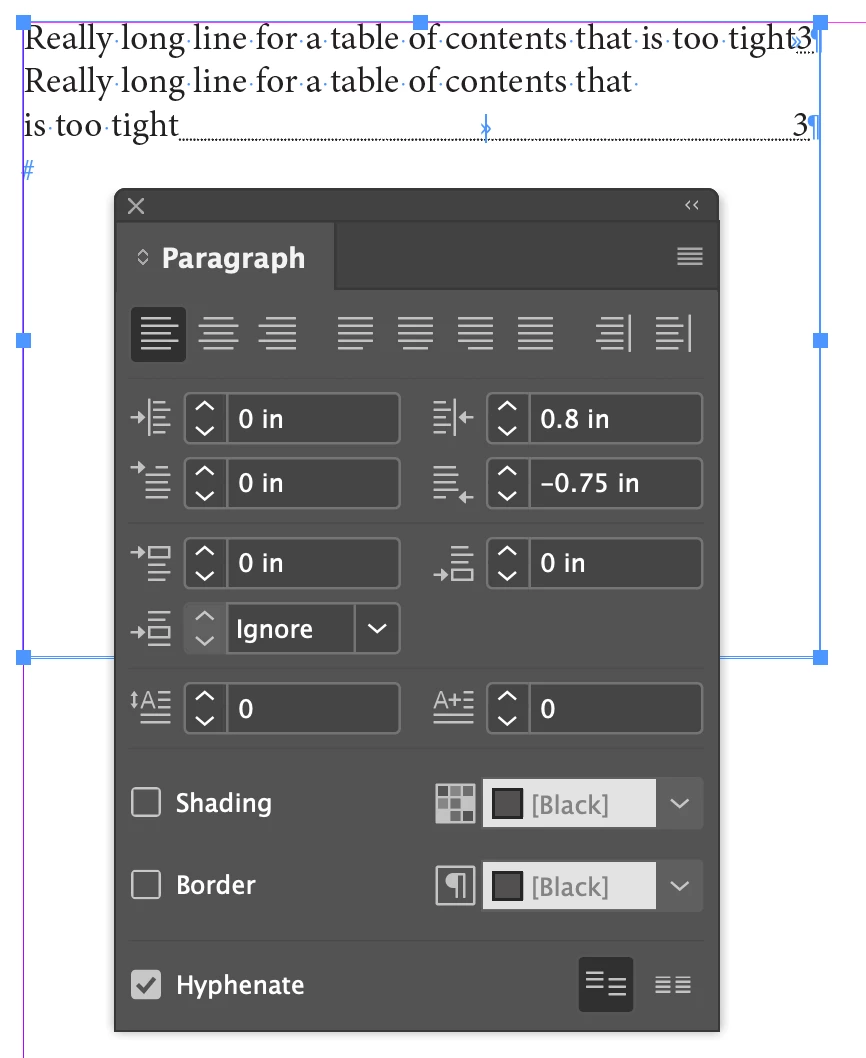
Some strategic adjustment of the right indent and last line right indent should help

2 replies

SJRiegelCorrect answer
Legend
January 17, 2023

Some strategic adjustment of the right indent and last line right indent should help

James Gifford—NitroPress
Legend
January 17, 2023

Yes, margins, font size, all that. I may have answered at a tangent, but if the issue is getting consistent breaks in the TOC entries, the hard-space gambit should work there as well.


And, of course, althought it's not always an option — just adjusting the length of the header content can help in stubborn situations.


James Gifford—NitroPress
Legend
January 17, 2023

Instead of line breaks, make selective use of non-breaking spaces to hold things like headings together in the copy. They won't prevent the lines from running together in a TOC unless they're so long they wrap there, too.